


A clear guide to the 8 phases of the DevOps lifecycle, the 7 Cs of DevOps, how DevSecOps differs, and the best practices that make it work.
The DevOps lifecycle is the loop of stages that development and operations teams work through together. It uses automation to ship software faster and more often. It has 8 phases:
- Plan
- Code
- Build
- Test
- Deploy
- Operate
- Feedback
- Monitor
What is DevOps?
DevOps is a way of working that combines culture, practices, and tools. It helps teams ship applications and updates faster than separate development and operations teams can.
Before DevOps, developers wrote and integrated the code, then handed it to IT operations to package and deploy. When something broke, the two teams went back and forth. DevOps removes that handoff and puts both teams in one shared workflow.
What is the DevOps lifecycle?
The DevOps lifecycle is the repeating set of practices that development (Dev) and IT operations (Ops) teams follow together. The goal is faster, more reliable releases without lowering quality.
The diagram below shows the lifecycle as an infinity loop. The first half covers the Dev team's work: plan, code, build, and test. The second half covers Ops: deploy, operate, feedback, and monitor. Teams use DevOps tools at every stage.
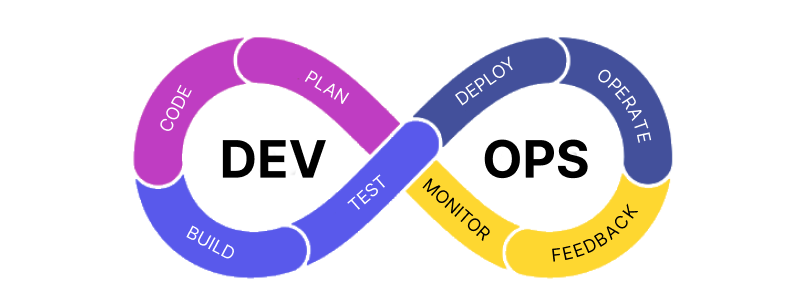
Stages of the DevOps lifecycle explained
1. Plan
In the planning stage, the team agrees on what to build and how. Product, development, and operations review requirements from customers and stakeholders.
They also set the timeline, resources, team structure, tech stack, tools, and main risks.
2. Code
Some teams start with a short design stage. Engineers choose an architecture pattern and break the system into smaller components.
Then developers write the code. Version control systems such as Git track changes and let the whole team work on the same codebase.
3. Build
Developers merge their changes into a shared repository, ideally several times a day. Continuous integration (CI) catches integration problems early, so the codebase always works.
When a developer commits code and it's approved, the CI server starts a build. It compiles the code and pulls in its dependencies, such as libraries and frameworks. The result is a build artifact: a deployable package ready for testing.
4. Test
Testing checks the build's functionality, performance, usability, security, and more. Your test strategy sets the overall approach, and your test plan lists the specific scenarios.
Automated testing is key to DevOps. It checks code changes faster and more reliably than manual testing, and it makes CI and continuous delivery (CD) possible. Automate tests at every level, and use parallel testing so test runs don't slow the pipeline:
- Unit testing: checks individual units of code
- Integration testing: checks that components pass data to each other correctly
- System testing: checks user flows in an environment as close to production as possible
To automate these tests, teams have two options. They can build scripts with frameworks like Selenium and Appium, which takes coding skill. Or they can buy a tool with low-code test creation. The build vs. buy choice depends on the team's skills.
After each run, reports should show which tests passed, which failed, and which defects were found. Watch for flaky tests: intermittent failures that slow CI without pointing to real defects.
Read more: Leveraging AI in quality assurance for autonomous testing
5. Deploy
Tested code is released to staging, UAT, and production environments. Each one gives different people access:
- The staging environment (or preproduction environment) is a near-exact copy of production. The QA team tests here to see how the software will behave live.
- The UAT environment comes after staging. It's also close to production, but customers or product owners do the testing.
- The production environment is the live system every customer uses. Bugs shouldn't appear here. If one does, QA is alerted right away.
Automated deployments make releases faster and reduce human error. They also make continuous deployment possible: changes go to production automatically as soon as they pass automated tests.
Read more: Best 14 CI/CD tools you should know
6. Operate
Once deployed, the software is live for users. An operations team keeps it running, available, and fast.
The ops team uses monitoring tools to track servers, databases, networks, and app metrics in real time. When a metric crosses a set threshold, the tool alerts the team so they can act before users notice.
This stage also covers capacity planning. The team uses past usage data to predict demand, so the system handles traffic spikes without wasting resources.
7. Feedback
The Ops team sends operational data back to the Dev team. Developers use it to track KPIs, find areas to improve, and decide what to change next.
8. Monitor
Monitoring keeps watching the live system after each release. Logs, metrics, and alerts show how the latest changes behave in production. What the team learns feeds the next planning stage, and the cycle starts again.
7 Cs of the DevOps lifecycle
You can also view the DevOps lifecycle as 7 continuous practices, known as the 7 Cs:
- Continuous development
- Continuous integration
- Continuous testing
- Continuous deployment and continuous delivery
- Continuous feedback
- Continuous monitoring
- Continuous operations
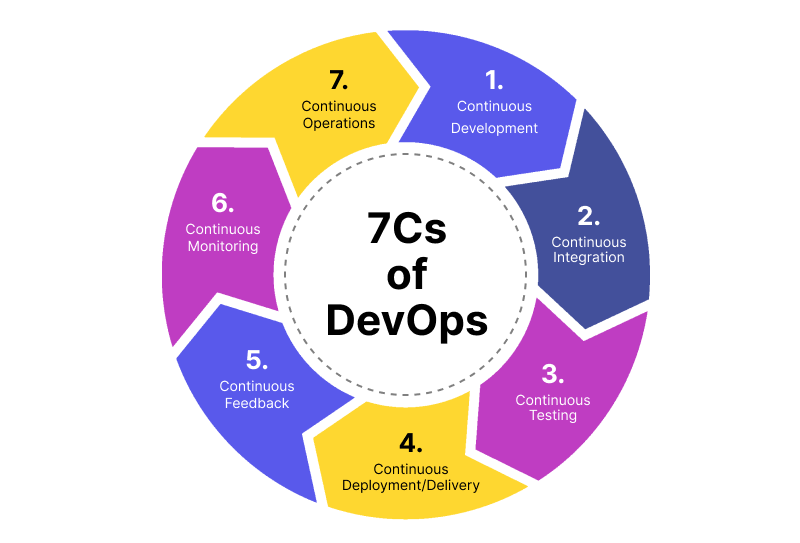
1. Continuous development
Instead of one large batch of changes, developers ship small changes often: bug fixes, new features, and refactoring. Each small iteration adds value and is easier to manage.
Small changes lower the risk of large failures and let teams respond faster to users and the market.
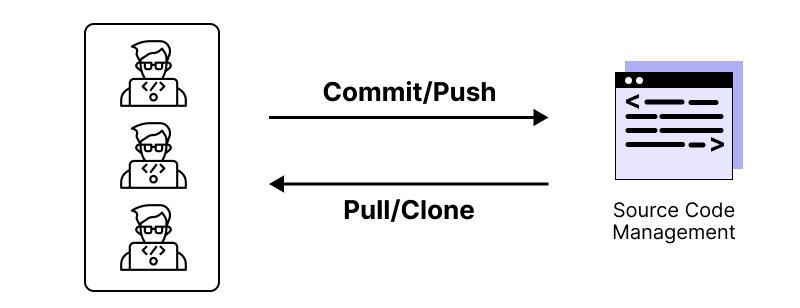
Most teams use Git for version control, with GitHub, GitLab, or Bitbucket to host their repositories.
2. Continuous integration
Each commit to the shared repository starts the CI pipeline:
- Detect new commits in the repository
- Analyze source code quality
- Build
- Run all unit tests
- Run all integration tests
- Generate deployable artifacts
- Report status
If a step fails:
- The pipeline stops or continues, depending on the defect's severity and your settings
- The team is notified by email or chat
- The team fixes the defect and commits again
- The pipeline runs again
Jenkins is a widely used open-source CI/CD server. It automates building, testing, and deploying code changes.
3. Continuous testing
Continuous testing runs automated tests at every step of the pipeline. Developers get fast feedback without waiting on manual checks. Testers spend the time saved on test design and planning.
Read more: Top 15 automation testing tools
For example, you can use Katalon Studio for continuous testing. It lets you create, manage, run, and analyze tests for web, API, desktop, and mobile apps in one place, with little coding needed.
You can build tests without code using built-in keywords, which you combine into a full test script, or use Record-and-Playback to turn your on-screen actions into a script. Katalon also offers AI testing features that help you create tests faster.
Katalon also supports the rest of the software testing life cycle (STLC):
- Manage test cases, objects, and artifacts in an Object Repository
- Run tests locally, remotely, or in the cloud across many environments
- Integrate with your CI/CD pipeline and collaboration tools
- Use reports to make better release decisions
Start testing with Katalon for free
4. Continuous deployment and continuous delivery
Continuous deployment and continuous delivery are closely related, but they differ in one step.
Continuous delivery automatically prepares every change for release after it passes the build, test, and validation steps. A person then decides when it goes to production.
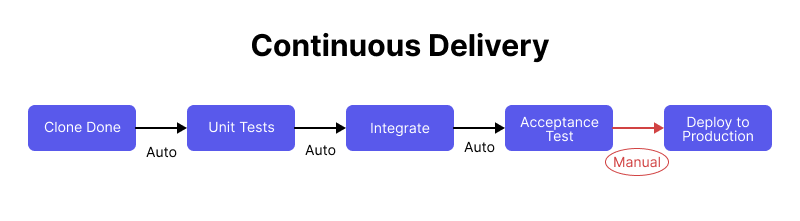
Continuous deployment goes one step further: changes go to production automatically, with no human approval.
Read more: Continuous delivery vs. continuous deployment: key differences
5. Continuous feedback
Teams collect user feedback all the time and use it to improve the product. Automated surveys, error reporting, and usage monitoring make this easier.
Common feedback channels include:
- In-app feedback forms triggered by specific events
- Support tickets
- Emails
- Community forums
6. Continuous monitoring
Monitoring gives real-time visibility into how the system performs and behaves. Continuous monitoring goes further, with a focus on:
- Real-time data collection and analysis
- Responding to risks before they become incidents
- Ongoing data analysis
Like continuous delivery, its goal is to help teams move faster without losing accuracy.
7. Continuous operations
Continuous operations keeps production systems stable, secure, fast, and available. It covers:
- Incident response and management: detect and respond to incidents and outages. The operations team finds the root cause and restores normal service.
- Change management: plan, test, and roll out updates carefully to limit disruption and risk.
- Monitoring and alerting: collect real-time metrics, and alert the team when thresholds are breached.
- Backup and recovery: take regular backups and keep a disaster recovery plan to limit downtime.
DevOps vs. DevSecOps
DevSecOps adds security to every stage of DevOps, so teams ship fast without compromising security. Everyone shares responsibility for keeping the codebase secure.
Here's how the two compare:
Aspect | DevOps | DevSecOps |
|---|---|---|
Focus | Collaboration between development and operations to improve delivery | Security built into DevOps across the whole lifecycle |
Core principles | CI, CD, automation, collaboration, and feedback loops | Shift-left security, automated security testing, shared ownership across Dev, Ops, and Security, and secure access management |
Objective | Faster delivery and better collaboration | Fewer vulnerabilities and secure software, delivered efficiently |
Scope | Speed, efficiency, and quality | Security from early development to production |
Security integration | Often added late or as a separate step | Built into every stage |
Security practices | Can be ad hoc or separate from development | Automated and continuous across the CI/CD pipeline |
Culture | Dev and Ops collaborate | Dev, Ops, and Security share responsibility for security |
Automation | Focused on development and delivery | Also covers security testing, vulnerability scanning, and security controls as code |
Benefits | Faster delivery, better collaboration, and higher quality | Lower security risk, more secure software, and more customer trust |
Challenges | Vulnerabilities may be found late | May need cultural and organizational change |
Example practices | CI, continuous deployment, infrastructure as code, and automated testing | Threat modeling, automated security testing, secure configuration, and container security |
4 DevOps best practices
- Shift left with CI/CD: developers integrate code continuously, and automated tests check each change. Issues found earlier are cheaper to fix.
- Set up automated testing: automated testing is the core of DevOps. Teams also need a quality management platform to plan, organize, create, run, and analyze tests. Choose a testing tool that fits into your CI/CD pipeline.
- Use infrastructure as code (IaC): define servers, networks, and storage in code. Teams can then create or remove infrastructure quickly and repeatably to scale or handle demand spikes.
- Move to microservices: split the application into small services that you deploy and run independently. Each can use its own language or framework. This fits DevOps well, because teams work on small components in parallel and release faster.
Frequently asked questions
The DevOps lifecycle is a continuous loop of planning, coding, building, testing, deploying, operating, gathering feedback, and monitoring software. It brings development and operations teams together to automate work and ship software faster and more reliably.
There are 8 phases: plan, code, build, test, deploy, operate, feedback, and monitor. Each release moves through all 8, and what the team learns from monitoring feeds the next plan.
CI covers the code and build phases. Developers merge changes into a shared repository often, and each change is built and tested automatically to catch issues early.
Continuous delivery automatically prepares every code change for release to production. It extends CI by automating the release process, so teams ship updates faster with less manual work.
Monitoring tracks system health and performance in production. It helps teams spot and fix problems before they affect users, and it feeds real data back into planning.
Common choices include Jira for planning; Git, GitHub, or GitLab for code; Jenkins, Maven, or Gradle for builds; Selenium, JUnit, or Katalon Studio for testing; Docker, Kubernetes, or Ansible for deployment; and Prometheus, Grafana, or Splunk for monitoring.
Automation is central to DevOps. It cuts manual effort and human error, from builds and testing to deployments and monitoring, so teams deliver quality software faster.
Feedback from users and systems shows teams what to improve. It helps them fix issues quickly and adapt to change, so each cycle improves on the last.





Test everything. Ship with confidence.
From generating test cases to spotting failures, Katalon's AI works across your entire pipeline, automatically.
