


What a test strategy is, what goes in the document, the main approaches, how to write one step by step, and a free Word and PDF template with a worked example.
A test strategy turns "we need to test this product" into rules the whole team follows: what gets tested, how deeply, where, by whom, and when testing counts as done. This guide covers what a test strategy is, how it differs from a test plan, what to put in the document, the main approaches, how to write one step by step, and a free template with a worked example.
What is a test strategy?
A test strategy is a high-level document that sets how a product or organization approaches testing: scope, quality objectives, test levels and types, methods, environments, tools, risks, and the default criteria for starting and finishing testing. It changes rarely. Each release's test plan applies it. Teams also call it a QA strategy or testing strategy.
It sits in a simple hierarchy of test documentation:
- Test policy: why the organization tests and what quality means to it. Many teams skip this or fold it into the strategy.
- Test strategy: how the team tests, across every release of a product.
- Test plan: what gets tested, when, and by whom for one release or project.
- Test cases: the exact steps and expected results. See how to write test cases.
The point of a strategy is that each release team doesn't have to decide coverage, environments, and exit rules from scratch. Those decisions are made once, reviewed by engineering and product, and reused. It's one part of wider test management.
How a test strategy relates to the test plan
The strategy sets the rules. The plan applies them to one release.
Test strategy | Test plan | |
|---|---|---|
Scope | A product, product line, or organization | One release, project, or sprint |
Question it answers | How we test and why | What we test, when, and who does it |
Owner and audience | QA lead or head of QA; read by engineering, product, and leadership | Test manager or QA lead for the release; read by the release team |
Lifespan | Revised when the product, architecture, or risk profile changes | Written per release and closed after it ships |
For the full comparison and a release-level example, see our guide to the test plan.
Download the test strategy template
The template follows the 15 sections in the next part of this guide. Each file has two parts: a blank template with a short prompt under every heading, and the same template filled in for a fictional e-commerce web and mobile product, which is the worked example later on this page. Numbers in the filled example are illustrative, so replace them with your own.
Format | Best for | Download |
|---|---|---|
Word (.docx) | Editing, tracked changes, and formal sign-off | |
Reading, printing, or sharing a read-only copy |
The template is a starting point, not a form to fill in completely. Delete sections that don't apply to your team, and keep the rest short enough that people read it.
What to include in a test strategy document
A test strategy document usually covers these 15 sections:
- Document control
- Purpose and scope
- Quality objectives
- Test approach
- Test levels
- Test types
- Automation approach
- Default entry and exit criteria
- Test environments and test data
- Defect management
- Tools
- Roles and responsibilities
- Metrics and reporting
- Risks and mitigations
- Review and approval
1. Document control
Product name, strategy version, owner, reviewers, approvers, the date of the last review, and a short change log. This is what tells a reader whether the document is still current.
2. Purpose and scope
Which products, platforms, and teams the strategy covers, and what is out of scope. Be specific about exclusions, such as a partner integration another team tests or a legacy module that's being retired. Out-of-scope items written down early save arguments at release time.
3. Quality objectives
What "good enough to ship" means for this product, tied to business risk. For example: no known defects in checkout or payment, accessibility at a stated WCAG level, page load within an agreed budget. Write objectives you can check, not "high quality".
4. Test approach
The method the team uses to decide what to test and how deeply: risk-based, requirements-based, exploratory, regression-averse, or a mix. Say which approach applies to which part of the product, and where testing starts. A common pairing is risk-based prioritization with shift-left testing. The approaches section below covers each option.
5. Test levels
The levels you test at and who owns each one:
- Unit tests: developers, run on every commit in CI.
- Integration tests: developers and QA, covering APIs, services, and third-party integrations.
- System and end-to-end tests: QA, covering full user flows in a production-like environment.
- Acceptance tests: product owners or business users, often as user acceptance testing before release.
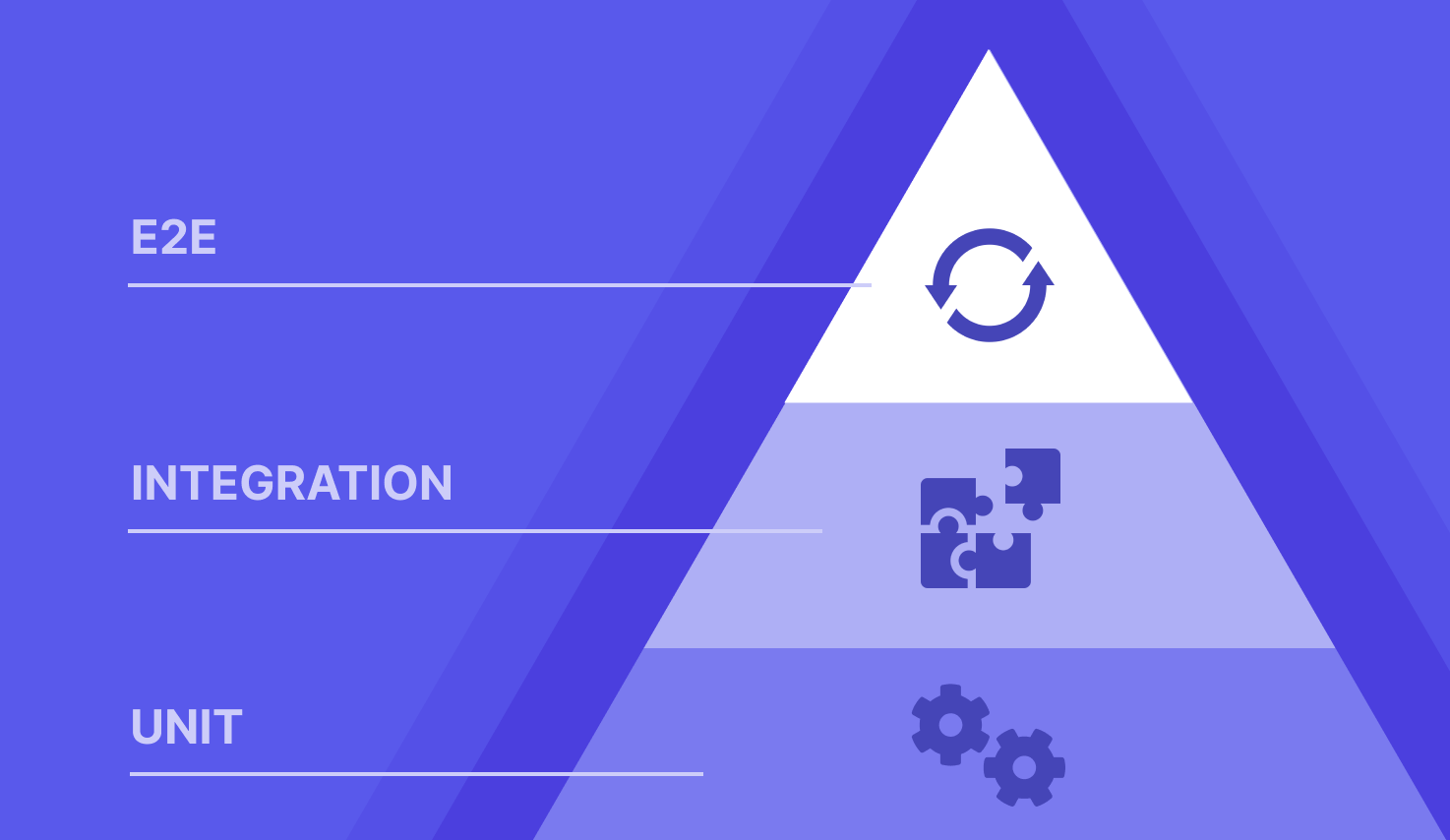
The test pyramid is useful guidance here: many fast unit tests at the base, fewer integration tests, and a small number of slow end-to-end tests at the top. Treat it as a shape to aim for, not a ratio to hit. The right balance depends on your architecture and where your defects come from.
6. Test types
Which types of testing you run and when:
Test type | What it checks | When it runs (example) |
|---|---|---|
Functional | Features behave as the requirements say | Every build, at the levels above |
Regression | Existing features still work after a change | On every merge (smoke subset) and before each release (full suite) |
Performance | Speed, load, and stability under traffic | Before major releases and seasonal peaks |
Security | Vulnerabilities, authentication, data handling | Static scans in CI, plus a periodic test by a specialist |
Accessibility | Usable with assistive technology, to your stated standard | Automated checks in CI, manual review on new UI |
Usability | Real users can complete key tasks | On major UI changes |
Exploratory | Unscripted, time-boxed testing to find what scripts miss | Each release, focused on new and high-risk areas |
7. Automation approach
What you automate, what stays manual, and how automated tests are maintained. A practical rule: automate checks that are stable, repeated often, and costly to run by hand, such as regression, smoke, API, and data-driven tests. Keep exploratory, usability, and one-off checks manual. See manual vs automation testing for how to decide case by case.
This section should also say which frameworks you use at which level, where tests run (CI pipeline, nightly, pre-release), who fixes a failing test, and what happens to flaky tests. If automation is a large part of your testing, write a separate test automation strategy and link it from here.
8. Default entry and exit criteria
The team-wide gates every release starts from. The strategy sets the default gates. Each test plan starts from them, then tightens them or adds criteria for that release. Relaxing a default gate needs sign-off from the strategy's owner. The values below are examples, so set your own.
Default entry criteria (testing can start when):
- The build is deployed to the test environment and the smoke suite passes.
- Unit and API tests pass in CI for that build.
- Test data is loaded and the environment matches the agreed configuration.
Default exit criteria (testing is done when):
- No open critical or high defects, and open medium defects are accepted by the product owner.
- All highest-priority (P1) test cases have run and passed, and lower priorities meet the pass rate the team agreed.
- The full regression suite has run on the release candidate.
Gates work best as automated checks where possible: a unit test and coverage check on each pull request, smoke tests on each deploy to staging, and full regression before release. For release-specific criteria, and when to suspend and resume testing, see entry and exit criteria in the test plan guide.
9. Test environments and test data
Which test environments exist, and how each test environment is used (for example dev, QA, staging), and how close staging is to production. Write the device and browser coverage as rules, not model numbers, so it doesn't go out of date: "the latest two versions of Chrome, Edge, Safari, and Firefox" and "the current and previous major versions of iOS and Android".
For test data, say where it comes from (generated, masked production copies, or fixed fixtures), how personal data is protected, and how data is reset between runs. See test data management for the options.
10. Defect management
How defects are logged, triaged, and closed. Define severity (impact on the user) and priority (order of fixing) separately, with a one-line example for each level. Name who runs triage and how often, the target response time per severity, and the states a defect moves through, from new to closed. Link your bug report template so every report has the same fields.
11. Tools
The tools by job, not just by name: test case management, automation frameworks, CI server, defect tracker, and reporting. Note who administers each one and how they connect, for example test results feeding into the reporting tool.
12. Roles and responsibilities
Who does what across testing: developers own unit tests, QA engineers own integration and system testing and the regression suite, the QA lead owns this strategy and triage, product owners run acceptance testing and accept known risks, and DevOps owns environments and pipelines. A short table works better than paragraphs.
13. Metrics and reporting
Which metrics you track, who reads them, and how often. Common ones include requirement and test coverage, pass rate, defect leakage (defects found after release as a share of all defects), open defects by severity, and automation coverage. Pick a few that drive decisions, and say which report carries them, such as a per-run test execution report and a test summary report at release.
14. Risks and mitigations
The risks that could stop testing or let defects through, scored by likelihood and impact, each with a mitigation and an owner. For example, a tight deadline with a team new to the domain is high likelihood and high impact, so the mitigation might be cutting scope, pairing with developers, or moving the date. Product risks (which features are most likely to break and hurt users) also drive the risk-based approach in section 4.
15. Review and approval
Who reviews and approves the strategy, and when it's reviewed again:
Role | Part in the strategy |
|---|---|
QA lead or test manager | Drafts and maintains it |
Engineering lead | Reviews levels, automation, environments, and CI gates |
Product owner | Reviews scope, objectives, and risk tolerance |
Security or compliance lead | Reviews security testing and evidence rules, where relevant |
Head of engineering or head of QA | Approves it |
Release teams | Are informed and apply it in each test plan |
Review it when you add a platform, change the architecture, after a serious production incident, and at least once a year.
Types of test strategy (approaches)
The International Software Testing Qualifications Board (ISTQB) names 7 types of test strategy. Teams often combine 2 or 3.
Approach | What it means | Fits when |
|---|---|---|
Analytical (risk-based) | Test depth follows an analysis of risk or requirements | You have more to test than time allows, which is common |
Model-based | Tests are derived from a model of the system, such as a state diagram or usage profile | Complex workflows, protocols, or performance profiles |
Methodical | Testing follows a fixed checklist, quality standard, or set of attributes | Mature products with known failure areas |
Process-compliant (standard-compliant) | Testing follows an external standard or regulation | Regulated industries that need an audit trail |
Reactive | Testing reacts to the software as delivered, often through exploratory testing | Short timelines, new features, or thin documentation |
Regression-averse | The focus is on keeping existing features working, usually with heavy automation | Stable products with frequent releases |
Consultative (directed) | Coverage is set by stakeholders or domain experts | Specialist domains, or when users define what matters |
Risk-based testing in practice: score each feature by the likelihood it breaks and the impact if it does. High likelihood and high impact gets the deepest testing, automated first and checked on every build. Low and low gets a smoke check. Re-score after incidents and major changes. See the risk-based approach to regression testing for a worked method.
Shift-left testing: move testing earlier, into requirements reviews, pull requests, and CI, so defects are found earlier, when they're usually cheaper to fix. In a strategy, this shows up as gates such as unit tests and static analysis on every pull request.
Agile test strategy: in agile teams the strategy sets the standing rules (definition of done, which levels are automated, which CI gates apply), and each sprint applies them without a new document.

You'll also see older pairings in some guides: static vs dynamic testing (reviewing code and documents without running them, vs running the software) and preventive vs reactive testing (designing tests before code exists, vs responding to what's built). Both are useful lenses, and both fit inside the approaches above.
How to write a test strategy (step by step)
To create a test strategy (or QA testing strategy), assess how you test today, agree scope and objectives, score risks, choose levels and approaches, define environments and tools, set default gates, get sign-off, and review it regularly.
- Assess how you test today. List where escaped defects came from, which suites are flaky or slow, and which areas nobody tests. The strategy should fix real gaps, not describe an ideal.
- Set scope and quality objectives with product. Agree what's covered, what isn't, and what "good enough to ship" means.
- Score your risks. Rate features and integrations by likelihood and impact. This decides where testing depth and automation go first.
- Choose test levels, types, and approaches. Map each level to an owner and decide which approach applies to which part of the product.
- Define environments, test data, and tools. Write coverage as rules, decide how test data is sourced and protected, and name the tool for each job.
- Set the default entry and exit gates. Turn them into CI checks wherever possible.
- Assign roles and get sign-off. Use the review and approval table in section 15. A strategy QA signs alone tends to be ignored by everyone else.
- Review and maintain it. Keep a version number and change log, and revisit it on a platform change, architecture change, serious incident, or once a year.
Test strategy example: an e-commerce web and mobile product
This is the filled example from the template, shortened. The product, numbers, and thresholds are illustrative, not benchmarks.
Product: Example Store, a fictional online store: a storefront web app, iOS and Android shopping apps, a public order API, and a third-party payment provider. Three product squads (Browse, Checkout, Accounts), a mobile team, and a platform team.
Section | Example content |
|---|---|
Document control | Strategy v1.0, owner: head of QA, reviewed by the engineering manager, product manager, mobile lead, and security lead, approved by the VP of Engineering, next review in 6 months |
Scope | In: storefront web app (desktop and mobile browsers), iOS and Android apps, search, cart, checkout and payment, accounts and loyalty, and the order management API. Out: the internal warehouse system (it has its own strategy), the payment provider's own systems (only the integration is tested), and marketing site content |
Quality objectives | All P1 checkout journeys pass before release. Defect escape rate falling quarter on quarter. Automated regression result within 30 minutes of a merge. WCAG 2.2 AA on key journeys. No open critical or high security findings at release |
Test approach | Risk-based first: every feature gets a likelihood and impact rating at refinement, and checkout, payment, and account security are always high risk. Shift-left (QA joins refinement), requirements-based tests for payment, tax, and privacy, exploratory sessions on new features, automated regression in CI, and shift-right monitoring after each deploy |
Test levels | Unit in CI on every commit (developers), integration in CI and the QA environment (developers and QA), system on staging (QA), acceptance on staging (product manager) |
Test types | Functional every story; regression smoke on every merge and full suite nightly and before each release; performance as a monthly baseline and before peak season; security scans on every build, a weekly dynamic scan, and a yearly external penetration test; accessibility checks in CI plus a quarterly manual audit; usability before major new journeys; exploratory on each new feature |
Automation approach | Automate smoke tests, P1 and P2 regression journeys, API contracts, and cross-browser and device checks of checkout. Smoke on every merge, full regression nightly and on each release candidate. A test that fails twice in a week without a code change is quarantined, then fixed or deleted within one sprint |
Default entry and exit criteria | Three stages: story testing, system testing, and release. System testing exit: all P1 test cases pass, P2 pass rate at least 95%, every open defect triaged with an owner. Release exit: no open critical or high defects, open medium defects accepted by product, rollback tested, QA lead and product manager sign off |
Environments and test data | Local, CI, QA, staging, and production (post-deploy checks). Browser and device coverage set each quarter from analytics. No real customer data outside production; test cards come from the payment provider's sandbox |
Defect management | Severity: critical, high, medium, low. Priority: P1 to P3. Triage daily during release hardening and twice a week otherwise, by the QA lead, an engineering lead, and the product manager |
Tools | Katalon TestOps for test management and reporting, Katalon Studio for web, mobile, and API automation, unit test frameworks native to each codebase, the company CI server and issue tracker, and a cloud browser and real-device grid |
Roles | Head of QA: owns the strategy and approves exceptions to exit criteria. QA engineers: tests, automation, exploratory sessions. Developers: unit and API tests, fixes. Product manager: acceptance testing and accepting open defects. Security lead: security testing. Platform team: CI, environments, performance |
Metrics and reporting | Requirement coverage each release, pass rate by suite daily during hardening, defect escape rate monthly, open defects by severity and suite run time and flaky rate weekly. A live dashboard, a release test summary report, and a quarterly quality review |
Risks and mitigations | Payment provider outage: mock it in CI and run a live sandbox check nightly. Flaky end-to-end tests: quarantine rule and a named owner per suite. Peak-season traffic: load test against the forecast peak before seasonal releases |
Review and approval | Reviewed every 6 months, and early after a new platform or architecture change, new regulation, a serious production incident, or exit gates missed on two releases in a row |
To show how the risk-based approach sets test depth, here is how the team might rate a few features (an illustration, not part of the template file):
Feature | Likelihood | Impact | What it gets |
|---|---|---|---|
Checkout and payment | High | High | Automated end-to-end on every build, plus exploratory testing each release |
Login and accounts | Medium | High | Automated end-to-end on every build |
Search | Medium | Medium | Automated API and end-to-end tests nightly |
Product reviews | Low | Medium | Automated API tests, manual check on change |
Marketing banners | Low | Low | Smoke check only |
Two shorter test strategy examples
A one-page strategy for a startup
A 6-person team shipping a web app every week doesn't need 15 sections. One page can do the job:
- Scope: the web app and its public API. Mobile web is checked; there are no native apps yet.
- Approach: risk-based. Sign-up, billing, and data export are high risk.
- Levels: developers write unit and API tests; every pull request runs them in CI.
- End-to-end: 10 to 15 automated tests on the critical paths, run on every deploy to staging.
- Exploratory: a 1-hour session on each new feature before release.
- Exit: no open bugs that block sign-up, billing, or data export.
- Defects: one board, triaged at the weekly planning meeting.
- Owner: the engineering lead writes it, the founder signs it off, and it's reviewed every quarter.
A regulated enterprise
A bank or healthcare product needs more, mostly because it has to prove what was tested:
- Approach: process-compliant, alongside risk-based prioritization.
- Traceability from each requirement to its test cases, runs, and defects.
- Formal sign-off on the strategy, each test plan, and each release, with evidence kept for the retention period the regulation sets.
- Separate performance and security strategies, owned by specialist teams.
- Change control on the strategy itself: changes are versioned, reviewed, and approved.
- Segregated test environments, with masked or synthetic data only.
For more on testing at that scale, see our guide to enterprise testing strategy.
From test strategy to test plan and test cases
Each strategy decision should show up somewhere concrete. Using the e-commerce example:
Strategy decision | In the release test plan | In test cases and runs |
|---|---|---|
Checkout is high risk | Full checkout regression on every build of the release | Checkout cases tagged high priority |
Exit: no open critical or high defects | The release's exit criteria, with any approved exceptions | Run results and linked defects |
Browsers: latest two versions | The configuration list for this release | One run per browser and device configuration |
Unit tests gate every pull request | A CI step, noted in the plan | No manual test cases needed |
The strategy sets the default, and each test plan records the exceptions. To write the release plan, start from our test plan template in Excel, Word, or PDF. For the test case layer, see our test case templates and examples.
Common test strategy mistakes
- Copied from a template and never updated. A strategy that still lists last year's browsers or a retired service tells readers the rest is stale too.
- No measurable exit criteria. "Testing is complete when quality is acceptable" can't be checked, so every release becomes a negotiation.
- Automation targets without a maintenance budget. Suites grow, nobody owns the failures, flaky tests multiply, and people stop trusting the results.
- Metrics nobody reads. If a metric doesn't change a decision, drop it.
- Too long to use. A 40-page document no one opens does less than a 2-page strategy and a living test plan.
- Owned by QA alone. Without engineering and product sign-off, the strategy has no authority when a deadline gets tight.
- Confused with the test plan. Release dates, names, and test case lists belong in the plan. If the strategy needs editing every release, those details are in the wrong document.
AI tools can help with parts of the work, such as drafting test cases from requirements, grouping similar failures, and summarizing results. They don't decide your risk tolerance, scope, or who signs off. Those stay human decisions. See AI in quality assurance for where it fits today.
Tracking your test strategy in Katalon TestOps
The strategy document lives in your own docs tool. Katalon TestOps helps you check whether it holds each release. Project Admins can set readiness criteria per release or sprint (minimum requirement coverage, minimum pass rate, and blocking-defect rules, which need Jira or Azure DevOps connected), and the Release Health Dashboard shows whether a release is Ready or At Risk. The Configuration Coverage Report and the Automation Progress Analysis Report track browser and OS coverage and automation coverage against your targets.
Frequently asked questions
It fixes how a team tests a product, including scope, test depth, environments, roles, and exit rules, so each release applies the same rules instead of deciding them again. It also gives engineering, product, and QA one agreed reference when priorities conflict.
Consistent coverage across releases, test effort spent where risk is highest, clear exit rules, faster onboarding for new testers, and fewer arguments at release time about whether testing is done.
As short as it can be while still covering scope, approach, levels, environments, criteria, roles, and risks. For a small team, 1 to 2 pages is often enough. Longer documents make sense mainly where regulation requires evidence.
Yes, but a light one. A page or two in the team wiki is often enough, updated when the team's practices change rather than rewritten each sprint.
The strategy sets the standing rules for a product: scope, levels, environments, tools, roles, criteria, and risks. The test approach is how those rules are applied to a specific project or release, such as risk-based, exploratory, or regression-averse testing, and it's usually recorded in the test plan. The strategy names the default approach, and each plan says how it applies.
Yes, if they share a platform, release process, and risk profile. Write shared rules once, and add a short appendix per product for its own scope, levels, and risks.
When something it depends on changes: a new platform, a major architecture change, a new regulation, or a serious production incident.
Testing shows the presence of defects, not their absence; exhaustive testing is impossible; early testing saves time and money; defects cluster together; repeating the same tests finds fewer new bugs over time (the pesticide paradox); testing depends on context; and fixing defects alone doesn't make a product meet users' needs (the absence-of-errors fallacy). Early testing and defect clustering are the two a strategy uses most, through shift-left gates and risk-based prioritization.





Test everything. Ship with confidence.
From generating test cases to spotting failures, Katalon's AI works across your entire pipeline, automatically.
