


What test management is, the 7-step process from planning to sign-off, how it differs from test case management, how it works in Agile, which dashboard metrics matter, and how to choose a tool.
Release testing goes wrong when nobody can say what has been tested, what failed, and whether the build can ship. Test management is how teams answer those questions before release day, not during it.
This guide covers the definition, the 7-step process, Agile practice, dashboard metrics, and tools, using one running example: an online store's regression suite of 200 test cases covering sign-in, checkout and payment, and search.
What is test management?
Test management is the process of planning, monitoring, controlling, and reporting on testing activities across the software testing life cycle. It decides what to test, who tests it, and when, tracks progress against the plan, adjusts when risks or defects change, and reports whether the software is ready to release.
Test management in software testing, sometimes called software test management, is not the same as project management. Project management runs the whole delivery. Test management runs the testing inside it and answers one question: is this release ready?
It has four core activities:
- Planning: set the scope, approach, people, schedule, and exit criteria for testing.
- Monitoring: compare what has run, passed, failed, and been blocked against the plan.
- Controlling: act when results drift from the plan, for example by re-prioritizing, adding a retest cycle, or pausing testing on a broken build.
- Reporting: share results, risks, and a release recommendation with the people who decide.
The test management process in 7 steps
The steps below follow a common order. On a small Agile team they overlap within a sprint; on a large release they can each take days.
1. Plan the testing
Start with the requirements and the risks. List the features that change, rank them by business impact, and decide what is in and out of scope. Then set the approach, estimate the effort, assign people, and write the entry and exit criteria that decide when testing starts and when it's done.
The test plan holds these decisions for one release. Your test strategy holds the team-wide defaults the plan builds on. If you're starting from a blank page, use a test plan template.
For the online store, checkout and payment carry the most risk, so the plan runs all 40 payment cases on every release candidate, a smaller smoke run on search during the cycle, and the full 200-case suite before release. For a full release plan built the same way, see the release 4.2 example in our test plan guide.
2. Design and organize test cases
Write test cases from the requirements, with clear steps, test data, and expected results. Our guide on how to write test cases covers the format. Then organize them so the right subset is easy to find and run. Common ways to group test cases:
- Feature or module
- Requirement or user story
- Priority (high, medium, low)
- Risk (business or technical impact if the feature fails)
- Test type (functional, regression, smoke, performance, security)
- Execution method (manual or automated)
Related cases are grouped into a test suite, such as smoke or regression. In Katalon Studio, test suite collections run several test suites together, in parallel or in sequence. Keeping the cases themselves current is the job of test case management, covered below.
3. Prepare test environments and test data
A test environment is everything the software needs to run under test: builds, browsers and devices, services, integrations, and configuration. Make it close to production, check that APIs and third-party services respond, and name exact versions rather than "latest browsers".
Test data needs the same care. Prepare reusable data sets, use masked or synthetic data instead of real customer records, and cover edge cases as well as the happy path. Our guide to test data management goes deeper.
One way to keep environments apart is to hold environment values in variables. In Katalon Studio, global variables live in execution profiles, and teams keep one profile per environment. An automated test run in Katalon TestOps can use a Studio execution profile, so the same suite runs against Dev, QA, or Staging.
4. Run the tests
Run the planned tests and record every result against the build and environment it ran on. Many teams mix manual testing for new, visual, and exploratory work with automated runs for stable regression checks. Both kinds of result belong in the same report, so coverage reflects all of the testing, not only the automated part.
For the online store, the automated regression cases run on every build, while testers check the new checkout flow by hand on each supported browser.
5. Track defects
Log each failure as a defect with steps to reproduce, the environment, severity, and a link to the failed test and its requirement. Triage new defects daily, so the most severe ones reach developers first, and retest each fix before closing it. Our guide to the defect life cycle explains the states a defect moves through.
6. Monitor, control, and report
Test monitoring compares actual progress with the plan: how much has run, what passed, what is blocked, and which defects are open. Test control is the action you take when the two differ. You might re-prioritize, add a fix and retest cycle, suspend testing on a broken build, or move scope to a later release.
For the online store, the payment pass rate stalls at 85% (34 of 40 cases) with 2 open critical defects. The QA lead pauses the search smoke run and moves testers onto payment retests until both fixes are in.
Share progress while testing runs, not only at the end. A test report summarizes what was tested, what was found, the open risks, and a recommendation. A test execution report covers the results of a single run.
7. Close and sign off
Check the results against the exit criteria in the plan, record any accepted risks, and make the go or no-go recommendation. Then hold a short review: what slowed testing down, which defects escaped earlier cycles, and which test cases need updating or retiring.
An example sign-off for the online store could read: all critical cases passed, no open critical defects, and every changed requirement covered by at least one executed test. Your own thresholds belong in the test plan.
Benefits of test management
Test management pays off in six places. The examples below use the online store's regression suite of 200 test cases for sign-in, checkout and payment, and search.
1. One repository for every test case
All test cases live in one place, with version history, so testers run the current copy and duplicates are easy to spot. The 200 regression cases sit in one repository, and each tester runs the current version in each release.
2. Shared visibility across the team
Testers, developers, and product owners see the same results as they come in. A product manager checks the pass rate for a new feature and knows whether it's ready, without asking for a status update.
3. Traceability from requirement to defect
Each requirement links to its test cases, and each failed test links to a defect. You can show which requirements are covered, and developers know what a defect affects. A checkout requirement links to 5 test cases; when one fails, the defect traces straight back to that requirement.
4. Planned and assigned test runs
Leads assign runs to testers, schedule them for specific environments, and balance the workload, so testing is more likely to finish on time. The regression run is scheduled overnight, and developers start the day with the results.
5. Reporting without the spreadsheet work
Pass and fail rates, defect trends, and coverage update after each run, so the team spends less time compiling numbers. A QA lead sees coverage by feature and moves testers to the areas with the lowest coverage.
6. Faster feedback from CI/CD
Automated tests run on each commit, and their results sit next to the manual results. Minutes after a push, the developer sees which tests failed, while the change is still fresh. The Agile section below shows how this fits into a sprint.
Test management vs test case management
Test case management is one part of test management. It covers writing, organizing, versioning, and reusing test cases. Test management also covers planning, people, environments, execution, defects, monitoring, and the release decision.
Aspect | Test management | Test case management |
|---|---|---|
Scope | The whole testing effort for a release or product | The test cases and suites themselves |
Main question | Are we ready to release? | Are our test cases complete and current? |
Typical owner | Test manager or QA lead | QA engineers and testers |
Artifacts | Test plan, test runs, defects, dashboards, sign-off | Test cases, steps, test data, suites |
When it happens | Across the whole release, from planning to sign-off | Continuously, as the product changes |
Test suites sit inside test case management. Some teams call the wider practice of running, monitoring, and reporting tests at scale TestOps.
Who is responsible for test management?
The test manager or QA lead usually owns test management, but several roles take part:
Role | What they do in test management |
|---|---|
Test manager or QA lead | Plans and estimates, assigns work, monitors progress, takes control actions, and makes the sign-off recommendation |
Testers and QA engineers | Design and run tests, log defects, and retest fixes |
Developers | Write unit tests, fix defects, and keep the CI pipeline running |
Product owner | Sets acceptance criteria and makes the final go or no-go call |
Engineering manager | Decides on people, priorities, and risk trade-offs |
On small Agile teams, one QA lead often covers the first two rows. For a closer look at the lead role, see test manager roles and responsibilities.
Test management in Agile and CI/CD
Agile test management works in short loops. The plan, the runs, and the report happen inside each sprint rather than once per release. For the wider practice, see our guide to Agile testing. A sprint for the online store team could look like this:
- Sprint planning: the team writes test cases from the acceptance criteria of each user story, links each case to its story, and picks the regression subset by risk.
- During the sprint: automated suites run on each merge in CI, and testers run manual and exploratory sessions on the new stories. Failures are triaged daily, and each defect is linked to its story.
- Sprint review: the team reports story coverage, pass rate, and open defects, and agrees what carries over.
Automation changes what test management has to handle. Results from CI need to land in the same reports as manual results, flaky and outdated tests need to be flagged, and environments need to be repeatable. In TestOps, results reach the platform from Playwright, Pytest, Jest, Robot Framework, JUnit, or TestNG through the Playwright reporter or the Katalon Report Uploader. With Jira or Azure DevOps connected, the Plans module shows release and sprint schedules, the requirements in each, and the test runs per release. For where AI fits into this work, see test management in the AI era.
Test management dashboards and metrics
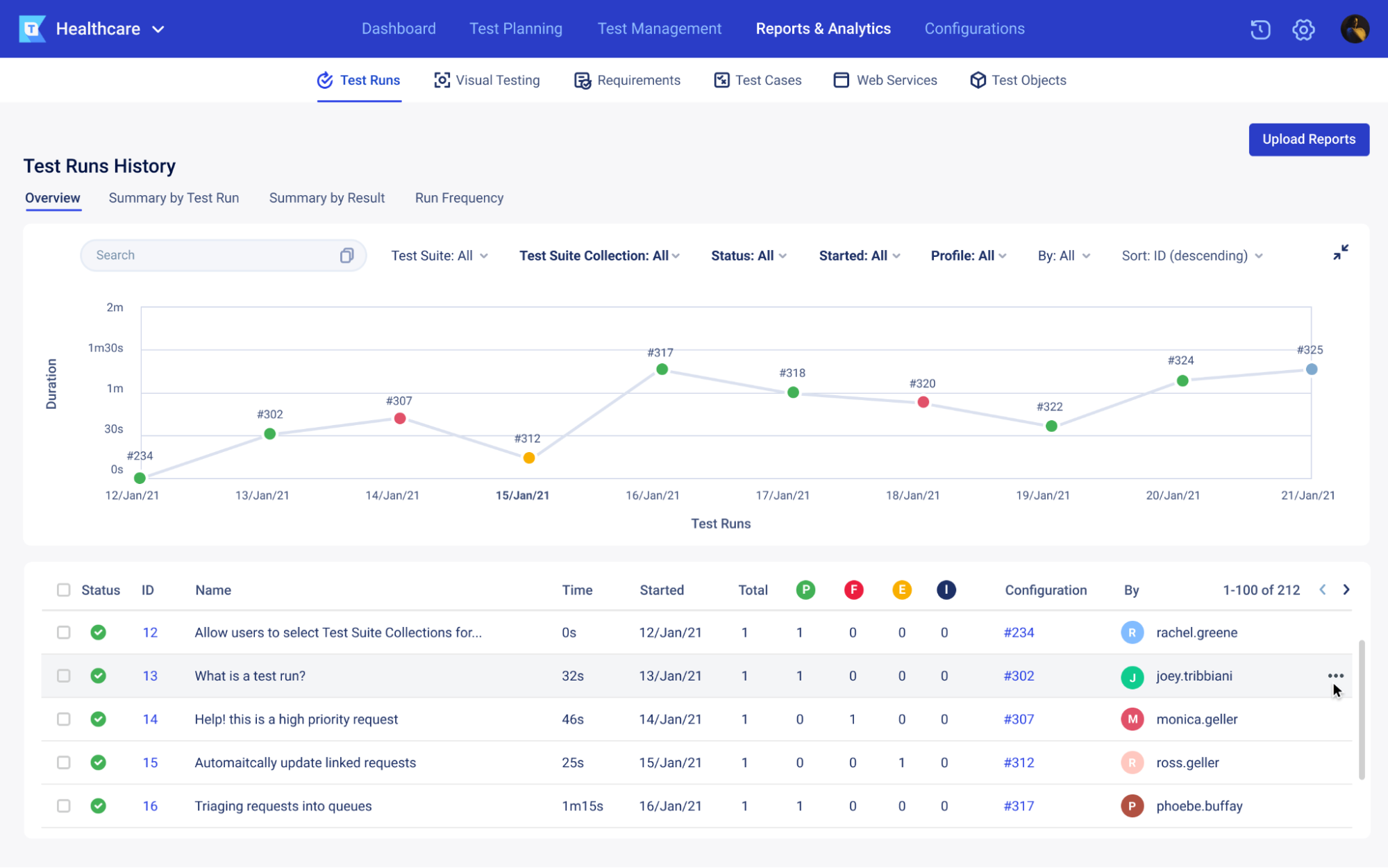
A test management dashboard shows, in one view, how much of the plan has run, what passed, what is blocked, and which defects stand in the way of release. It's the main tool for test monitoring and control. Different readers need different views:
Audience | What they watch | Decision it supports |
|---|---|---|
QA lead | Execution progress, pass and fail rate, blocked tests, flaky tests | Where to move testers today |
Engineering manager | Defect leakage, defect density, pipeline test time, automation coverage | Where quality or speed is slipping |
Product or release owner | Requirement coverage, open critical defects, exit criteria status | Whether to ship |
A few metrics do most of the work:
- Execution progress: executed tests divided by planned tests in the cycle or sprint.
- Pass rate: passed tests divided by executed tests.
- Requirement coverage: requirements with at least one executed test divided by all requirements in scope.
- Defect leakage: defects found in production compared with those found in testing.
- Automation coverage: automated test cases divided by all test cases in scope.
- Flaky test rate: the share of tests whose result changes without a code change.
For the online store on release day, a dashboard snapshot could read (illustrative numbers): 196 of 200 cases run, 2 search cases blocked by a search index outage, 2 deferred by agreement, 193 passed, 3 failed with low-severity defects logged, no open critical defects, and every changed payment requirement covered.
In TestOps, the Analytics & Trends, Release Health, and Live Monitor dashboards give quick summaries, and reports such as Requirement Coverage Analysis go deeper. A Project Admin can set readiness criteria per release or sprint: a minimum requirement coverage, a minimum pass rate, and blocking-defect rules by priority and severity. The Release Health dashboard then marks the release Ready or At Risk. The Requirement Traceability Report links each requirement to its test cases, each test case to its executions, and each execution to its defects. Defect rules and the traceability report need Jira or Azure DevOps connected.
In this AutomationDecoded clip, Mush Honda shares the test management metrics he uses to measure success and tie it to business goals:
Test management challenges
Early on, a spreadsheet is often enough. A handful of testers share one file and talk every day. As the team and the product grow, overlapping environments, parallel runs, test case reuse, and several delivery pipelines make the spreadsheet hard to keep accurate.
Cristiano Caetano compares the need for a dedicated test management system with the need for a CRM:
If you're a small startup or an early-stage company with just a few people, you don't need a CRM tool yet. You don’t need it to manage leads, build relationships, or track renewals because you might only have 10 to 15 customers. But as you grow, bring on more people, and deal with longer sales cycles, suddenly having a tool to manage your sales becomes a must-have. It’s no longer optional. You can’t rely on spreadsheets or people’s memory.
 Cristiano CaetanoVP of Product
Signs it's time to move off spreadsheets:
- More complexity: your team works across several environments, parallel workflows, or teams.
- Upkeep problems: keeping the spreadsheet current takes more time and causes more errors each release.
- Limited visibility: stakeholders can't get an accurate, current view of testing status without a meeting.
- Inconsistent data: manual entry errors and version conflicts make the results hard to trust.
Even with a tool in place, three challenges come up again and again:
- Changing requirements mid-release: test cases and the plan fall behind the product. Review scope at each sprint planning.
- Environment and data availability: a shared staging server or missing test accounts can block a whole day of testing. Book environments and prepare data before the cycle starts.
- Out-of-date test cases: cases that no longer match the product produce false failures. Retire or update them each release.
What is a test management tool?
A test management tool, also called a test management system, stores test cases, plans and runs tests, collects manual and automated results, links them to requirements and defects, and reports on readiness. Tools come in 4 types: standalone tools with their own repository, such as TestRail, Qase, or Katalon TestOps; Jira-native apps that store tests inside Jira, such as Xray or Zephyr; enterprise suites tied to a wider lifecycle platform, such as Azure Test Plans in Azure DevOps or Tricentis qTest; and free or open-source tools, such as Kiwi TCMS or TestLink. When you compare them, check three things: integrations with your issue tracker and CI, manual and automated results in one view, and reports your stakeholders will read. For side-by-side comparisons, see our guides to test management tools and test management tools for Jira.
We make Katalon TestOps, so here is how it covers the steps above. Each manual test case step has Description, Expected Results, and Test Data fields. You can import existing test cases from a CSV file, or have Katalon AI Assistant connected to Azure DevOps import a Test Plan's test cases with their steps, expected results, and test data, after you approve the import. Katalon AI can generate test cases from synced requirements, and testers can execute a manual run themselves or with Run with AI. With Jira connected, TestOps syncs projects, releases, requirements, and defects from Jira in real time, plus sprints when a board is connected, and Report Defect creates or links a Jira defect from a failed result.
Test management best practices
- Plan testing early. Start with the sprint or release planning, not after the build is ready.
- Prioritize by risk. Test the features with the highest business impact first, so the riskiest areas are covered if time runs short.
- Agree exit criteria before execution starts. Write them into the test plan so the sign-off isn't a debate.
- Version test cases like code. Track each change, so the team works from the current version and can see why a case changed.
- Retire outdated test cases. Review the suite every release or two. Remove duplicates and update cases that no longer match the product.
- Automate reporting. Reports should update after each run, so stakeholders don't wait for a manual summary.
- Link each requirement to its test cases. It's the clearest way to show test coverage and to know which features are ready to release.
- Track a few metrics that show progress. Pass rate, defect leakage, and coverage say more than a long list nobody reads. See the dashboards section above.
Putting it together
For the online store, test management means planning the 200-case regression suite around payment risk, monitoring each run against that plan, moving testers when payment stalls, and reporting a clear go or no-go. The same four activities apply to any team, from a single sprint to a large release.
To go deeper, start with the test plan for planning, manual testing for running tests by hand, and the test report for reporting results.
Frequently asked questions
Two phases. Planning covers risk analysis, estimation, scope, resources, and exit criteria. Execution covers test design, environments, running tests, tracking defects, monitoring and control, and reporting through to sign-off. The 7 steps in this guide map onto those two phases.
Jira tracks issues, stories, and defects, but on its own it has no test case, test run, or coverage model. Teams add a Jira-native test management app, such as Xray or Zephyr, or connect a standalone test management tool that integrates with Jira. See our guide to test management tools for Jira.
In short: analyze the requirements and risks, define scope and approach, plan environments, data, and people, set the schedule and the entry and exit criteria, then get sign-off. Our test plan guide walks through each step, and the test plan template gives you a file to fill in.
Test monitoring compares actual progress and results with the plan: what has run, passed, failed, and been blocked, and which defects are open. Test control is the action taken when they differ, such as re-prioritizing tests, adding a retest cycle, suspending testing on a broken build, or moving scope.
Risk-based prioritization, test estimation, entry and exit criteria, requirement traceability, and regression test selection. Together they help a team test the riskiest areas first and know when testing is done.
Yes. A test management platform can collect manual run results and automated results from CI in the same reports and dashboards, so coverage and release readiness reflect all of your testing, not only the automated part.
Test planning decides what will be tested, how, by whom, and when, and sets the entry and exit criteria that say when testing starts and when it's done. It gives the team one agreed scope to monitor against, so control decisions and the release sign-off rest on criteria set in advance rather than debated on release day.
The usual sequence is requirement analysis, test planning, test case design, test environment setup, test execution, and test closure, often called the software testing life cycle. Test management runs across all of these stages.





Test everything. Ship with confidence.
From generating test cases to spotting failures, Katalon's AI works across your entire pipeline, automatically.
