


Preparing for a DevOps interview? Here are 30+ common DevOps and CI/CD interview questions with sample answers, covering key definitions, why teams adopt DevOps, how to implement it, and the differences between related practices.

DevOps, a widely adopted software development practice, keeps drawing attention. More and more companies use it, including large enterprises such as Netflix, Meta, and Amazon, and DevOps roles have become some of the most promising career paths for IT professionals.
You might be among the developers who are planning to advance your career as a DevOps engineer, analyst, or specialist. Besides the required technical skills, a DevOps job interview can be tough without diligent preparation.
This blog post presents more than 30 of the most common DevOps interview questions, neatly broken out into themes, so you can ace your next interview and successfully get that dream job.
DevOps Terms and Definitions
1. What is DevOps?
In general, DevOps is the gray area between development (Dev) and operations (Ops) teams in a product development process. DevOps is a culture in which communication, integration, and collaboration in the product development cycle are emphasized. Thus, it eliminates the silos between software development and operations teams, allowing them to focus on rapid and continuous product deployment.
Read More: DevOps Lifecycle Explained In Detail
2. What is continuous integration?
Continuous integration (CI) is the process of automatically integrating code changes from multiple developers into a shared repository. Automated tests verify that the new code doesn't conflict with the existing codebase. Ideally, code changes should be merged multiple times a day, at every commit, with the help of CI tools.
3. What is continuous delivery?
Continuous delivery (CD), together with CI makes a complete flow for deliverable code packages. In this phase, automated building tools are applied to compile artifacts (e.g., source code, test scripts, configuration files, and environments) and have them ready to be delivered to the end user. With that in mind, in a CD environment, new releases are just one click away from being published with fully functional features and minimal human intervention.
For more details, see our introduction to CI/CD.
4. What is continuous deployment?
Continuous deployment takes continuous delivery a step further by releasing every change automatically. As soon as an update passes all stages of the pipeline, it's deployed to production without human intervention. To make continuous deployment work, code must go through rigorous automated tests and checks before it reaches production.
Read more: Continuous Deployment vs Continuous Delivery: A Comparison
5. What is continuous testing and its benefits?
Continuous testing is the practice of applying automated tests early, gradually, and adequately in the software delivery pipeline. In a typical CI/CD workflow, builds are released in small batches. Therefore, it is impractical to manually perform test cases for each delivery. Automated continuous testing eliminates the manual steps and turns them into automated routines, which reduces human effort. That’s why automated continuous testing is essential for the DevOps culture.
Benefits of continuous testing:
- Ensures the quality and speed of builds
- Enables faster software delivery and a continuous feedback mechanism
- Detects errors as soon as they occur in the system
- Reduces business risks and evaluates potential problems before they become real problems
6. What is version control and its uses?
Version control (or source control) is a repository in which all changes in the source code are stored and managed at all times. Version control provides an operating history of code development that allows developers to rewind if they made any mistakes, compare versions, and finalize the best version of the code. All the code versions must be updated and checked into the version control, making it the single source of truth that is applicable for all environments.
7. What is Git?
Git is a distributed version control system that tracks changes to code. It supports branch-based workflows, such as GitHub flow, that make it easier for teams to collaborate as projects grow.
Reasons for Implementing DevOps
1. Why does DevOps matter? How does DevOps benefit teams in software delivery?
In today's digital world, organizations must rethink how they deliver software, making it more reliable and flexible to keep up with the competition.
This is where DevOps comes in. DevOps brings speed and agility to the entire software development pipeline, from idea to deployment to end users, and drives a more streamlined, efficient process for continuously updating and improving products.
2. Explain how DevOps is helpful for developers.
In a world without DevOps, the workflow would start with developers building new codes, shipping, and integrating them, and then it’s the operation team’s duty to package and deploy the codes. After that, they have to wait for feedback. And if things go wrong, they have to go back and do it all over again to solve the bugs. In this process, there is exorbitant manual communication between different teams involved in the project.
With DevOps, CI/CD practices automate much of the integration, packaging, and deployment work, so developers can focus more on building code. Bringing engineering and operations together also improves communication and collaboration, because processes become more transparent and accessible to everyone.
3. Why has DevOps gained popularity in software delivery recently?
DevOps has gained attention over the last few years primarily due to its ability to streamline the development, testing, and deployment processes for organizational operations and convert them into business value.
Technology moves fast, so organizations adopt DevOps and Agile practices to streamline operations and stay ahead of the competition. Companies such as Facebook and Netflix are well-known examples of using continuous deployment to grow without disrupting ongoing operations.
4. What are the benefits of CI/CD?
CI/CD merges all code changes into a shared repository and runs them through automated tests, so the product is always in a deployable state.
CI/CD enables organizations to roll out product updates as quickly, efficiently, and automatically as their customers expect them to be.
In short, a well-planned, well-run CI/CD pipeline speeds up releases, improves reliability, and catches defects earlier, which leads to higher customer satisfaction.
5. What are some benefits of continuous delivery?
Manually releasing changes in code gives teams complete control of the product. In some cases, a new product release aligns with a bigger picture in the organization, for example, a promotion strategy with clear business purposes.
By automating repetitive and mundane tasks, IT professionals have more time to focus on improving the product without worrying about the integration progress.
6. What are some benefits of continuous deployment?
With continuous deployment, developers can focus solely on the product because their final task in the pipeline is to review pull requests and merge them into the main branch. This method enables frictionless deployment and shortens the deployment duration by releasing new features and fixes right after they have passed the automated tests.
Small, frequent releases also make problems easier to isolate and fix, and teams get real user feedback on each change much sooner.
How to Effectively Implement DevOps
1. Define a typical DevOps workflow.
A typical DevOps workflow can be organized into four stages:
- Version control: The stage where source code is stored and managed. Version control keeps every version of the code.
- Continuous integration: Developers build components and have them compiled, validated, and tested through code review, unit testing, and integration testing.
- Continuous delivery: The next level of continuous integration, where release and testing processes are fully automated so new releases can be delivered quickly and sustainably.
- Continuous deployment: Once the application passes all testing requirements, it's automatically deployed to production with no human intervention.
To learn more, read From DevOops to DevOps: Best Strategies to Implement for Your Team.
2. What are the core operations of DevOps?
The core operations of DevOps in terms of development and infrastructure are:
- Software development: code building, code coverage, unit testing, packaging, and deployment
- Infrastructure: provisioning, configuration, orchestration, and deployment
3. What are some precautions that teams need to consider before implementing DevOps?
There are a few misconceptions about DevOps practices that can lead to costly failures when organizations try to apply this new approach:
- Myth: DevOps is just new tools or a new "department." In fact, DevOps is a culture in which development and operations teams work side by side within a shared framework.
- Myth: You don't need a clear vision for DevOps. Adopting DevOps is a big change for both development and operations teams. A clear roadmap, goals, and expectations remove confusion and give everyone clear guidelines from the start.
- Myth: Once DevOps is rolled out, the work is done. Leadership needs to build and sustain a culture of continuous learning and improvement, treating failures as chances to learn and prevent repeat mistakes.
4. What role does the SCM team play in DevOps?
Software configuration management (SCM) is the practice of tracking and keeping records of the development environment, including all the changes and adjustments made in the operating system.
In DevOps, SCM is built as codes under the umbrella of Infrastructure as Code practice.
SCM simplifies tasks for developers as they no longer have to manually manage the configuration processes. This process is now constructed in a machine-readable form and is automatically duplicated and standardized.
5. What role does the Quality Assurance (QA) team play in DevOps?
As DevOps practices become a more desired culture in innovative organizations, QA teams’ responsibilities and relevance have shown signs of decline in today’s automated world.
However, this can be considered a myth. The rise of DevOps is not equal to the end of QA roles. It only means that their working environment and required expertise are changing. Therefore, their main focus should be to professionally evolve in order to keep up with this maturing trend.
In DevOps, QA teams play a strategic role to ensure the stability of continuous delivery practices as well as perform the exploratory testing tasks that automated and repetitive tests cannot fulfill. Their insights in assessing the test and detecting the most valuable tests still play an essential role in mitigating bugs in the last steps of a release.
6. What are some tools used for DevOps? Describe your experience working with any of these tools.
Throughout a typical DevOps lifecycle, there are various tools to support different phases of product development. The most common tools for DevOps can be divided into six key phases:
- Source control and planning: Git, GitHub, GitLab, Jira
- Continuous integration: Jenkins, GitHub Actions, GitLab CI/CD, Azure Pipelines
- Artifact management: Nexus, JFrog Artifactory
- Configuration and deployment: Docker, Kubernetes, Ansible, Terraform, Argo CD
- Continuous monitoring: Prometheus, Grafana, ELK Stack, Splunk
- Continuous testing: Selenium, Playwright, Katalon True Platform
Read more: Best DevOps tools list
7. How do you apply change management in DevOps practices?
The typical change management approach needs to be appropriately integrated with DevOps’s modern practices. The first step is to centralize changes into a single platform to streamline the change, problem, and incident management processes.
Next, businesses should establish high transparency standards to make sure everyone is on the same page and assure accuracy in internal information and communication.
Stratifying the upcoming changes and establishing clear policies will help minimize risks and shorten the timeline for change. Lastly, organizations should apply automation into their process and integrate it with their DevOps software.
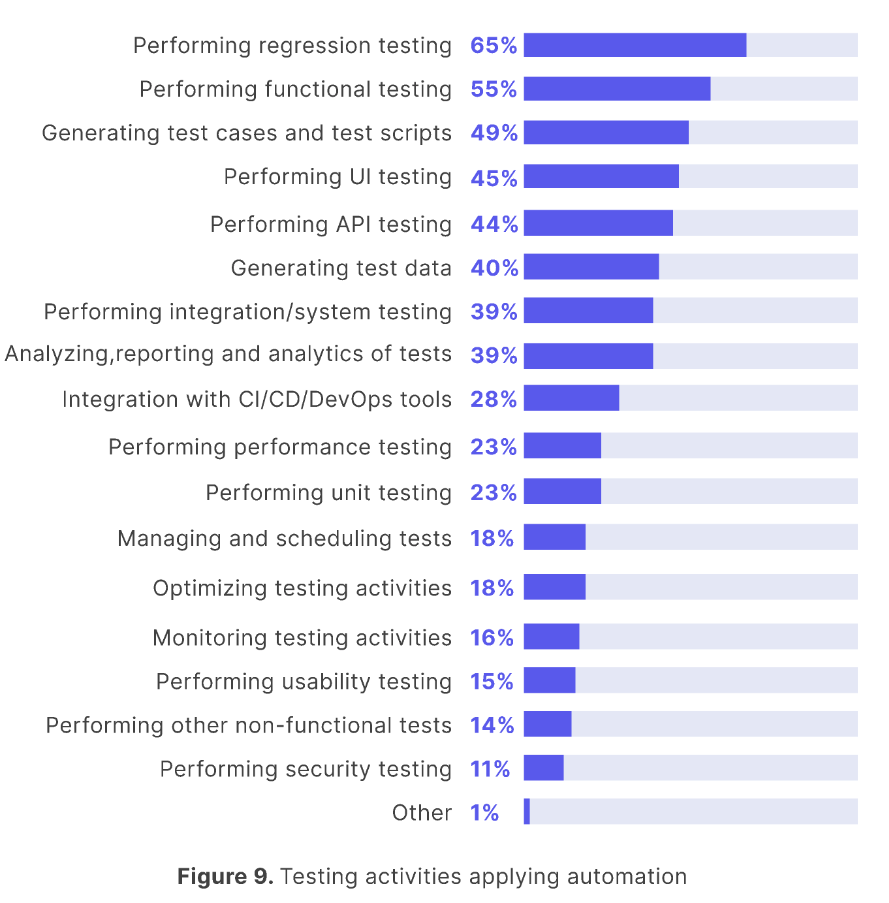
In fact, according to Katalon's State of Quality Report 2024, many QA teams have already integrated automated tests into their CI/CD and DevOps workflows to speed things up.
How to Effectively Implement CI/CD
1. What are some core components of CI/CD?
A stable CI/CD pipeline requires a repository management tool that acts as a version control system so that developers can keep track of changes in the software build.
In the version control system, developers can also collaborate on a project, compare between versions, and undo any mistakes they make, thus mitigating disruption to all team members.
Continuous testing and automated testing are the keys to a smooth CI/CD pipeline. Automated testing should be built into every development phase, including unit, integration, and system testing, and cover functionality, usability, performance, load, stress, and security.
2. What are some common practices of CI/CD?
Here are some best practices for establishing an efficient CI/CD pipeline:
- Develop a DevOps culture
- Implement and use continuous integration
- Deploy to every environment the same way
- Fail and restart your pipeline
- Apply version control
- Include the database in the pipeline
- Monitor your continuous delivery pipeline
- Get your CD pipeline flowing
3. When is the best time to implement CI/CD?
Ideally, as early as possible, even at the start of a new project, because CI/CD is far easier to build in from the beginning than to retrofit. For existing products, start once you have version control and some automated tests in place, then expand the pipeline step by step. Keep in mind that CI/CD often comes with a broader DevOps shift that touches workflow, team structure, and infrastructure, so prepare the organization for that change.
4. What are some common CI/CD servers?
- Azure DevOps (Azure Pipelines)
Azure DevOps supports a complete DevOps workflow with Agile planning, source control, package management, testing and release automation, and continuous monitoring. Azure Pipelines is its CI/CD service.
- TeamCity
TeamCity is a CI server from JetBrains that offers built-in framework support and code coverage without extra plugins or changes to build scripts.
- Jenkins
A self-contained CI server, it supports collaboration between development and operation teams with a shared pipeline and error-tracking function. It can also be combined with hundreds of dashboard plugins.
- GitLab
GitLab offers built-in CI/CD that teams can customize for efficient continuous integration and deployment. It helps teams ship code faster, spot errors early, and roll back changes when needed.
- Bamboo
Bamboo is a continuous integration server for product release management automation. Bamboo keeps track of all deployments on all tools and communicates errors in real time.
5. Describe an efficient workflow for continuous integration.
A successful workflow when implementing continuous integration encompasses the following practices:
- Implement and maintain a repository for the project’s source code
- Automate the build and integration
- Make the build self-testing
- Commit changes daily to the baseline
- Build all commits added to the baseline
- Keep the builds fast
- Run tests in a clone of the production environment
- Make it easy to get the latest deliverables
- Make build results easy to be monitored by everyone
- Automate deployment
Differences between each terminology
1. What are some key differences between Agile and DevOps?
Basically, DevOps and Agile are complementary to each other. Agile focuses more on the values and principles of developing new software and managing a complex process in a more effective way. Meanwhile, DevOps is all about enhancing communication, integration, and collaboration between different teams, which comprise the developer and operation teams.
Agile and DevOps work best together: Agile principles keep development heading in the right direction, and DevOps practices and tools make sure the product reaches customers reliably.
2. What are some differences between continuous integration, continuous delivery, and continuous deployment?
CI is a practice in which code versions are continuously integrated into a shared repository. This practice ensures that new code is automatically tested and that errors are quickly detected and fixed.
Continuous delivery takes CI one step further by ensuring that after integration, the code base is ready to be released any time, with just a push of a button. Therefore, CI is considered a prerequisite for continuous delivery, the other essential part of the CI/CD pipeline.
As for continuous deployment, no manual step is required. Once the codes have passed the tests, they are automatically pushed to the production environment.
All three of these components (continuous integration, continuous delivery, and continuous deployment) are essential phases of implementing DevOps.
Continuous delivery suits teams that want a human decision point before release, for example when releases must line up with business events or compliance reviews. Continuous deployment suits teams with mature automated testing and monitoring that want every change that passes the pipeline to ship automatically.
3. What are some fundamental differences between continuous delivery and continuous deployment?
Under continuous delivery, the codes in the main branch are always ready to be deployed manually. This practice allows the development team to decide when to release new changes or features to best benefit the organization.
Meanwhile, continuous deployment will have all updates and fixes in the code automatically deployed to the production environment immediately after the testing phase and without any human intervention.
4. What are the differences between continuous integration and continuous delivery?
Continuous integration helps ensure that software components work closely together. Integration should be done frequently; preferably on an hourly or daily basis. Continuous integration helps increase the frequency of code commits and reduces the complexity of connecting code from multiple developers. Eventually, this process reduces the chances for non-compatible code and redundant efforts.
Continuous delivery is the next step in the CI/CD pipeline. As the code is integrated into the shared repository continuously, continuously testing that code is made possible. There are no gaps while waiting for code to be completed before testing can occur. This ensures as many bugs are found as possible to then continuously deliver code to production.
5. What are the differences between DevOps and continuous delivery?
DevOps is more of an organizational and cultural approach that promotes collaboration and communication between both the engineering and operation teams.
Meanwhile, continuous delivery is an essential factor that contributes to the success of implementing DevOps into the product development workflow. Continuous delivery practices help to make new releases more reliable and create a smoother, shorter process.
The key purpose of DevOps is to combine the Dev and Ops roles, remove silos, and deliver on business goals. Continuous delivery is one of the main practices that makes that possible.
Alternatively, continuous delivery works best when there is already a DevOps process in place. Thus, it amplifies collaboration and streamlines the unified product development cycle of the organization.
6. What are the differences between Agile, Lean IT, and DevOps?
Agile is a methodology focused on how software is developed. It aims to develop iteratively, deliver continuously, shorten feedback loops, and improve team collaboration throughout the software development life cycle (SDLC).
Lean IT is a methodology that aims to streamline the value stream of the product development cycle. Lean focuses on eliminating processes that don't add value and creating flow to optimize value streams.
DevOps focuses on both development and deployment, the Dev and Ops of the product development process. Its goal is to unite people, processes, and automation tools for a more streamlined, automated delivery process.
Ready to Ace Your Next DevOps Interview?
There are countless DevOps interview questions out there that this article doesn't cover yet. We hope these questions and suggested answers give you a solid foundation in DevOps and CI/CD to get through your next interview.
We will add more content to this list in the future. So if you have any suggestions on this topic, please do not hesitate to reach out to share.
In the meantime, keep learning with Katalon Academy and explore effective orchestration with test automation. To prepare further for your interviews, here are some topic-specific lists of interview questions:
Frequently asked questions
DevOps is described as the “gray area” between development and operations, emphasizing communication, integration, and collaboration to eliminate silos and enable rapid, continuous product deployment.
CI is automatically integrating code changes from multiple developers into a shared repository, using automated tests to verify changes don’t conflict with the existing codebase, ideally merging multiple times a day.
Continuous delivery keeps code ready to be released with a manual push, while continuous deployment automatically deploys changes to production once they pass all pipeline stages—no human intervention.
Continuous testing applies automated tests early and throughout the delivery pipeline; it’s essential because frequent small releases make manual testing impractical, reducing human effort and enabling faster feedback.
QA remains strategic: ensuring stability of continuous delivery and performing exploratory testing that automated, repetitive tests can’t cover, helping mitigate bugs near release.





Test everything. Ship with confidence.
From generating test cases to spotting failures, Katalon's AI works across your entire pipeline, automatically.
