


CI/CD combines continuous integration and continuous delivery to shorten development and release cycles. Learn how each practice works, the stages of a CI/CD pipeline, why test automation is essential, and which tools support it.
CI/CD is the acronym for the combined practices of Continuous Integration (CI) and Continuous Delivery (CD). CI/CD practices are currently the most widely accepted choice to shorten software development and delivery cycle time.
In today’s ever-evolving landscape, one of the top challenges for software companies is quickly responding to market and customer demands. And CI/CD methodology emerged as the pivotal solution to such a challenge. Read on to find out more about CI/CD and how these practices are performed.
Learn CI/CD optimization in a free Katalon Academy course.
What Is Continuous Integration?
Continuous Integration (CI) is a software development practice where developers frequently merge their code changes into a shared repository, usually several times a day. Each merge triggers an automated build and testing process to catch errors quickly, ensuring the codebase stays in a working state.
A CI pipeline typically involves the following tasks:
- Detect changes in the source code repository (new commits appear)
- Source code quality analysis
- Build
- Execute all unit tests
- Execute all integration tests
- Generate deployable artifacts
- Report status
If one of the steps above fails:
- Integration may stop or continue depending on defect severity and configuration
- Results are notified to the team via email or chat system
- The team fixes defects and commits again
- Tasks are performed again
It’s like a regular health check for your project, making it easier to find and fix issues early while speeding up development.
What Is Continuous Delivery?
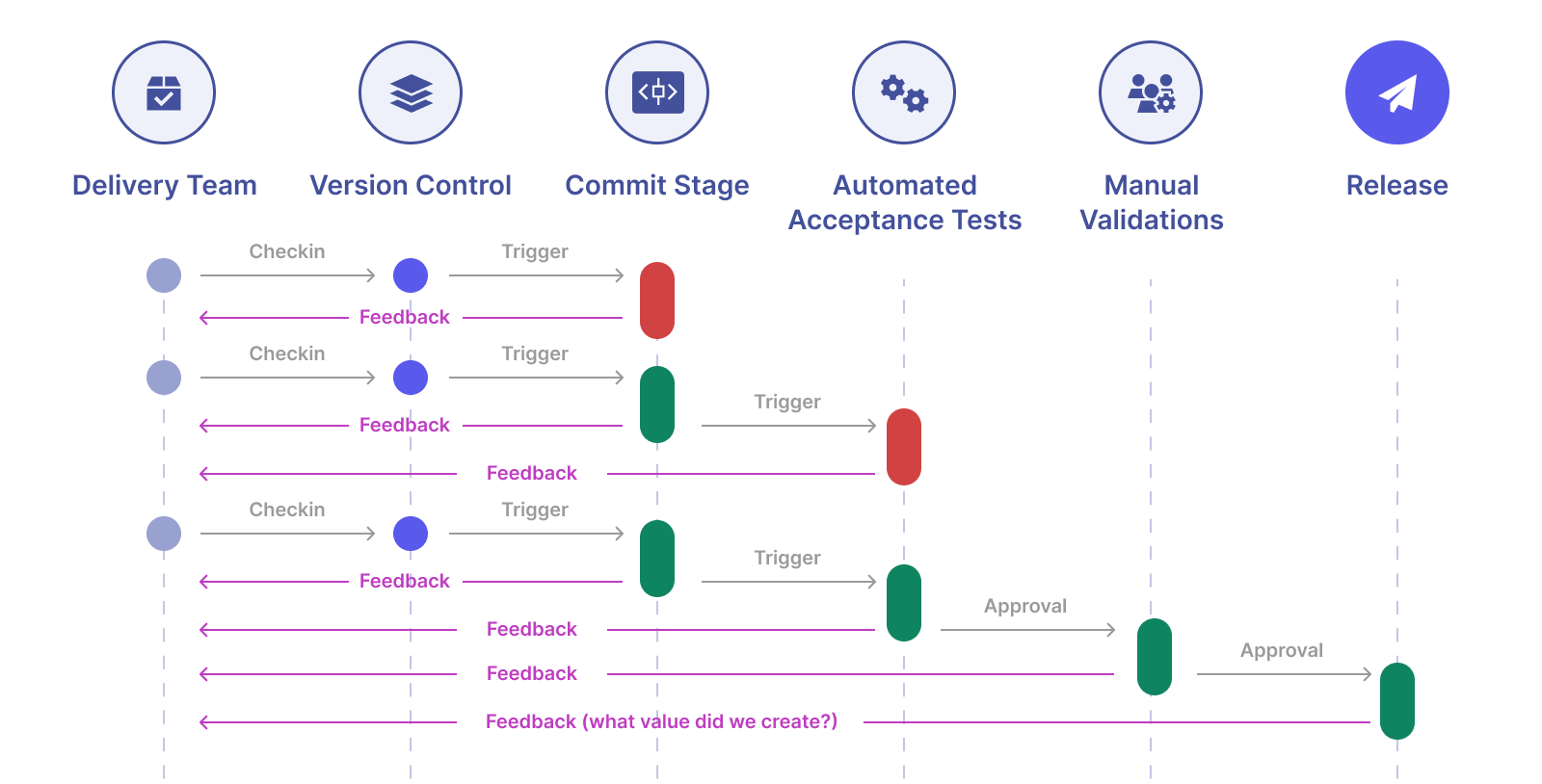
Continuous delivery (CD) picks up where continuous integration ends. While CI builds and tests code automatically, CD deploys all code changes in a build to the testing or staging environment.
CD makes it possible to release builds to the production environment when needed. Allowing the team to deploy at will, CD effectively reduces time to market.
Before deploying software to production, the CD process runs automated tests such as unit tests, API tests, integration tests, system tests, and, where needed, load tests.
The steps from CI to CD are usually completed automatically, including automated testing at the unit, integration, and system levels. As tests can fail at any level and environment, CI/CD must include a feedback channel to quickly report failures to developers.
Dependent on policies and processes defined by teams, developers may do the following with CI/CD:
Step 1: Before committing changes, developers check to see if the current build succeeded. If not, fix errors before committing new changes.
Step 2: If the current build succeeded, reset the workstation with the build’s configuration.
Step 3: Build and test locally to ensure the update does not break any functionality. If successful, commit new changes.
Step 4: Allow CI to complete with new changes.
Step 5: If the build fails, stop and fix errors on local workstations. Go back to Step 3.
Step 6: If the build passes, continue working on other items.
Read More: Continuous Delivery vs Continuous Deployment: A Comparison
CI/CD Workflow Pipeline
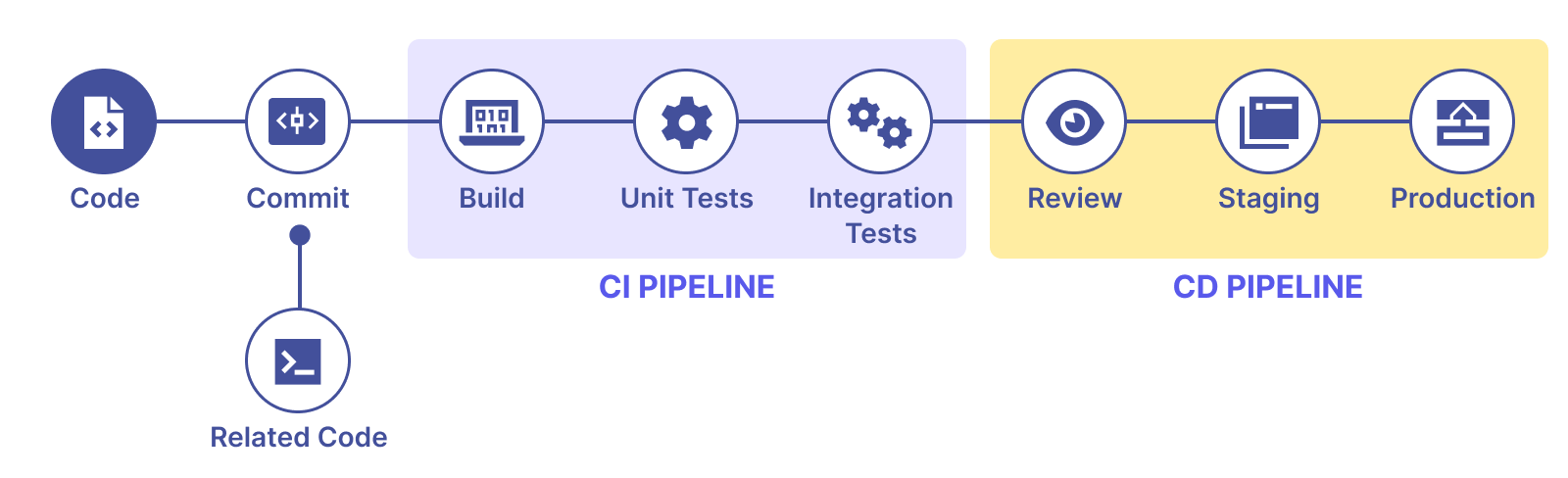
A CI/CD pipeline is the path a unit of change takes from development to delivery. It usually consists of the following main phases:
Phase 1: Commit
When developers complete a change, they commit the change to the repository.
Phase 2: Build
Source code from the repository is integrated into a build.
Phase 3: Automate tests
Automated tests are run against the build. Test automation is an essential element of any CI/CD pipeline.
Phase 4: Deploy
The built version is delivered to production.
Importance of Test Automation for CI/CD
Test automation is an essential component of any CI/CD pipeline. The benefits of applying CI/CD cannot be realized if there is a lack of automated testing and a low level of test coverage. Teams need to perform automated testing at all levels including unit, integration, and system testing.
- Unit test
Covers units of code such as methods, classes, and API services. Effective unit testing significantly increases test coverage for the whole system. - Integration test
Ensure modules and parts of the system work together smoothly. - System test
Runs on the entire system to simulate active users. The test environment should be as close to the production environment as possible.
Teams also need to apply automation testing for multiple testing types such as functionality, usability, performance, load, stress, and security.
Essential Software for the CI/CD Pipeline
Many software tools support CI/CD practices. These CI/CD tools range from repository management platforms such as GitHub and Bitbucket, to build automation servers such as Jenkins, to test automation tools such as Selenium and Katalon Studio.
Katalon Studio provides a comprehensive set of features for API, web, mobile, and desktop testing. It integrates easily into a CI/CD pipeline to handle API, integration, and system testing.
Conclusion
CI and CD are two core DevOps practices that close the gap between developers and operations teams. With automation in place, developers can release changes and new features more frequently, while operations teams keep better overall stability.
Frequently asked questions
CI/CD helps reduce technical debt by automating code quality checks, running tests, and enforcing best practices during development. With every code merge, tools can detect potential issues, such as outdated dependencies or violations of coding standards, allowing teams to address them early. This prevents the accumulation of unresolved issues that can slow down future development.
Version control systems (like Git) are the backbone of CI/CD. They track changes to the codebase, allowing developers to collaborate effectively. CI/CD tools monitor these repositories for changes and trigger automated pipelines whenever new code is committed. Version control also enables rollbacks if a deployment fails, ensuring stability.
CI/CD pipelines can use environment variables and configuration management tools to handle environment-specific settings. For example, secrets like API keys or database credentials can be stored securely using tools like HashiCorp Vault or AWS Secrets Manager and injected dynamically during deployment. This ensures consistent behavior across development, testing, and production environments.
Blue-Green Deployment: Two environments (blue and green) are maintained. The current version runs on blue, while the new version is deployed on green. Once validated, traffic is switched to green, minimizing downtime. Canary Deployment: The new version is rolled out incrementally to a small subset of users first (the "canary"). If no issues are detected, it’s gradually deployed to the remaining users. This minimizes risk while still validating the update.
Use modular builds: Break the application into smaller, testable modules. Parallelize tasks: Run tests and builds concurrently where possible. Implement caching: Cache dependencies and artifacts to reduce repetitive work. Monitor pipeline performance: Use metrics to identify bottlenecks and optimize steps consuming the most time. Adopt incremental builds: Only rebuild the parts of the application affected by recent changes.
Security risks include exposure of secrets, vulnerabilities in dependencies, and unauthorized access to the pipeline. Mitigation strategies include: Storing sensitive data securely using secret management tools. Regularly updating dependencies and using tools like Snyk to scan for vulnerabilities. Restricting access to the CI/CD system with role-based access controls (RBAC). Auditing pipeline logs for unusual activity. Running security tests as part of the pipeline to catch issues early.





Test everything. Ship with confidence.
From generating test cases to spotting failures, Katalon's AI works across your entire pipeline, automatically.
