


Plan and run your web testing with this complete website QA checklist, covering test planning, functional, compatibility, performance, usability, API, visual, and accessibility testing, plus recommended tools to get started.
Web testing can sometimes be complicated considering the wide variety of factors involved. QA teams always need to develop a detailed test plan to guide the testing project, but it gets overwhelming quickly if they don’t have a comprehensive view over what needs to be tested. With a good QA checklist, the team can:
- Have a standardized set of guidelines and criteria that guide that testing process
- List out all of the necessary tasks to accomplish
- Ensure all aspects of the website are covered in the project
- Align all team members on the same vision
In this article, we’ll provide you with the ultimate website QA checklist to help you thoroughly plan your web testing initiative from start to finish. Simply work through the list and tick off each item as you finish testing it.
Complete Website QA Checklist
Checklist for QA Planning
It is essential to plan the test project beforehand so that resources can be efficiently allocated and the QA team understands the tasks they need to complete to reach the project objectives. A good test plan should include the following:
- Objective:
- What are the testing goals and objectives? (e.g., Validate the functionality of the payment gateway)
- Which functionalities or features to be tested? (e.g., User registration, product search)
- How to define expected outcomes and success criteria? (e.g., Successful completion of a transaction, accurate data validation)
- Approach:
- What testing techniques to use? (e.g., Exploratory testing, regression testing)
- What level of testing to perform? (e.g., Unit testing for individual modules, integration testing for system components)
- Which testing methodologies or frameworks to employ? (e.g., Behavior-driven development, test-driven development) Learn more about BDD vs TDD
- Scope:
- What is included in the testing scope? (e.g., Front-end user interface, back-end database)
- What functionalities or features are out of scope? (e.g., Third-party integrations not yet implemented)
- Any specific boundaries or constraints? (e.g., Limited access to production data for testing purposes)
- Test Deliverables:
- What should the test plan document include? (e.g., Test objectives, test strategies)
- How to develop test cases, scripts, or scenarios? (e.g., Using a test management tool, writing test scripts in a programming language)
- What test reports or summaries to generate? (e.g., Test execution summary, defect reports with severity and priority)
- Dependencies:
- Are there any external dependencies impacting testing? (e.g., Availability of test environment, data from third-party systems)
- What prerequisite tasks or activities are required? (e.g., Completion of user interface design, integration of backend services)
- How to address dependencies or interdependencies? (e.g., Collaborating with the UI development team to align on interface specifications)
- Test Environment:
- What are the required hardware and software configurations? (e.g., Specific browser versions, minimum system requirements)
- How to set up and configure the test environment? (e.g., Provisioning virtual machines, installing necessary software dependencies)
- Are there any specific tools or frameworks needed? (e.g., Selenium for automated browser testing, JMeter for performance testing)
- Risk Management:
- What are the potential risks and uncertainties? (e.g., Lack of test data, resource constraints)
- How to assess risk severity and likelihood? (e.g., using a risk matrix to evaluate impact and probability)
- What risk mitigation strategies or contingency plans to implement? (e.g., Creating backup test data, allocating additional resources for critical tasks)
- Schedule:
- What is the timeline or schedule for testing? (e.g., Testing phase from week 3 to week 5 of the project timeline)
- What milestones or checkpoints to set? (e.g., Completion of test case development by week 4, test execution kickoff meeting by week 2)
- How to allocate time for different activities? (e.g., Allowing 2 weeks for regression testing, 1 week for performance testing)
- Roles and Responsibilities:
- What are the roles and responsibilities of team members? (e.g., Test lead responsible for test planning, developers responsible for fixing defects)
- Who are the key stakeholders and their roles? (e.g., Product owner for requirements clarification, business analyst for providing test data)
- How to define communication channels and reporting? (e.g., Weekly status meetings with stakeholders, defect tracking via a designated tool)
Functional Testing
Now that we have carefully planned our web testing project, the next step is to test the website functionalities. Note that certain types of websites may require a different approach, such as eCommerce sites, which have many product-related features. Here is a general checklist that can be applied to any type of website:
- Navigation and Links
- Verify that all main navigation menus and submenus are present and accessible.
- Test each navigation link to ensure it leads to the correct destination page.
- Check for broken links or redirects and ensure they are handled properly.
- Validate the behavior of anchor links and confirm they scroll to the correct sections on the same page.
- Test the consistency and accuracy of breadcrumb navigation.
- Verify that external links open in a new tab or window, if specified.
- Check the accessibility of navigation elements for keyboard-only users.
- Test the responsiveness of the navigation menu on different devices and screen sizes to ensure it remains usable and visually appealing.
- Forms and Input Fields
- Validate that all required fields are properly indicated and cannot be submitted empty.
- Test the validation rules for each field, such as character limits, format restrictions, and input type validation (e.g., email, phone number).
- Verify that error messages are displayed when invalid data is entered and that they provide clear instructions on how to correct the errors.
- Test the behavior of optional fields to ensure they can be left blank without causing issues.
- Check for proper input sanitization to prevent code injection or unintended characters.
- Test the usability of input fields, including tab order, focus, and placeholder text visibility.
- Validate the handling of special characters, whitespace, and input encoding.
- Test form submission and data transmission, ensuring that the data is correctly processed and sent to the appropriate backend systems.
- User Registration and Login
- Test registration process with valid credentials.
- Verify successful login with valid credentials.
- Check error handling for incorrect login attempts.
- Test password recovery/reset functionality.
- Validate user account activation/verification (if applicable).
- Test security measures (2FA, password encryption, secure transmission).
- Search Functionality
- Verify search results for relevant and accurate matches.
- Validate search filters and sorting options.
- Check pagination or infinite scrolling for search results.
- Test search performance for large datasets.
- Verify search suggestions or auto-complete functionality.
- Test search results when no matches are found.
- Images and Videos
- Verify that images and videos are displayed in the expected format and load properly.
- Test different file formats and ensure compatibility.
- Check image and video resizing or responsiveness on different devices.
- Check the behavior of image and video galleries or sliders.
- Test video playback and controls (play, pause, volume, etc.).
- Check for broken or missing image/video links.
- Test the performance of loading large or high-resolution media files.
- Interactivity
- Validate dynamic content updates and real-time notifications.
- Test interactive features (drag and drop, sliders, carousels) for smooth operation.
- Verify interactive animations and transitions.
- Test user feedback (hover effects, tooltips) for accuracy and visibility.
- Validate interactive maps, charts, and graphs.
- Test interactive multimedia elements (audio, video, interactive images) for proper playback and interaction.
Read More: Top 8 Automated Functional Testing Tools
Compatibility Testing
Compatibility testing is about ensuring that the website functions as expected across different environments, platforms, devices, browsers, and operating systems. In a world with increasing diversity, the user experience becomes more and more personalized based on the device they used to browse your website, and so compatibility testing becomes a must-have.
Before performing compatibility testing or cross-browser testing, QA teams must identify the sources of their website user. To optimize resources, it is better to conduct testing on devices and environments that the majority of users are using to browse your website.
- Popular Browsers (Desktop and Mobile):
- Google Chrome
- Mozilla Firefox
- Safari
- Microsoft Edge
- Opera
- Brave
- Samsung Internet (for Android)
- Popular Operating Systems (Desktop and Mobile):
- Windows 11 and Windows 10
- macOS (current and previous major versions)
- Linux (Ubuntu, Fedora, etc.)
- iOS and iPadOS
- Android
- Popular Device Types:
- Desktop Computers
- Laptops
- Tablets (iPad, Android tablets)
- Smartphones (iPhone, Android phones)
- What to Test on Different Devices:
- Compatibility with different operating system versions (e.g., the latest and previous iOS and Android releases)
- Testing across various screen sizes and resolutions (desktop, laptop, tablet, mobile)
- Checking responsiveness and layout consistency across different devices
- Verifying touch interaction on mobile devices
- Testing device-specific features (cameras, accelerometers, GPS, etc.)
- Ensuring compatibility with different device orientations (portrait, landscape)
- Compatibility with Browser Extensions:
- Testing compatibility with popular browser extensions (ad blockers, password managers, translation tools, etc.)
- Verifying proper functionality with installed extensions
- Checking for conflicts or issues with specific extensions
- Network Speed:
- Testing under different network conditions (high-speed, low bandwidth, 3G, 4G, 5G, etc.)
- Verifying proper loading and performance across different network speeds
- Checking how the application handles data transfer and network-related functionalities
Performance Testing
The end goal of performance testing is to identify performance bottlenecks of the website and ensure that it can deliver a decent user experience in case there is extreme traffic volume. Here is a QA checklist for performance testing on a website:
- Average response time for typical user actions
- Response time during peak user load
- Transaction throughput (number of transactions processed per second)
- Server CPU utilization under load
- Memory usage and allocation patterns
- Network latency and response time across different geographic regions
- Maximum concurrent user capacity before performance degradation
- Connection pool efficiency and performance impact on response time
- Page load time for different page types and sizes
- Database query performance and optimization opportunities
- Effectiveness of caching mechanisms in reducing response time
- Error rate and error handling under high load conditions
Usability Testing
Usability testing is a unique type of testing, requiring a lot of intuition and empathy. Before performing usability testing, the tester must select a representative sample of users that match the target audience of the website and understand what appeals to them from a UX standpoint. They can either rely on traffic analytics or use real-life feedback to gain insights into this user group, then manually browse the website to see if the website is optimized for this specific audience.
Here is a checklist of what to look for when defining your user group:
- Demographic characteristics (age, gender, location, occupation, education level)
- User behavior and goals (what they are looking to achieve on the website)
- Technical proficiency (level of familiarity and skill with using websites)
- Device and platform preferences (desktop, mobile, operating system)
- Accessibility needs (considering users with disabilities or specific accessibility requirements)
- Language preferences (if your website serves multiple languages)
- Content preferences (what type of content they are interested in or expect to find)
- Frequency of website usage (regular users vs. occasional visitors)
- Customer segmentation or target market analysis
- Feedback and input from stakeholders or existing users
- Consideration of any legal or compliance requirements (e.g., age restrictions)
After fully understanding what the users want, testers can browse the website to check if it has been well-designed to serve the needs of that group:
- Navigation and menu usability
- Readability and legibility of content
- Clarity of instructions and guidance
- Ease of use for common tasks and actions
- Consistency in design and layout
- Accessibility for users with disabilities
- User feedback and error reporting mechanisms
- Visual appeal and aesthetics
- Intuitiveness of user interface and interactions
API Testing
API Testing is a more technical side of web testing, focusing on checking if APIs connecting your website with external systems and applications are working properly.
- Request validation (parameters, headers, payload)
- Response validation (status codes, headers, data)
- Error handling and error codes
- Authentication and authorization mechanisms
- Rate limiting and throttling
- Data validation and data integrity
- Testing different API methods (GET, POST, PUT, DELETE)
- Testing API endpoints and URL structures
- Handling of query parameters and filters
- Testing API caching and cache control headers
- Testing API security (e.g., SSL/TLS encryption)
- Testing concurrent API requests and concurrency limits
- Load and performance testing of APIs
- Testing API integration with third-party systems or services
- Testing API versioning and backward compatibility
- Webhook and event notification testing
- Handling of edge cases and boundary conditions
- API documentation accuracy and completeness
Visual Testing
Visual testing is essential for ensuring that an application or website's user interface (UI) meets design and usability standards, which a UI testing checklist helps you verify item by item. Visual defects or inconsistencies can affect the user experience, leading to frustration, decreased productivity, or abandonment of the application. Traditional functional testing methods may miss visual issues like misaligned elements, broken images, or incorrect fonts or colors, so we must also have visual testing to ensure comprehensive testing:
- Layout and alignment of elements on different screen sizes
- Font styles, sizes, and readability
- Color scheme and contrast for text and backgrounds
- Images and graphics display and quality
- Logo visibility and consistency
- Navigation menu appearance and functionality
- Buttons and interactive elements design and behavior
- Consistency in styling across different pages
- Use of whitespace and padding for visual clarity
- Responsive design and mobile-friendly layout
- Consistent branding elements (colors, logos, fonts)
- Header and footer display and consistency
- Text formatting (paragraphs, headings, lists)
- Usage of icons and symbols for clarity and usability
- Error messages and validation notifications visibility
- Form field design and input validation
- Loading indicators and progress bars appearance
- Visual feedback for user interactions (hover, click, etc.)
- Compatibility with different web browsers
- Consistency in visual elements across different devices
Accessibility Testing
The final aspect of web testing is accessibility testing, a practice to ensure that the website works for people with disabilities, including those who rely on assistive technologies (e.g., screen readers, voice recognition, or color blindness support).
- Keyboard accessibility for navigating and interacting with the website
- Proper use of ARIA (Accessible Rich Internet Applications) attributes
- Alternative text for images and multimedia content
- Proper heading structure and hierarchical organization
- Color contrast for text and background elements
- Logical and descriptive link text
- Form fields with appropriate labels and accessible input instructions
- Consistent and meaningful use of focus indicators
- Video and audio captions or transcripts for multimedia content
- Text resizing and scalable layout for users with low vision
- Skip navigation links to bypass repetitive content
- Clear and understandable error messages and validation prompts
- Consistent and intuitive navigation menus and site structure
- Accessible forms with error validation and clear instructions
- Support for assistive technologies like screen readers and screen magnifiers
- Proper use of headings, lists, and other formatting elements
Recommended Tools for Web Testing
Google PageSpeed Insights for Website Performance Checks
Google PageSpeed Insights is a widely used free tool to instantly gain insights into website performance and offers suggestions for improvement. The Google PageSpeed score is calculated using Lighthouse, a tool developed by Google. Lighthouse performs various audits, including one for performance. By evaluating different metrics, Lighthouse assigns the Performance score, which is equivalent to the score provided by Google PageSpeed.
Katalon for Comprehensive Web Testing
Katalon Platform is a comprehensive software quality management platform that automates tests for not only web but also API, desktop, and mobile apps, all in one place. It is a complete tool for creating, executing, and managing testing tasks with user-friendly features like Record-and-Playback, where you can record your actions and convert them into a test script. You can also drag-and-drop Katalon Keywords, which are essentially automation code snippets, to build a test case.
For example, you can see how the keywords “Open Browser”, “Click”, “Set Text”, “Verify Element Present” and “Close Browser” have been arranged to create a test for Login feature.
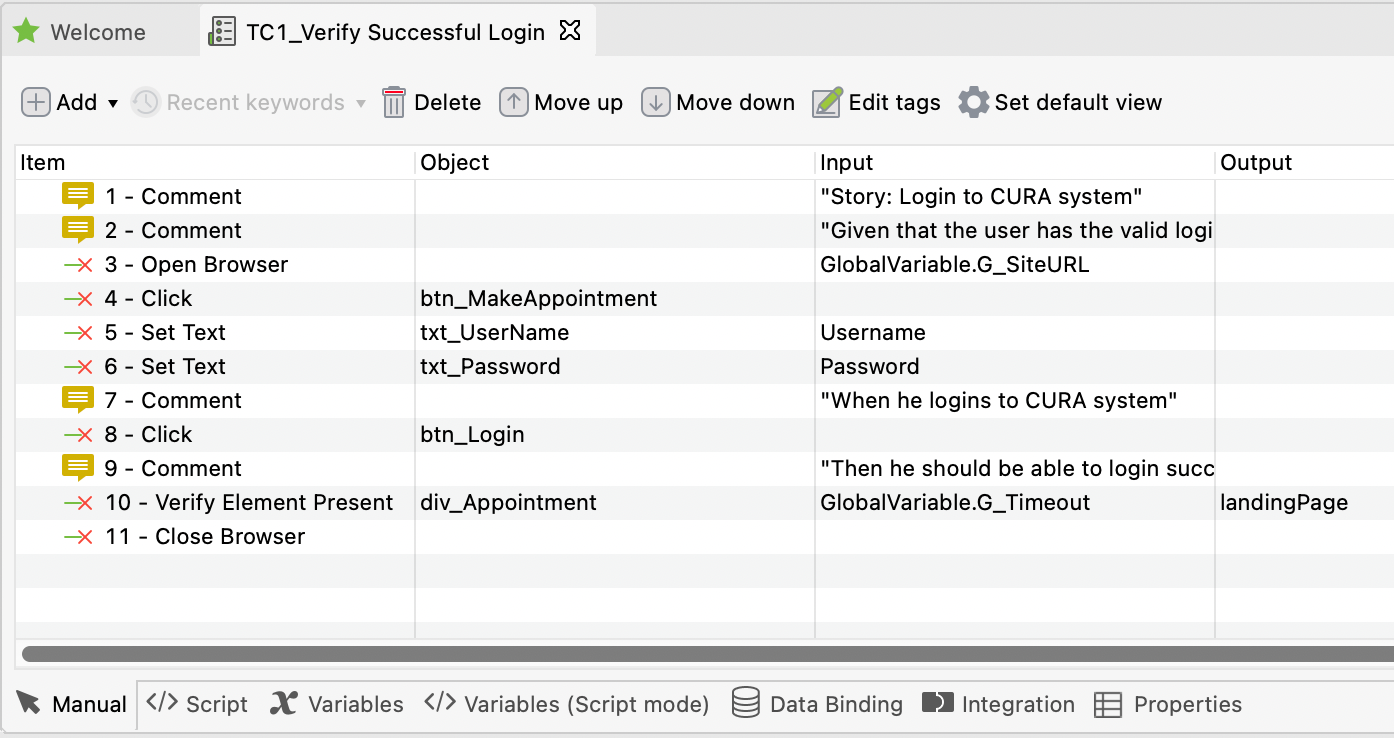
Test objects are stored in a central Object Repository, and test cases, test suites, and other artifacts are organized in one project for easier management. With Jira and Xray integration, you can even map automated tests to existing manual tests.
When it comes to test execution, Katalon simplifies running tests simultaneously across various browsers, devices, and operating systems, with environments preconfigured for you. Features like Smart Wait, AI-assisted self-healing, scheduling, and parallel execution reduce the effort of maintaining tests.
Lastly, for test reporting, Katalon generates comprehensive analytics on coverage, release, flakiness, and pass/fail trends. These reports facilitate quicker and more confident decision-making.
Frequently asked questions
A website QA checklist helps testers and QA teams plan, execute, and validate every aspect of website and software quality. It should cover the essential testing types, from functional and compatibility to usability, performance, and accessibility, for end-to-end coverage and alignment across QA teams.
This guide is by Henrik (Minh Huy) Dao, a Senior Quality Engineer at Katalon. The last updated date is shown at the top of the post.
QA engineers, test leads, SDETs, developers, and project managers who want a structured, actionable QA checklist to standardize testing, reduce coverage gaps, and improve cross-team collaboration. It also helps teams that are building or refining their web testing strategy.
The article moves from planning to execution. It starts with QA planning, then covers functional, compatibility, performance, usability, API, visual, and accessibility testing. It ends with recommended tools: Google PageSpeed Insights for performance and Katalon for automated, cross-browser web testing.
Start with the QA planning section and define scope, risks, roles, and objectives before testing begins. Then work through the checklist step by step, marking off each task as you validate it. Automate repetitive checks such as regression and cross-browser tests with Katalon or your preferred tool, and update the checklist as your website changes.





Test everything. Ship with confidence.
From generating test cases to spotting failures, Katalon's AI works across your entire pipeline, automatically.
