


TDD starts from tests to guide code, while BDD starts from user behavior written in Gherkin. Learn how each works step by step, see examples, compare them side by side, and explore popular TDD and BDD frameworks.
TDD (Test Driven Development) and BDD (Behavior Driven Development) are fairly similar development approaches that both emphasize testing and collaboration, yet have major differences in focus and methodology. Simply put, in TDD, developers test first, then use the test results to guide their development, while in BDD, developers express the system behavior they want to create through Gherkin syntax, then code according to those Gherkin expressions.
From a higher perspective, TDD is more developer-centric, revolving around code correctness, with programming language-specific frameworks. On the other hand, BDD is more user-centric, revolves around system behavior, and promotes collaboration between relevant stakeholders with a domain-specific language.
In this article, we will explore in-depth the differences between TDD vs BDD through true-to-life testing scenarios, and learn about the popular TDD and BDD testing frameworks.
What is TDD (Test Driven Development)?
The test-driven development process involves writing automated tests before writing the code. The results from these automated tests provide insights for the developer to improve their code. TDD is a more focused and disciplined approach to development, and is itself a way to provide continuous feedback for faster bug identification and debugging.
How To Do TDD?
TDD is a continuous and iterative process of improving your code through tests. The goal after each test is to make the code incrementally better.
1. Create Tests
Developers start the TDD process by writing a test. In this test, they specifically define the expected behavior or functionality of a small unit of code, which may include:
- Code input (what parameters the code will receive)
- Code output
- Preconditions/dependencies that must exist/be true for test execution
- Assertions
The developer can write the test themselves using a programming language or use automation testing tools with low-code features for faster test authoring and test execution. The final decision lies in whether the developer wants to build a test framework or buy a pre-built framework from a vendor.
See How You Can Write Tests Faster and Better
2. Execute 1 specific test
Next, developers run 1 specific test and observe it fail (since no code was developed at this stage, yet). It may sound counterintuitive, but this is actually the fundamental principle behind TDD. There are 4 major reasonings for why we need this step:
- Running tests on an underdeveloped code ensures that your testing infrastructure, frameworks, and environment are properly set up and functioning correctly. If there are any issues with the test environment, you can address them from the very beginning.
- A failed test confirms that it is indeed checking the behavior of the functionality you want to code. It is a positive signal that this test is reliable.
- This test (and future tests that will be executed) act as a checklist that guides your development activities. They become objectives to pursue (think: I am coding this feature in order to pass this test), keeping developers focused on meeting the requirements and specifications laid out in the test plan.
- As the cycle repeats, this step provides immediate feedback on the correctness of the code, allowing developers to catch misassumptions early on, minimizing the risk of introducing issues later down the road.
In other words, in TDD, a failed test is a good test. The real question is: Which specific test should be executed and failed first? Usually we should just start the initial test with a small, focused scope that captures the core requirements of the feature or function.
3. Implement The Code
With the insights from the tests, developers write *just enough* code to make the tests pass. At this stage, the goal still isn't a complete, fully optimized solution, since the idea behind TDD is to let test results guide development, not the other way around. Developers should only optimize their code after receiving input from tests.
The ingenuity of this step is to promote code minimalism. The code follows what the test results tell them, so developers can write concise, straight-to-the-point code, and therefore are able to solve immediate requirements. It discourages developers from prematurely optimizing or adding unnecessary features (i.e. over-engineering the application). It is a healthy mindset to achieve a lean codebase that is easy to understand, maintain and refactor.
4. Run All Tests And Refactor The Code
Now that we have some newly added code, developers can run all of the remaining tests, including the one they’ve just written to further confirm that the new code is working fine, and does not break any existing functionality. It is similar to regression testing where the tests are executed to ensure that the features are still working after a code change. In a way, TDD is about continuously executing regression tests to provide feedback on the quality of newly written code.
With this feedback, developers can refactor the code, improve its design, readability, and maintainability. After that, the cycle of Fail - Pass - Refactor begins again, and we call this the Red - Green - Refactor cycle of TDD.
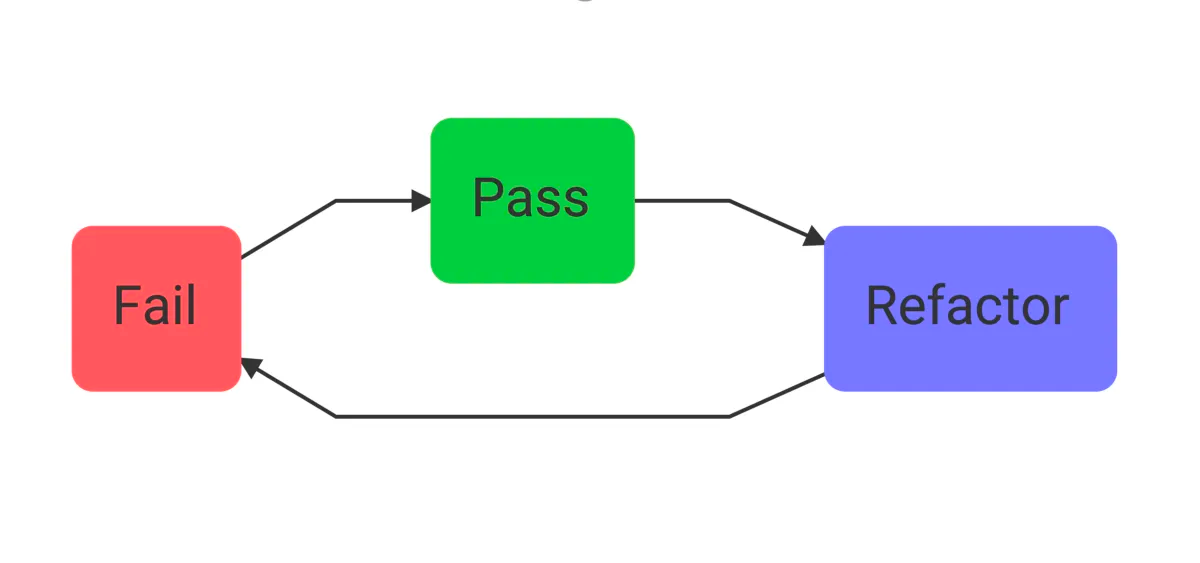
In companies that practice TDD, developers are far less likely to see show-stopping bugs slip into production, since tests define the expected behavior before the code is written. Over time, teams build up a comprehensive set of tests that can be reused across scenarios and environments, which speeds up each new TDD cycle.
Test Driven Development Examples
Let’s imagine a scenario where hundreds of angry clients are reporting a critical bug that stops them from using your application, and this bug has a terrible impact on their business. Your team provides a hot-fix, but unfortunately this hot-fix causes an even worse bug in the system, leading to a wide level crash.
TDD makes that much less likely. Developers write automated unit tests (and often functional tests) for a change before writing the code, and run the full suite on every change. After watching the new test fail, they can code with confidence, knowing the test will tell them when the fix works and whether it breaks anything else.
What is BDD (Behavior Driven Development)?
Simply put, BDD is an Agile testing methodology that uses system behavior to guide the development activities. Instead of starting with a test like in TDD, BDD starts with analyzing the desired behavior that developers want to create. After that, they’ll express the desired behavior using the Gherkin syntax, which consists of Given - When - Then statements. These statements show developers how to develop the code that fulfills the behaviors described.
How To Do Behavior Driven Development?
1. Write Scenarios Using Gherkin
In this stage, stakeholders, testers, and developers sit together to gather the requirements and define the expected outcome they want to create. They will use a unique business-readable language called Gherkin (available in more than 70 spoken languages) to describe business behaviors. It consists of Given - When - Then statements, each describing a specific aspect of the system.
For example, below is an example of Gherkin describing the Checkout process:
Feature: Checkout Process
  As a customer
  I want to be able to add items to my cart and complete the checkout process
  So that I can purchase products online

  Scenario: Add item to cart
    Given I am on the product page
    When I click on the "Add to Cart" button for product "ABC"
    Then the item "ABC" should be added to my cart

  Scenario: Remove item from cart
    Given I have "ABC" item in my cart
    When I click on the "Remove" button for item "ABC"
    Then the item "ABC" should be removed from my cart

  Scenario: Update quantity of item in cart
    Given I have "XYZ" item with quantity "2" in my cart
    When I update the quantity of item "XYZ" to "3"
    Then the quantity of item "XYZ" in my cart should be "3"

  Scenario: Proceed to checkout
    Given I have items "ABC" and "XYZ" in my cart
    When I click on the "Checkout" button
    Then I should be redirected to the checkout page

  Scenario: Enter shipping details
    Given I am on the checkout page
    When I enter my shipping information
    Then my shipping details should be saved

  Scenario: Enter payment details
    Given I am on the checkout page
    When I enter my payment information
    Then my payment details should be saved

  Scenario: Place order
    Given I have entered my shipping and payment details
    When I click on the "Place Order" button
    Then my order should be placed successfully
    And I should receive an order confirmation
2. Apply TDD
TDD can be a standalone or complementary practice to BDD. Now with the Gherkin statements written out, developers can start implementing automated tests based on them. Depending on the company's programming language or tech stack, developers can choose BDD frameworks such as Cucumber, Behat, or Reqnroll (the successor to SpecFlow).
The first test execution is supposed to fail, but it will provide valuable direction to the developers. After developers have implemented the feature, we can run the automated BDD scenarios again to show that the feature is complete. The cycle then repeats until the application is fully developed.
The ingenuity behind BDD is that it translates complex, highly technical jargon from requirements into readable language so that even non-technical professionals can also join hands and contribute to the project. BDD promotes collaboration and reduces misunderstandings.
What Is The Difference Between TDD vs BDD?
Aspect | Test-Driven Development (TDD) | Behavior-Driven Development (BDD) |
|---|---|---|
Focus and perspective | Implementation of code functionality through a test-first approach | Collaboration, shared understanding, and validation of system behavior from a user's perspective |
Terminology and readability | Test cases written with programming-centric terminology | Scenarios written in a natural language format, easily understood by both technical and non-technical team members |
Collaboration and communication | Collaboration between developers and testers | Collaboration among developers, testers, and business stakeholders to define and validate system behavior |
Level of abstraction | Focuses on low-level unit tests that verify the behavior of individual code units | Focuses on higher-level tests that simulate user interactions or end-to-end scenarios |
Test organization | Tests organized based on code structure and hierarchical or modular approach | Scenarios organized around desired behavior, typically grouped by specific features or functionalities |
Purpose | Ensures code correctness through automated tests | Promotes shared understanding, communication, and validation of system behavior |
Development workflow | Tests are written before implementing corresponding code | Scenarios are defined collaboratively before implementing the code; TDD can be used within BDD |
Test scope | Narrow scope, typically focusing on individual code units | Broad scope, covering multiple units of code working together |
Test case style | Technical and implementation-centric | User-focused and behavior-centric |
Test granularity | Fine-grained, testing individual code units in isolation | Coarser-grained, testing system behavior as a whole |
Iterative refinement and feedback | Iteratively refines code through test failures and subsequent code modifications | Iteratively refines scenarios and behavior through collaboration and feedback |
Popular TDD Testing Frameworks
1. csUnit
csUnit is an open-source unit testing framework for the .NET Framework, compatible with any .NET-compliant language, and has been tested with C#, Visual Basic .NET, Managed C++, and J#. Its permissive license lets you include it in commercial closed-source products at no cost. Note that csUnit hasn't been actively maintained for many years; most .NET teams practicing TDD today use NUnit, xUnit.net, or MSTest.
Pros:
- Inherits the maturity and stability of NUnit.
- Familiar syntax for developers familiar with NUnit.
Cons:
- Limited community support and documentation compared to NUnit.
- Less actively maintained.
2. PyUnit
PyUnit, also known as unittest, serves as the standard unit testing framework for Python. It offers a built-in framework within the Python standard library, making it easily accessible for Python developers. PyUnit requires no additional installation since it is already included in the standard library. This framework inherits the simplicity and user-friendly syntax that Python is renowned for, making it straightforward to create tests.
Pros:
- There is no need to install extra modules since it is included in the standard Python library.
- Allows for simple, clean, and fast execution of test cases.
- Can generate XML test reports with add-ons such as unittest-xml-reporting.
- Widely used and widely adopted by the Python community.
Cons:
- Compared to some third-party Python testing frameworks, PyUnit may be considered relatively basic.
- Additional libraries might be required for advanced features like test mocking or parameterized testing.
- Test code abstraction can occasionally make the intent unclear.
- Requires a significant amount of "boilerplate" code.
3. TestNG
TestNG is a testing framework for Java that draws inspiration from JUnit while adding additional features and capabilities. It provides support for writing and executing tests in Java, offering features such as test grouping, test dependencies, parallel test execution, and advanced test configuration. TestNG also provides detailed reporting and flexible test configuration options. It integrates with Java IDEs and build tools, making it a popular choice for Java developers.
Pros:
- Provides advanced features beyond what JUnit offers, expanding testing capabilities.
- Offers excellent support for test configuration and reporting, enhancing the testing process.
Cons:
- May have a learning curve for newcomers due to the additional features and configurations.
- Has a smaller community compared to JUnit, potentially affecting available resources and support.
Popular BDD Frameworks
1. Cucumber
Cucumber testing is a behavior-driven development (BDD) testing approach that uses the Cucumber tool to define, automate, and execute test cases in a format that is easily understandable by both technical and non-technical stakeholders.
In Cucumber testing, test scenarios are written using a natural language format, often employing the Gherkin syntax. This syntax employs keywords like Given, When, and Then to describe the steps of a test case. This allows business analysts and product owners to write test scenarios in a language that aligns with their understanding of the system being tested.
Pros:
- Provides an intuitive way to express requirements in a human-readable format.
- Supports multiple programming languages, enhancing flexibility and adoption.
- Enables code reusability, allowing for the efficient creation of test cases.
Cons:
- Gherkin-induced complexity can arise.
- The Given-When-Then framework, while providing clarity, may result in the creation of redundant steps, potentially increasing maintenance efforts.
Read More: A Guide To Doing Cucumber Testing
2. SpecFlow (now Reqnroll)
SpecFlow is a BDD framework for .NET that helps developers, testers, and business stakeholders collaborate on executable specifications. Note that SpecFlow reached end of life at the end of 2024; its open-source successor, Reqnroll, is largely compatible and is the recommended choice for new .NET BDD projects.
Pros:
- Collaboration drives design progress, involving business analysts, designers, programmers, and producers.
- Low cost of bug fixes due to real-time visibility during development.
- Living documentation of progress and failures during code writing and testing.
Cons:
- Unsuitable for short projects due to time-consuming nature and cost.
- Expensive for beginners in coding.
- Dependency on all developers for stable use of Behavior Driven Development.
- Requires continuous effort and frequent stakeholder meetings.
BDD Testing With Katalon
Katalon is a comprehensive solution supporting automated test creation, management, maintenance, execution, and reporting for web, API, and mobile across a wide variety of environments, all in one place, with minimal engineering and programming skill requirements.
For BDD testing, Katalon Studio has a native integration with the Cucumber framework, allowing you to perform UI & API functional automation tests written in BDD Cucumber format. Katalon Studio comes with many features:
- Quickly create a feature file (i.e. the documentation for system behavior written in Gherkin syntax).
- Create test cases using built-in keywords, which are basically code snippets for common test scenarios.
- Group those steps into test suites and collections for easier management.
- Reuse test cases from previous test runs across multiple environments.
- Execute feature files.
- Generate BDD report files.
- Sharing and collaboration capabilities.
Here is a sample BDD testing project on our GitHub repository that you can take a look at.
Frequently asked questions
TDD is a software development approach where developers write automated tests before writing the actual code. The process follows a "Red-Green-Refactor" cycle, where a test is written (red, fails), then minimal code is implemented to make it pass (green), and finally, the code is refactored (refactor) while maintaining test passes.
BDD is an Agile testing methodology that emphasizes defining desired system behaviors from a user's perspective. It uses a human-readable, domain-specific language called Gherkin syntax (Given-When-Then statements) to describe these behaviors, promoting collaboration among developers, testers, and business stakeholders.
TDD is developer-centric, focusing on the correct implementation and functionality of individual code units. BDD is user-centric, focusing on the overall system behavior and ensuring that the software meets specified business requirements from a user's perspective, facilitating shared understanding among all project stakeholders.
The "Red-Green-Refactor" cycle is the core iterative process in TDD:1. Red: Write a new test that captures a small piece of desired functionality and observe it fail (because the code for it doesn't exist yet).2. Green: Write just enough code to make the failing test pass. The focus is solely on passing the test.3. Refactor: Improve the structure, readability, and maintainability of the code without changing its external behavior, while ensuring all existing tests continue to pass. This cycle repeats for each new piece of functionality.
Gherkin syntax is a plain-language, structured format used in BDD to describe software features and behaviors in a way that is understandable by both technical and non-technical team members. It uses keywords like "Feature," "Scenario," "Given" (preconditions), "When" (actions), and "Then" (expected outcomes) to define user stories and acceptance criteria, which then guide the development and testing process.





Test everything. Ship with confidence.
From generating test cases to spotting failures, Katalon's AI works across your entire pipeline, automatically.
