


Hybrid testing combines manual and automated testing to get the best of both. Learn when to use each and how to build a hybrid testing strategy.
Hybrid testing is the testing approach which balances manual with automated testing to achieve the best of both worlds.
It is effective because software testing by nature requires both the creativity of humans and the automating powers of machines.
Why Hybrid Testing?
Neither manual testing nor automation alone is sufficient for achieving comprehensive test coverage.
- Manual testing strengths: Exploratory, usability, edge cases, and dynamic user experience validation.
- Automation strengths: Speed, accuracy, repeatability, and large-scale execution.
Hybrid testing allows teams to strategically integrate both methods.
From Manual Testing to Hybrid Testing
Initially, testing was done manually by dedicated testers. They interacted with the software in exactly the same way that a real user would.
The late 1990s and 2000s saw the rise of test automation, starting from early test automation frameworks. After that came the rise of automation testing tools. The SDET (Software Development Engineer in Test) was a role that required a lot of automation expertise.
However, test automation is not a silver bullet. Even with automation, many teams struggle to reach the test coverage they need.
Moreover, expanding automation can create new bottlenecks due to maintenance overhead. Someone must continuously maintain those automated tests. At the same time, manual testing is still needed for complex scenarios requiring human judgment and creativity.
That is where hybrid testing comes in.
How to Do Hybrid Testing
1. Plan for Hybrid
Consider a hybrid strategy from the test planning phase.
Not all test cases should be done manually. You must evaluate automation feasibility of test cases to decide if they are actually worth automating.
Find the balance that fits your product and team. Automation should be strategically applied to repetitive, high-impact tasks, including smoke, regression, and sanity tests. Manual testing, meanwhile, remains essential for exploratory, nuanced, and rapidly changing areas where automation overhead outweighs immediate benefits.
Ideal automation test candidates include:
- Repetitive test cases that need frequent execution.
- High-risk areas prone to defects.
- Tests that require large data sets or multiple configurations.
- Tests with stable and predictable behavior.
- Regression, smoke, and sanity test cases.
Avoid:
- Exploratory tests requiring human intuition.
- One-time test cases or low-priority scenarios.
- UI-heavy tests with frequent changes, leading to high maintenance overhead.
Ask yourself:
- Is the test case stable? If requirements are constantly changing, automation may become a maintenance burden.
- Does the UI frequently change? Fluctuating UIs may lead to brittle test scripts.
- Can the test case be parameterized? Reusable and data-driven tests are more automation-friendly.
Once feasibility is evaluated, rank test cases based on:
- Business impact: Does failure in this test impact end users?
- Execution frequency: Is this test run daily, weekly, or rarely?
- Automation complexity: Can it be automated efficiently?
- Maintenance needs: Will automation scripts require frequent updates?
2. Decide How You Want to Automate
After that, you need to decide your approach to automation. Usually, QA teams have two choices:
- Open-source testing frameworks
- Automation testing tools
Let's go through the pros and cons of each.
1. Open-Source Testing Frameworks
These are the libraries (e.g., Selenium, Playwright) to build a custom testing framework.
- Pros: Full control, no licensing costs.
- Cons: High setup effort, requires coding expertise, ongoing maintenance.
This option is best for teams with strong technical skills needing flexibility.
2. Automation Testing Tools
These are all-in-one solutions integrating various testing types (web, API, mobile) into a unified workspace.
- Pros: Scalable, reduces tool fragmentation, covers all quality stages. For small teams, these tools offer low-code and no-code features to help you start testing quickly, while larger teams can benefit from the integrated analytics, reporting, and test management features.
- Cons: As these tools come with a wide range of features, some of those may be underutilized in early adoption. However, over time, as the QA team scales, they can use more and more of those features.
This option is best for teams needing end-to-end testing with streamlined reporting and management.
3. Make Sure Your Test Management Is Properly Set Up
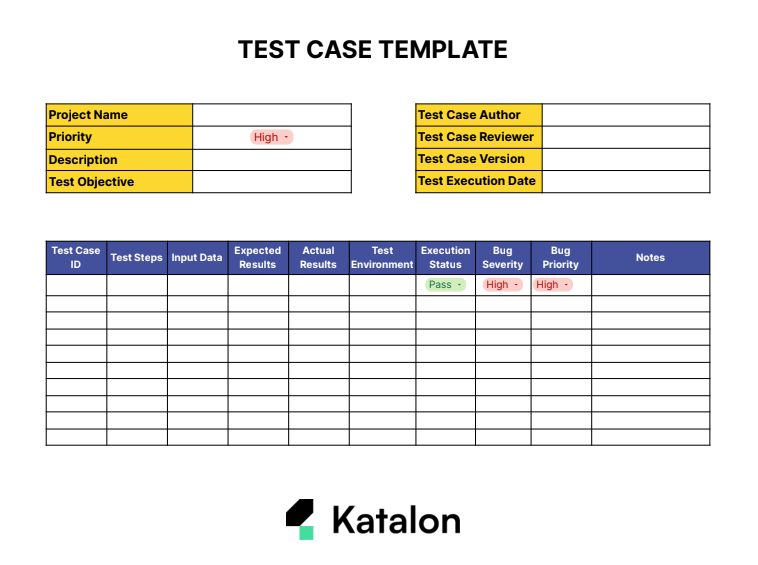
QA teams usually need a dedicated test management system to keep track of testing results. A common choice is a test case template in Excel where they list the test cases, assign IDs, and use a dropdown column to track the results (Passed/Failed/To be fixed/Fixed/Closed).
Another popular choice for test management is Jira. Although it is more of a project management tool, Jira can be adapted for test case management. The downside is that Jira may lack the more specialized testing features, such as test plans, reporting, and automated execution.
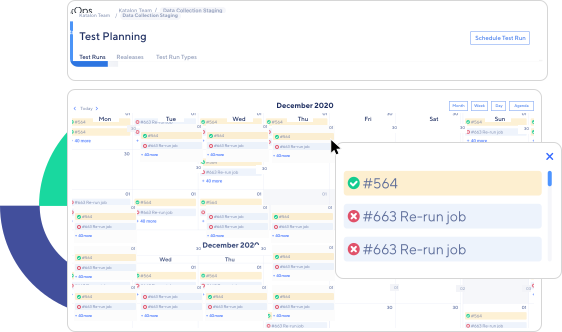
Many automation testing tools offer built-in test management, test analytics, and reporting features, such as Katalon TestOps. In a single dashboard, you can manage and schedule the entire testing project. You can sync it with the automation testing tool Katalon Studio, so all automated test cases can be pushed into this test management system.
4. Execute the Tests
Finally, it is time for execution. As we are following the hybrid testing approach, there should be a team of manual testers carrying out the test steps and another team of automation testers running the scripts.
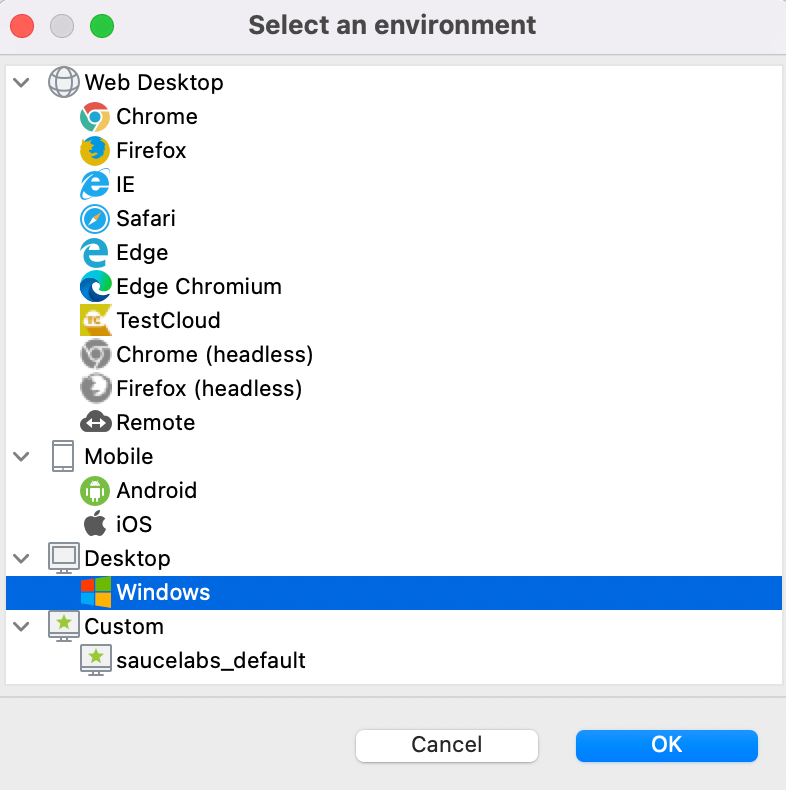
Think about the test environments when you execute tests. Cloud-based testing tools such as Katalon Test Cloud give you access to a wide range of mobile and desktop environments on which to run the test cases.
Hybrid Testing Best Practices
1. Manual Testing First, Automation Testing Second
Start by rigorously performing manual testing: cover positive, negative, and edge cases comprehensively. This ensures that testers deeply understand feature behavior before automating anything. Manual testing sets the baseline for what the automated test should cover.
2. Automate Regardless of Initial Pass/Fail
After manual testing, write automation scripts regardless of whether the tests initially pass or fail.
If a test passes immediately, great. You can commit and move forward. If it fails, rather than discarding or delaying the test, clearly tag it as "skipped" and reference the related bug explicitly. Checking these scripts in immediately prevents forgetting or overlooking tests later, effectively managing tech debt.
3. Use Your CI/CD Pipeline for Immediate Feedback
Use your CI/CD pipeline to quickly execute automated scripts against feature branches. This provides instant "go/no-go" visibility, which allows for immediate assessment of build stability.
Critical bugs should cause the feature to be sent back for fixes. However, automation scripts remain ready for quick revalidation once issues are addressed. Less critical bugs can be safely moved to the backlog to prioritize team resources effectively.
4. Shift Left
QA teams should be engaged early in the process, ideally during initial planning and design phases. Early involvement allows rapid identification of automation candidates, provides early feedback to developers, and streamlines future automation efforts. Shift left testing results in fewer bugs, more relevant automated tests, and quicker overall turnaround times.
Conclusion
Hybrid testing strategically blends manual and automated testing to capture the strengths of both approaches. To succeed with hybrid testing, begin planning for automation from the test planning phase, carefully evaluating which test cases are best suited for automation and which require manual expertise.
Frequently asked questions
Hybrid testing is an approach that combines manual and automated testing. Automation handles repetitive, stable, high-volume checks, while manual testing covers exploratory, usability, and edge-case scenarios that need human judgment.
Good candidates are repetitive tests that run often, high-risk areas, tests that need large data sets or many configurations, tests with stable behavior, and regression, smoke, and sanity suites.
Keep exploratory tests that rely on human intuition, one-time or low-priority scenarios, and UI-heavy tests on screens that change often, since automating them creates high maintenance overhead.
Open-source frameworks like Selenium or Playwright give full control with no licensing costs but need coding skills and ongoing maintenance. All-in-one tools like Katalon reduce setup and tool fragmentation and add built-in reporting and test management.
Running automated scripts against feature branches in your CI/CD pipeline gives fast go/no-go feedback on build stability, while manual testers focus on the areas automation can't cover.





Test everything. Ship with confidence.
From generating test cases to spotting failures, Katalon's AI works across your entire pipeline, automatically.
