


Katalon Studio 8.2 made Studio and Runtime Engine up to 2x faster, added a delay between parallel instances, HAR generation keywords, overlay-aware clicks, Smart Wait for Fetch API, and options to disable external connections.
Katalon Studio 8.2.0 focuses on speed and performance. Studio now consumes fewer resources and gives more horsepower to your software delivery pipeline.
What’s New?
Studio 8.2 delivers performance enhancements that make your test automation cycle more resource-efficient, with improvements to startup and to opening projects, test cases, keyword files, and more.
We also continued our open-source software compliance work, addressing high-risk security vulnerabilities in Katalon Studio’s dependencies.
Other updates include the new Idle Timeout Bypass Limit and support for Chrome and Microsoft Edge (Chromium) version 95.
Enhanced Studio IDE and Runtime Engine (KRE) Performance
Performance is a continuous focus in our development journey, and v8.2.0 gives it a boost with one simple keyword: speed.
- Opening big projects in KRE is now 2x faster, and 1.5x faster for small and medium projects
- Renaming test cases is now about 2x faster
- Opening test cases is now 2x faster
- Moving test cases is now 1.5x faster
We’ve minimized CPU and memory consumption by loading less nonessential content, refactoring code, and adding new features such as a delay between instances and keywords to disable HAR file generation. Together, these features increase responsiveness, which means less waiting and more doing.
Below are some details on the major enhancements in the newest version.
Delay Between Instances for Test Suite Collections Running in Parallel
Test Suite Collection (TSC) with parallel execution saves running time, but it also consumes lots of memory and CPU at the start. Imagine more than 20 executions or browsers starting at once.
To tackle this, we introduced a new setting called Delay between instances, which adds a delay between starting executions so devices have time to react. It’s a small change that helps prevent resource usage spikes for a smoother experience.
You can apply the feature through the Katalon Studio UI or the -delayBetweenInstances parameter in Katalon Runtime Engine.
New Keywords to Disable HAR File Generation
HAR file is a format used for logging interaction information between a web browser and a website. Although helpful in troubleshooting performance issues, generating HAR files for each web service request by default creates an excessively large workload, especially for thousands of requests.
New keywords let you enable or disable HAR file generation on demand, which can significantly improve execution speed for big test suites. Learn more in [WS] Set HAR File Generation and [WS] Get HAR File Generation.
Software Compliance Enhancements
Open-Source Vulnerabilities Report
With the ongoing priority of enhancing safety and accessibility to the testing environment, the Katalon Studio team is working on the White Source Bolt Build report by:
- Removing MySQL lib to add the option to disable external domain connections.
- Upgrading the version scope for xmlBeans and Apache Commons Compress.
Options to Disable External Connections
When working with Katalon Studio you will need to connect to certain external domains such as update.katalon.com, backend.katalon.com for multiple purposes: getting updates, content, and notifications. However, in certain organizations that require a high level of security (e.g., healthcare and banking) external connections will be limited.
You can disable or have alternatives for several domains, while some remain untouched. In this version, we added options to disable the remaining domains. This will appear on the UI for easy access, and a tooltip is added to show the corresponding domains, helping users identify the connections.
Handling Selenium’s Timing Issues: Studio’s Remedies
Trying to interact with elements before they have finished loading and become visible is a hassle Selenium users frequently face. A testing tool without a waiting mechanism might act too early, causing false test failures.
Auto-Delay for Click Keywords When an Element Is Behind a Loading Overlay
Loading overlays are common across the web, and they block interaction with elements until the page finishes loading. A good testing tool should detect an overlay and wait before taking action.
In this version, we’ve improved the test engine (KS and KRE) to detect if the failure is caused by a loading overlay covering the target element, and if so, the Test Engine will wait for a period (predefined in Project Settings), and then perform the click action keywords again.
Enhanced Smart Wait to Wait for Fetch API Requests
Previously available on Chrome and Firefox, Smart Wait has also been added to support Edge Chromium.
Smart Wait is one of Katalon Studio’s unique capabilities, designed to specifically wait until web elements are visible and clickable before proceeding. From Studio 8.2.0 onwards, Smart Wait also knows that it needs to wait for Fetch API requests as well.
Before 8.2.0, Katalon Studio only supported XMLHttpRequest and AJAX requests. To support modern web UI testing more fully, we added support for the Fetch API (promise-based requests).
Fetch API lets you make HTTP requests to a server from a web browser and is widely used because it offers a more flexible interface for modern web apps.
More News
Newly Supported Browser Versions
- Chrome 95
- Microsoft Edge (Chromium) 95
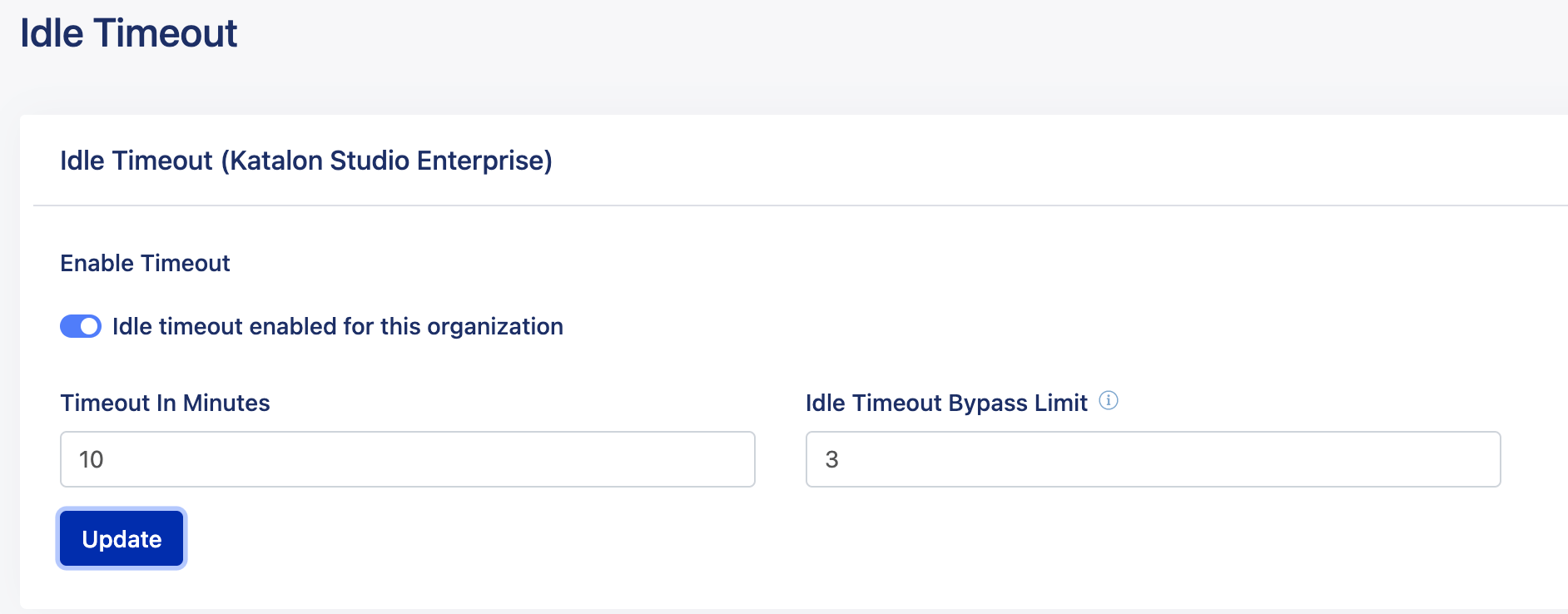
Introducing Idle Timeout Bypass Limit
From version 7.8.0 onwards, admin users can maximize the usage of KSE licenses by setting a time restriction for Katalon Studio users, called Idle Session Timeout. However, users who keep clicking ‘Continue’ every time the prompt appears make the license look active, which makes the feature ineffective.
In 8.2.0, to further enhance the control of active licenses, Katalon Studio provides a configuration called Idle Sessions Threshold that limits the number of consecutive times users are allowed to click Continue on the pop-up notification, which prevents occupying a license without using it.
You can access the configuration in Katalon TestOps: click Settings and choose Organization Management.
To use this feature, find the Idle Timeout Bypass Limit section in Settings.
Wrapping Up
Studio 8.2 focused on speed, lower resource use, security compliance, and smarter waiting. To get these improvements and everything released since, download the latest version of Katalon Studio.
For a complete list of new features, improvements, and fixes, visit the release notes. As always, please post any questions, ideas, or concerns on our community site. We are eager to hear from you.
Frequently asked questions
Quick, recorded scripts in many tools can become fragile and not playable when the application under test changes, making maintenance costs too high.
It’s designed to improve efficiency, effectiveness, maintainability, and collaboration in test creation.
Yes. Users can load an existing test case’s steps into the recording window and continue recording to add new steps.
Users can add many step types, edit the Variables section, and customize test objects in the object repository during recording, with objects synced to test steps.
There is a default option to merge recorded test objects with existing ones if their names match, supporting consistency and maintainability.


Test everything. Ship with confidence.
From generating test cases to spotting failures, Katalon's AI works across your entire pipeline, automatically.
