


Katalon Studio 8.1 improved immediate retries to expose flaky tests, added failure thresholds to stop runs early, mapped results to Azure Test Plans releases, and enhanced Kobiton, mobile waits, and plugin APIs.
In May 2021, we delivered Katalon Studio 8, which included features for better scalability and a better user experience.
Katalon Studio 8.1 (KS8.1) brings a broad set of new features as well as dozens of improvements and fixes. Read on to learn what’s included in this release.
What’s New?
Studio 8.1 delivers features that aim to increase the resource and cost-efficiency of your automation cycle, provide better integration with Azure Test Plans, and enhance mechanisms to tackle test flakiness.
Improved Immediate Retry of Failed Executions to Spot Flaky Tests
A flaky test is a test that passes or fails inconsistently without any changes to the underlying code. Test flakiness can be caused by external factors like faulty infrastructure setup or network glitches, or by an issue with the test itself. Flaky results are one of the biggest challenges in test automation because, without accurate results, DevOps teams can’t make confident decisions about their releases.
To tackle test flakiness, developers rely on the following steps:
- Identify the flaky Test Case
- Troubleshoot the cause
- Edit and improve the Test Case accordingly
Katalon Studio users have multiple options to tackle test flakiness: they can retry all Test Cases when the Test Suite finishes; retry only failed Test Cases when the Test Suite finishes, or retry a failed Test Case immediately after its first failure. The latter is a popular option among Katalon Studio Enterprise users.
At Katalon we understand how important it is for developers to be able to make data-driven decisions. In this release of Katalon Studio, we have improved the logic of our reporting mechanisms so they are more intelligent and intuitive to provide better insights on test results. Studio 8.1 groups all executions into one report and makes it much easier to find inconsistent results or false positives.
Additionally, we have enhanced our test result third-party integrations with tools like TestOps and qTest so the report shows only one final set of results rather than multiple sets of results for each test case. This feature allows users to easily identify failed or passed test results faster.
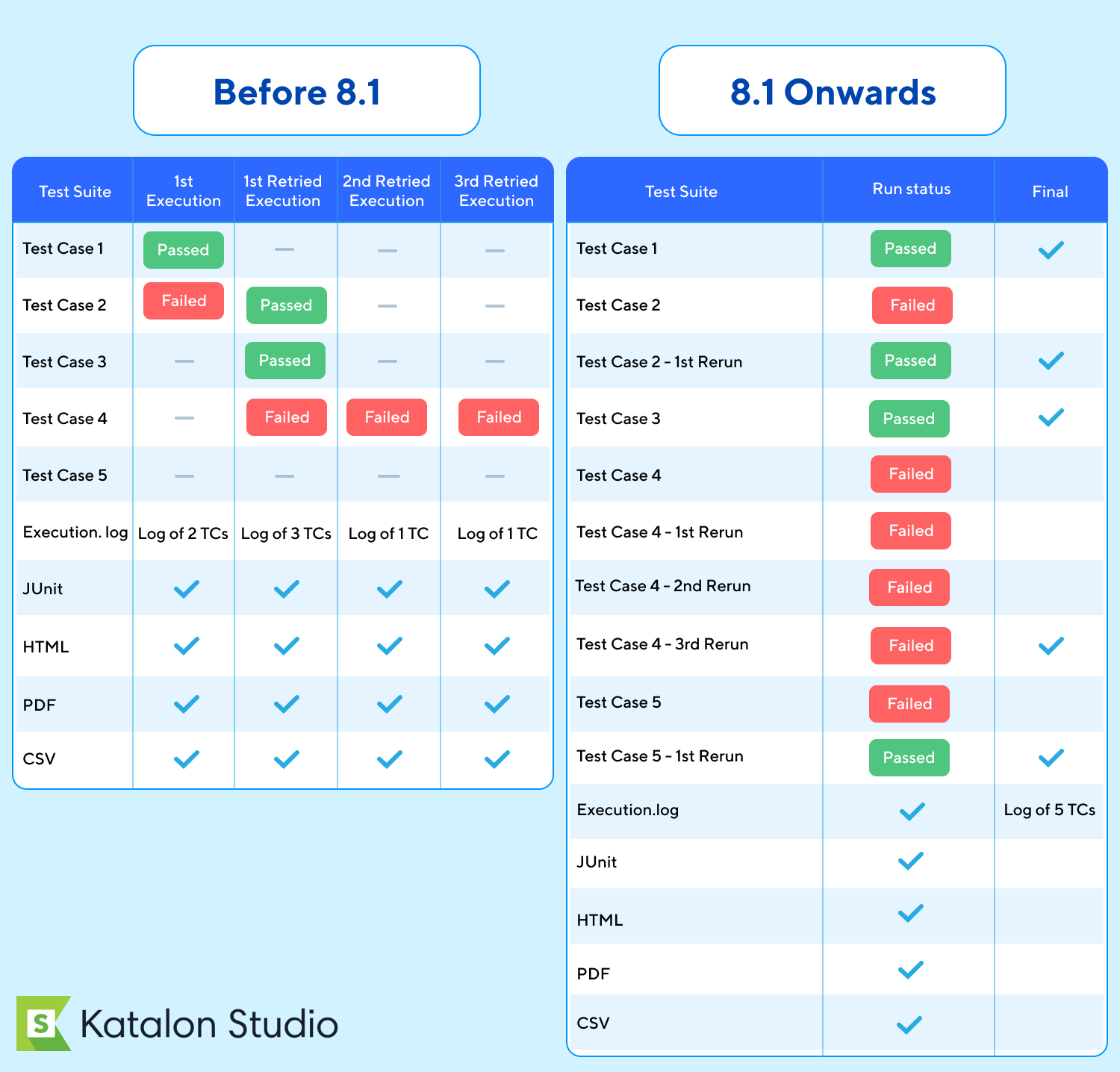
To learn more about the reporting enhancements included in this release, check out the release notes for Katalon Studio.
Less Execution Wait Time With Terminate Execution Conditionally
One of the benefits of test automation is the ability to test early, often, and anywhere in the development cycle. In Studio 8.1 we leveled up these benefits by allowing users to stop Test Cases when they detect an issue early in the cycle by establishing a failure tolerance threshold.
This new feature lets users terminate a Test Suite or Test Suite Collection execution when a significant number of test cases have failed, giving feedback earlier rather than waiting until the whole test cycle is complete. Failure thresholds help teams use testing devices more efficiently and save on infrastructure costs, especially in the cloud.
To use this feature, add the new command option -maxFailedTests=<T>, where T is the maximum number of failed executions allowed before the test is stopped. Once the execution stops, Katalon Studio generates a report with all the insights. This feature is only available for tests executed through the CLI or CI using Katalon Runtime Engine.

To learn more about using this feature in your testing environment, check out the Katalon Studio 8.x release notes.
Azure Test Plans Integration
Building on the promise to always provide the best integration with your existing testing platform, Studio 8.1 delivers a better way for users to map Studio test results to release views in Azure Test Plans.
In Azure DevOps users have the ability to get a full view of the quality of a release, including passed and failed tests as well as the number of runs. Studio’s enhanced integration with Azure Test Plans includes a new parameter, “Release Definition ID,” which can be used to map test results with releases in Azure DevOps.
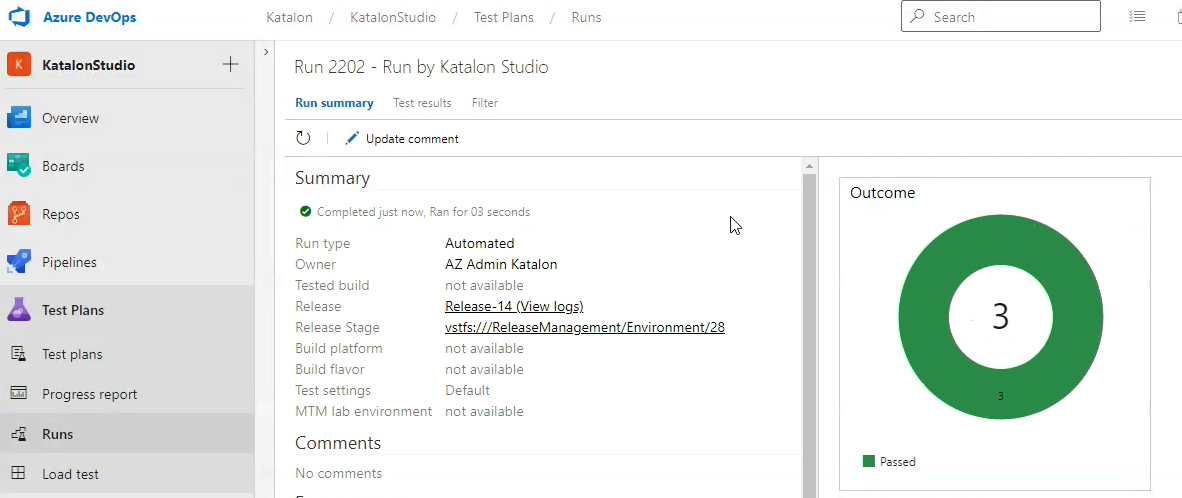
Starting in Studio 8.1, users can enable this feature from the Project Settings menu and add a numerical ID to the “Release Definition ID” parameter. Alternatively, testers can use the new command option --info-adoReleaseDefID=<DefinitionID> to pass the specified Definition ID and its stage to the Test Run properties in Azure DevOps.
Other Updates
- Enhanced Kobiton integration: Starting in Studio 8.1, users can customize the remote server protocol and device name in Kobiton. See our documentation on mobile testing to learn more.
- New built-in keyword for conditional waiting: Studio 8.1 introduces a new keyword,
waitForElementNotPresent, for mobile testing, letting users set conditional waits when executing test scripts. This can cut execution time and help prevent flaky tests. See [Mobile] Wait for Element Not Present for more details. - New APIs for plugin development: Katalon Studio provides a list of new APIs for building integration plugins. These APIs give plugins access to the JRE location, running mode (IDE or Katalon Runtime Engine), Test Suite/Test Suite Collection, and JUnit report location via the plugin platform.
Wrapping Up
Studio 8.1 made it easier to spot flaky tests, stop failing runs early, and connect results to Azure Test Plans. To get these features and everything released since, download the latest version of Katalon Studio.
For a complete list of new features, improvements, and fixes, visit the release notes. As always, please post any questions, ideas, or concerns on our community site. We are eager to hear from you.
×
Frequently asked questions
A flaky test is a test that can pass or fail without any changes to the underlying code.
Flakiness can be caused by issues with new code, external factors such as faulty infrastructure setup or network glitches, or an issue with the test itself.
Users can retry all test cases when the test suite finishes, retry only failed test cases when the test suite finishes, or retry a failed test case immediately after its first failure.
Studio 8.1 improves reporting logic by grouping all executions into one report, making it easier to find inconsistent results or false positives.
Integrations with tools like TestOps and qTest are enhanced so reports show one final set of results rather than multiple sets for each test case, helping users identify pass/fail results faster.




Test everything. Ship with confidence.
From generating test cases to spotting failures, Katalon's AI works across your entire pipeline, automatically.
