


What to test in each module of an insurance application, sample test cases, and best practices for premium calculations, performance, and integrations.
Insurance software has changed a lot. Customers now expect fast quotes, easy claims, and good mobile apps, so insurers are modernizing old, heavily regulated systems. More new software means more need for careful insurance application testing.
This guide covers why it matters, what to test in each module, sample test cases, and best practices.
Why insurance application testing matters
Insurance covers many lines, including property and casualty (P&C), health, auto, and life. That's why it often falls under BFSI domain testing.
In every line, a bug or system failure can cause financial loss, damage the company's reputation, and create legal risk. Testing acts as a quality gate before software reaches customers.
Test automation helps here. When teams find and fix breaking bugs quickly, the software stays stable, and the business can release with confidence.
Read more: A practical guide to automation testing
Why a single testing platform suits insurance
Many test automation tools speed up testing. But teams often spend a lot of time configuring and connecting several tools. A single quality management platform avoids that. It gives you:
- End-to-end coverage: planning, test creation, execution, management, and analytics all happen in one place. See end-to-end testing.
- One place for every system: P&C systems include web and mobile apps, policy management systems, and APIs. Testing each with a different tool creates gaps. One platform covers them together.
- Less maintenance: with everything in one place, there's less setup and upkeep, so QA time goes to higher-risk areas.
- Central reporting: leaders get one view of quality across the testing life cycle and can make decisions from data.
- Shared planning and scheduling: DevOps integrations connect the teams on a project, shorten the feedback loop, and support continuous testing.
In this webinar, QA leaders from SAGA and Katalon discuss software quality for insurance: watch Software Quality for Insurance.
How to test an insurance application
An insurance application is made of many subsystems, each with its own job. Testers need to check that each one works on its own and that they work together.
How an insurance application is structured
The application runs on a framework of components, data flows, and communication protocols that connect its modules. Here's a typical example:
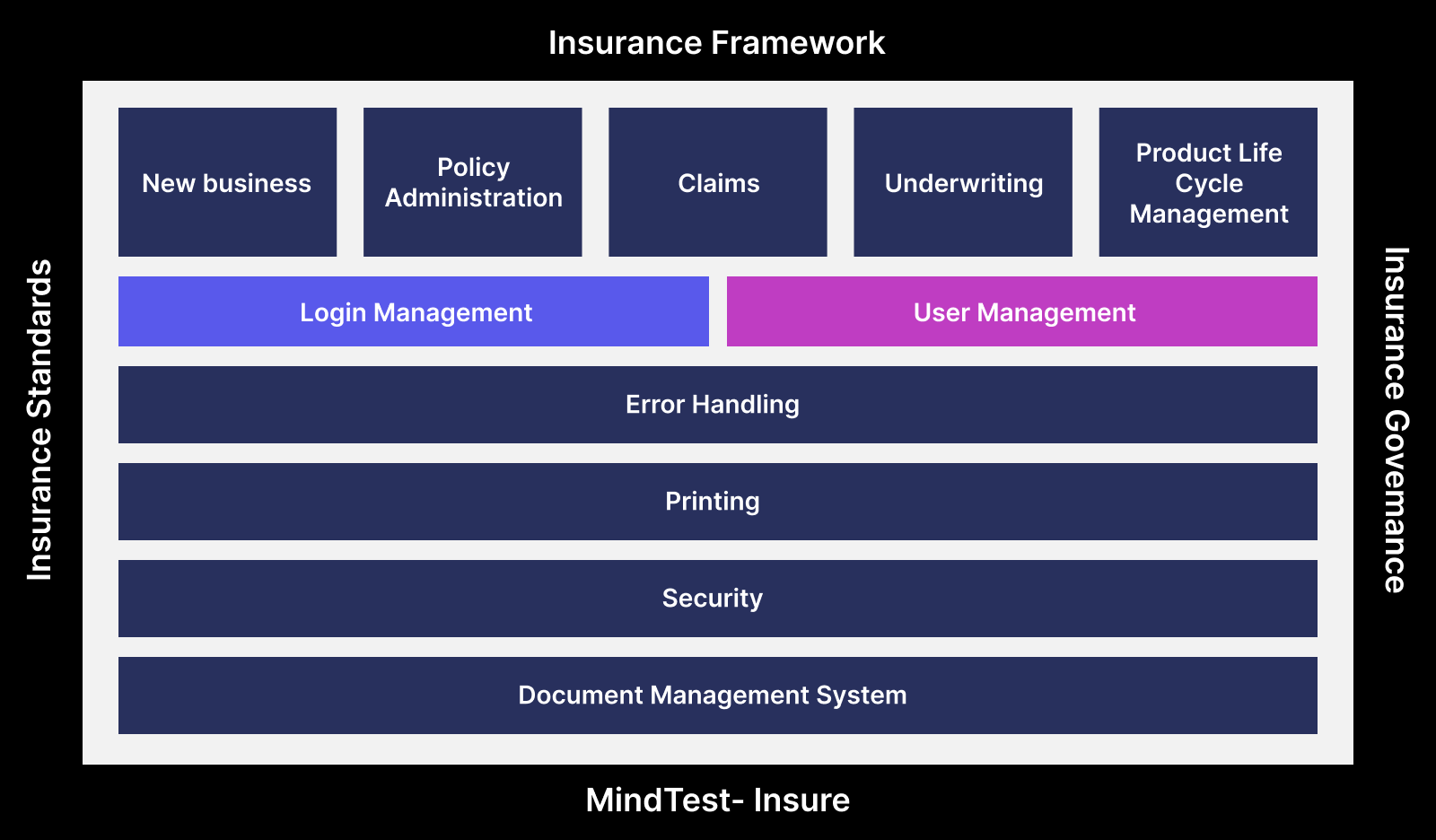
Here's what to test in each module of a P&C system.
New business
- Data entry for new policyholders and policies is accurate and complete
- Policy details are correct, including premium, coverage limits, and effective date
- Underwriting decisions follow eligibility rules
- Policy documents are generated correctly, with the right discounts or promotions applied
Policy administration
- Users can update policy, policyholder, and agent information
- Premium adjustments, renewals, cancellations, and endorsements work correctly
- Policyholder requests update the policy correctly
Claims
- Claims can be recorded and tracked
- Claimant identity and policy coverage are verified, with the right authorization and documents
- Valid claims are paid within policy terms and limits
Underwriting
- Applicants and risks are evaluated correctly
- Decisions follow regulations and underwriting guidelines
- Data sources and risk models are accurate, and decisions produce the right policy terms
Product life cycle management
- Product design, pricing, and distribution processes work as expected
- Product performance data is accurate, so teams can spot improvements
Error handling
- The system recovers from errors, including data recovery and backups
- Error messages, escalation steps, and error logs are clear and complete
Printing
- Policy documents print accurately and quickly
- Layout and formatting meet branding and regulatory rules, on different printer types
Security
- Authentication, authorization, and access controls protect data
- Regular security audits and penetration tests find threats such as breaches
Document management
- Documents can be stored, retrieved, shared, versioned, and access-controlled
- Policies and claims documents are classified correctly and easy to search
Sample test cases for insurance application testing
Test case | Test steps | Expected result |
|---|---|---|
User registration | Fill in all required fields with valid data and submit | Account is created |
Login | Enter a valid username and password and click Log in | User is logged in |
Policy creation | Fill in all required fields with valid data and submit | Policy is created |
Policy cancellation | Select a policy, enter a reason, and submit | Policy is canceled |
Policy renewal | Select a policy, enter payment details, and submit | Policy is renewed |
Endorsement processing | Select a policy, make changes, and submit the endorsement | Endorsement is processed |
Claim submission | Enter valid claim details and submit | Claim is submitted |
Claim processing | Select a claim, review it, and approve or reject it | Claim status updates correctly |
Premium calculation | Enter policy details and check the premium | Premium is calculated correctly |
User roles | Check access for each user role | Each role has the right permissions |
Data validation | Enter invalid data in required fields | Correct error messages appear |
Integration | Test connections to external systems | Data passes correctly between systems |
Performance | Test under different load levels | Performance stays acceptable and stable |
Security | Test data protection controls | Data is secure |
Compatibility | Test on different browsers and devices | App works on each one |
Mobile app | Test the mobile version | Features work, with no major visual differences |
Localization | Switch between supported languages and regions | Content is translated, with no layout issues |
Reporting | Generate reports for each part of the process | Reports are accurate and complete |
Document management | Upload and manage policy documents | Documents are stored and managed correctly |
Best practices for insurance QA
1. Use data-driven testing for premium calculations
In P&C insurance, premiums depend on many variables, such as driver age, location, vehicle type, past claims, and coverage options. There are too many combinations to test by hand.
Data-driven testing lets testers:
- Check premium logic across many real-world risk profiles
- Find edge cases and inconsistencies in rating engines
- Keep results accurate at scale
To run premium calculation tests this way:
- List the input variables, such as age, ZIP code, vehicle value, and claim history.
- Build test datasets with inputs and the expected premium.
- Bind the data to your test scripts, so each row becomes a test case.
- Run the tests and compare actual and expected premiums.
- Review differences, then fix the logic or flag rating errors.
Katalon Studio can use Excel, CSV, XML, or database files as data sources, and its data binding runs the same test across hundreds of scenarios.
2. Find breaking points with performance testing
During busy periods like open enrollment, thousands of users may sign up for or change policies at once. Without preparation, that can cause:
- System crashes
- Slow response times
- Full outages
Performance testing simulates heavy traffic in a controlled way, so teams find bottlenecks, slow responses, and resource limits before real users do.
3. Use integration testing to catch data mismatches
The policy administration system (PAS), claims management system (CMS), and customer relationship management (CRM) system are core to insurance software. Each may work fine alone, yet still fail where they connect.
For example, if an adjuster updates a claim's status but the billing module doesn't get the change, the customer may get a wrong bill. Fixing errors like this costs time and money. Integration testing checks these connections so data stays consistent.
4. Plan what to automate
Start by deciding which test cases to automate. Repetitive work, like regression and performance testing, and areas with many test cases are good candidates.
Then compare automation testing tools and frameworks. Decide whether to build your own framework or buy a tool with ready-made features.
5. Build a culture of quality
Insurers already value risk management, compliance, and customer service. Software quality belongs on that list.
Make quality a shared job, not just QA's. Invest in automated testing, code reviews, and continuous integration, and use customer feedback to guide improvements. QA leaders can set the tone as they scale QA in insurance enterprises, committing to quality and recognizing the people who improve it.
Insurance application testing with Katalon
Katalon True Platform helps P&C insurance teams plan, build, run, and analyze tests in one place.
1. Cover every part of testing
In one workspace, testers handle:
- Test planning
- Test authoring
- Test management
- Test execution
- Test analysis
With low-code test creation in Katalon Studio, people with different coding skills can test insurance websites, mobile apps, APIs, and policy management systems. AI-assisted visual testing flags layout changes that affect users, so testers don't have to compare screens by eye.
2. Test faster
Katalon speeds up testing with self-healing tests, data-driven testing, parallel runs, and shared test artifacts across teams. It plugs into CI/CD pipelines, and Katalon TestOps gives you reports and dashboards to guide decisions. One insurtech platform used automation with AI-driven test prioritization to cut testing cycles by 75% and reach 90 to 95% automation coverage.
3. Get support when you need it
Katalon offers global support through a ticket system. You can also find answers on the Katalon blog, in the product documentation, and in the Katalon Community, where testers around the world share advice.
Frequently asked questions
Bugs in insurance software can cause financial loss, reputational damage, and legal risk. Testing acts as a quality gate before software reaches customers.
Insurance systems span web and mobile apps, APIs, and policy and claims platforms. One platform covers them together, cuts setup and maintenance, and gives you central reporting and scheduling.
Core modules are new business, policy administration, claims, underwriting, and product life cycle management. Also test error handling, printing, security, and document management.
Common ones cover registration and login, policy creation, cancellation, and renewal, endorsements, claim submission and processing, premium calculation, user roles, and data validation. Add integration, performance, security, compatibility, mobile, and localization testing.
Premiums depend on many variables, such as age, ZIP code, vehicle, and claim history. Data-driven testing runs the same test across hundreds of rows of data and compares actual and expected premiums.
Before busy periods like open enrollment. It finds bottlenecks and resource limits before they cause crashes, slow responses, or outages.
It catches defects where systems like PAS, CMS, CRM, and billing connect. For example, a claim status change that never reaches billing can lead to a wrong customer bill.





Test everything. Ship with confidence.
From generating test cases to spotting failures, Katalon's AI works across your entire pipeline, automatically.
