


Field testing puts your mobile app in real users' hands and conditions before launch. Learn how it differs from in-house testing, when to run it, real-world examples, and six best practices for planning effective field tests.

Field Testing and Its Importance
Field testing is an important step in the last phase of mobile testing. After regression tests pass, testers take the app into real-world conditions to verify its usability and behavior before releasing it to end users. The goal is to see how the app performs the way real users will experience it, on real devices and real mobile and Wi-Fi networks, in different locations and situations.
Importance of Field testing
- It reveals real-world issues, such as poor connectivity handling or battery drain, that lab testing can miss.
- It catches problems that would otherwise be reported frequently by users after launch.
Limitations of Field testing
- Field testing can be time-consuming and resource-intensive, since it requires dedicated QA team members to take devices into real-world settings.
- Buying a wide range of devices (different models and OS versions) for adequate field coverage can be expensive.
Differences Between In-House Testing and Field Testing
Mobile testing falls into two categories: in-house (lab) testing and field testing.
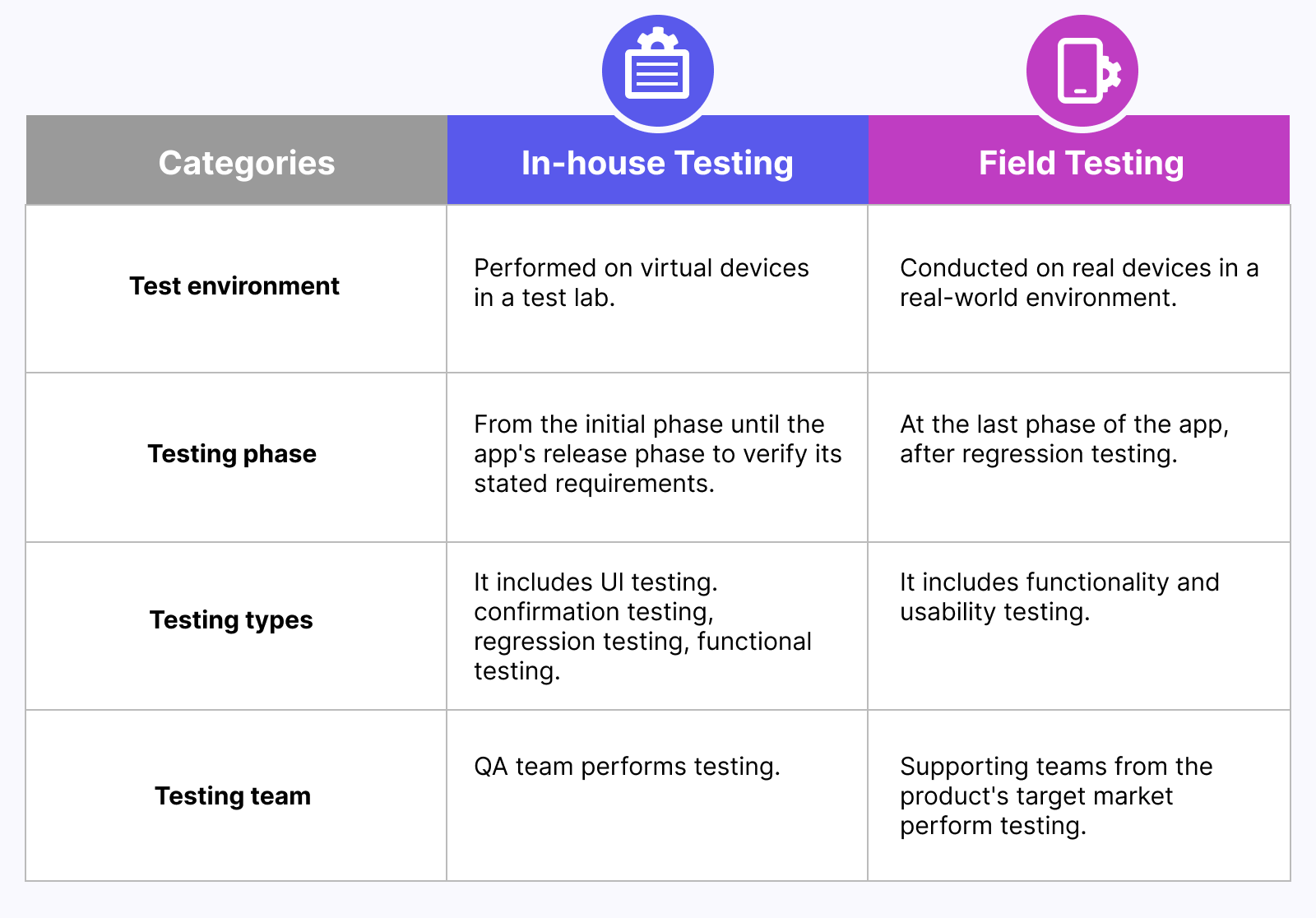
Despite their differences, both in-house testing and field testing are essential for any mobile app. Together, they help stakeholders understand target users and how they experience the product, shifting the focus from quality alone to the overall user experience.
When Should the Team Perform Field Testing?

Testers should perform field testing only after thorough in-house testing of the app's functionality. Field testing is especially valuable in these situations:
As a routine testing practice
Field testing should be repeated regularly, just like regression testing. Doing so helps keep the app stable over time.
Before the first release
Field testing lets the team analyze the app the way an end user would, in a real environment. It helps testers check the app's features and performance before it's available to everyone on Google Play or the App Store.
When an app is built natively for a specific OS
Native apps rely heavily on the device's hardware features and operating system (Android or iOS). That's why field testing is worth repeating for each new release of a native app, even when the app's features haven't changed.
When a new OS version is launched
When a new OS version launches, testers need to verify the app against it. Field testing confirms the app still performs well and stays stable and compatible in the new environment.
When a new app is released or features change
Run a field test when you release a new app or update existing features. This helps confirm that performance hasn't been affected negatively.
Explore an All-in-One Regression Testing Tool
Examples of Field Tests
- Test a mobile app on different phone models and network types in crowded areas (a market or cinema), on a bus, while driving as a passenger, or while walking. This helps you understand issues users may face when sending or fetching data through the app.
- Test a travel app for booking train tickets by logging in as an end user in different locations, on different phone models, and on different network types. This verifies the end-to-end flow, from logging in to booking a seat. You can also use the app's review feature to submit feedback and check that it appears correctly in the review list.
6 Best Practices for Field Testing

- Run field tests only after regression testing is complete and the app's core functionality works.
- Before a field test, write test cases based on the app's purpose and its target users.
- Review the planned field test with your development team to see if anything should be added to your test cases.
- Keep a record of each test case, how it will be executed, and the result of each run. This shows which areas need improvement in future releases.
- Test on at least two devices with the same OS, such as a budget smartphone and a flagship device, to compare performance and catch device-specific defects.
- Create a field testing plan that covers where tests will run, who runs them, and how defects are reported. Reuse it to evaluate future releases.
Conclusion
Field testing is an important part of any mobile app testing cycle. It's the best way to confirm an app stays stable and responsive in real conditions, because testers take devices into the real world and use the app as an end user would.
Mobile application field testing can also cost testers their time and effort if not prepared properly. Follow the best practices in this article to carry out your field testing to achieve your desired outcome.
Mobile Testing with the Katalon Platform

Katalon True Platform makes software testing simpler and more efficient.
Here's a look at how Katalon helps you get started with mobile testing for Android and iOS apps. Feel free to go full screen.
Interested? Learn more about Katalon, or
Frequently asked questions
It is real-world testing conducted after regression tests pass, to verify usability and behavior under live mobile network conditions.
It identifies issues users may encounter in real-world scenarios, provides insights for improving user experience, and reduces post-launch complaints.
After in-house testing, during first releases, when an app targets a specific OS, when new OS versions launch, or when app features change.
Testing in crowded locations, during commuting, on different phone models, and verifying flows like login, booking, or submitting reviews.
Create detailed test cases, collaborate with developers, maintain execution records, test on budget and flagship devices with the same OS, and use a structured roadmap for test locations and procedures.





Test everything. Ship with confidence.
From generating test cases to spotting failures, Katalon's AI works across your entire pipeline, automatically.
