


Katalon Studio 7 added desktop app testing for Windows 10, built on WinAppDriver. Learn the key features, from Spy and Record for Windows objects to built-in keywords, and why automating desktop app testing still matters.
We've added desktop application (app) testing to Katalon Studio, starting with version 7.0.0.
This addition to the tool’s existing capabilities (web, API, and mobile testing) will transform Katalon Studio into a complete cross-platform test automation solution.
See the desktop app testing documentation.
Katalon Studio for Desktop App Testing
Starting with Katalon Studio 7, you can test desktop apps on Windows 10. Built on the Windows Application Driver (WinAppDriver) service, Katalon Studio 7 supports Universal Windows Platform (UWP), Windows Forms (WinForms), Windows Presentation Foundation (WPF), and classic Windows (Win32) apps. Learn more about desktop app testing.
This capability comes with a host of features that support easy test automation. Whether you’re proficient at programing or have just gotten started, you can still automate desktop app testing immediately. These features include:
- Easy setup and configuration
- Detect and spy Windows objects
- Record Windows actions
- Smart element-locating mechanism
- Windows built-in and custom keywords
- Minimal maintenance
Easy setup and configuration
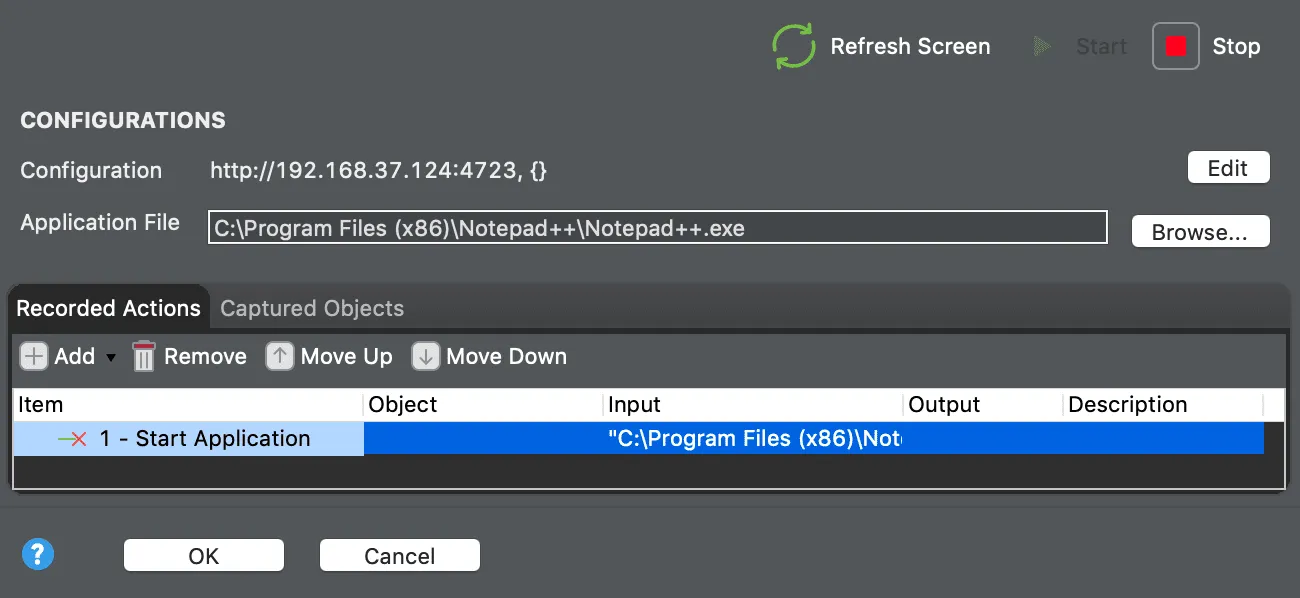
Get up to speed quickly with Katalon Studio's interface and features. Windows desktop tests run on a Windows machine with WinAppDriver. You can run them locally on Windows, or, if you use Katalon Studio on macOS or Linux, run them remotely on a Windows machine.
There's no need to integrate and deploy extra add-ons to test apps across multiple platforms, so you spend less time configuring the tool and more time on the tasks that matter.
Detect and spy Windows objects
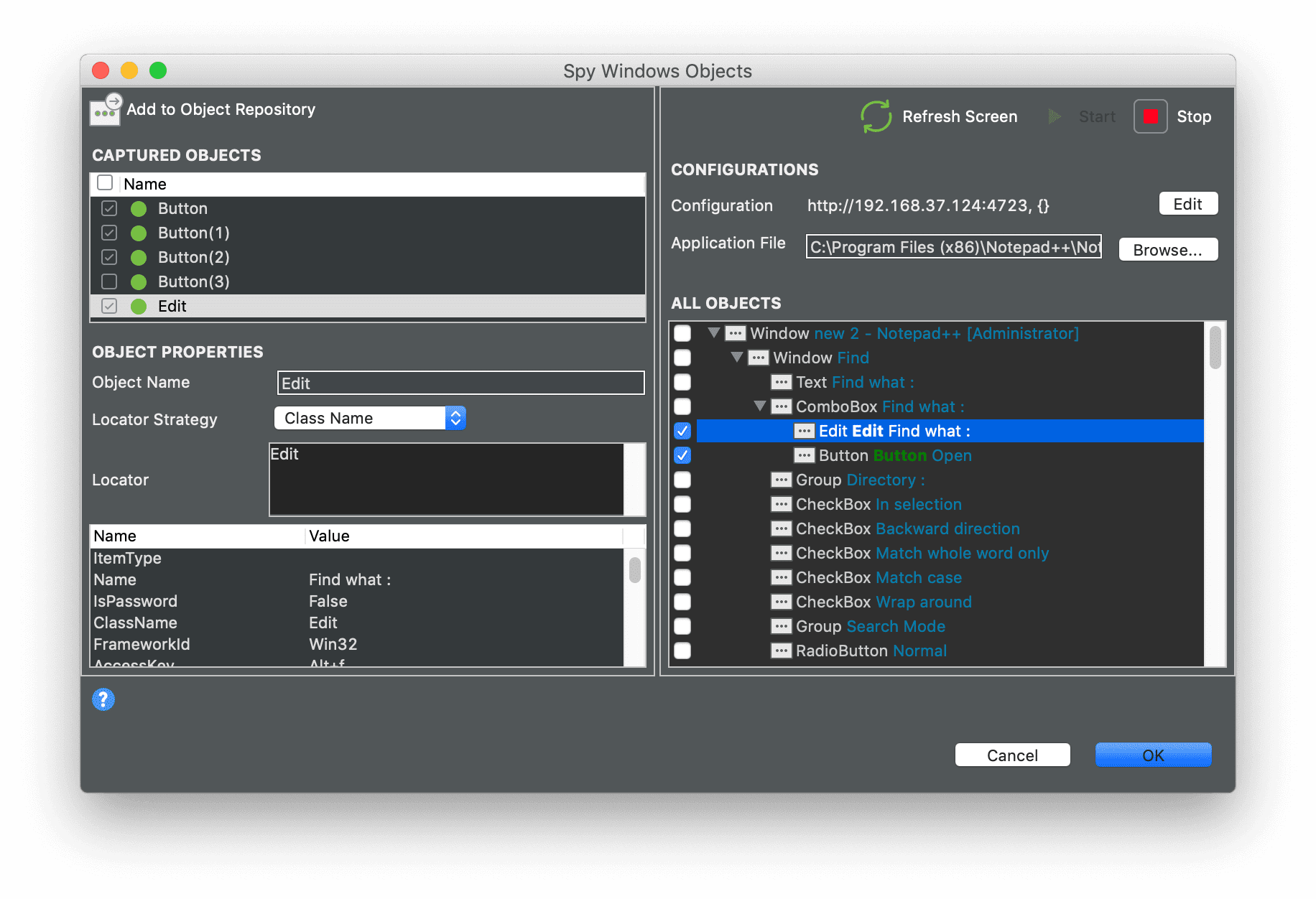
Katalon Studio 7 makes it easy to detect and spy Windows objects. You can explore, analyze, and capture objects from any running desktop app, then add them to the object repository.
From the Spy Windows interface, you can specify an object name or locate methods to save time and effort of analyzing tests and locating objects.
Record Windows actions
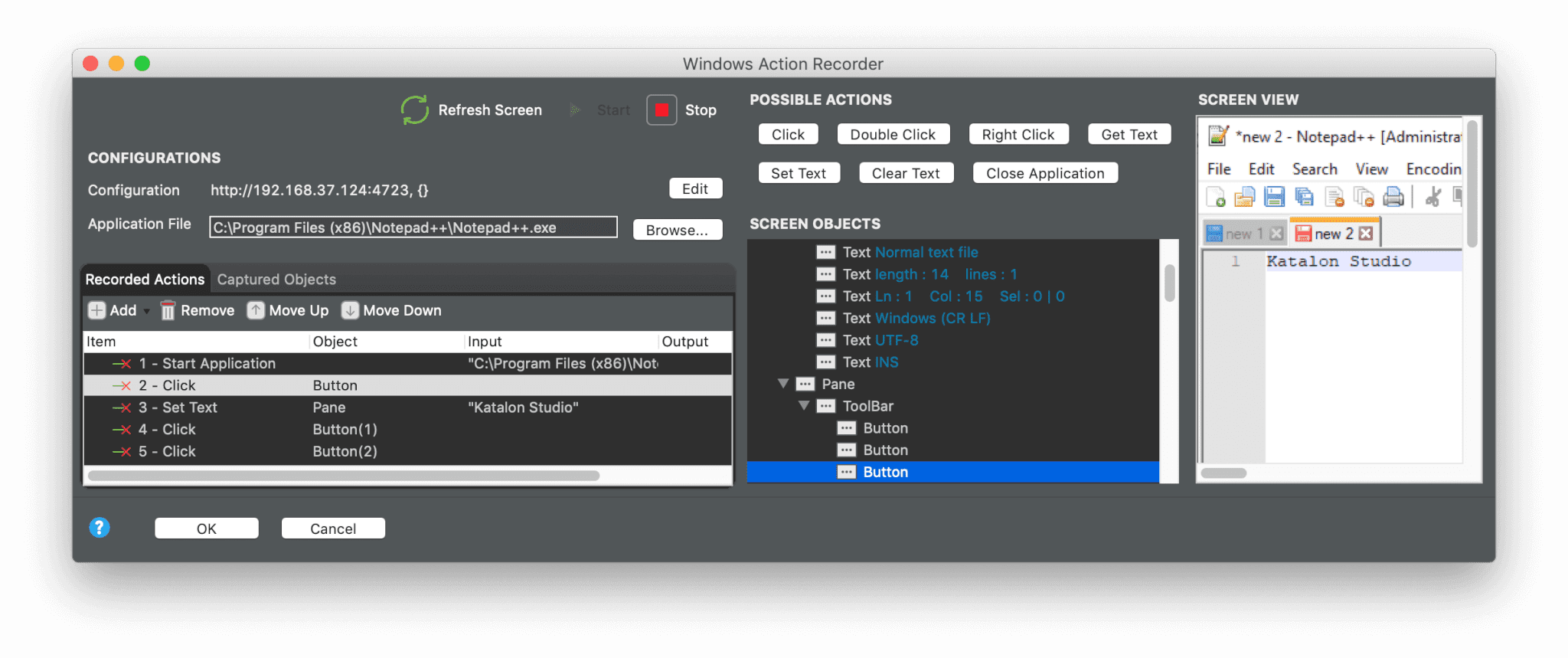
From recording test actions to inspecting running app objects and showing them in a tree view, the recorder gives you the support you need to build test cases efficiently.
This feature also allows you to highlight an object, auto-scroll to inspecting elements, display an actual screen view, and modify test steps during recording.
For fresh testers, the record Windows action is an invaluable way to adopt automated testing for desktop apps.
Smart element-locating mechanism
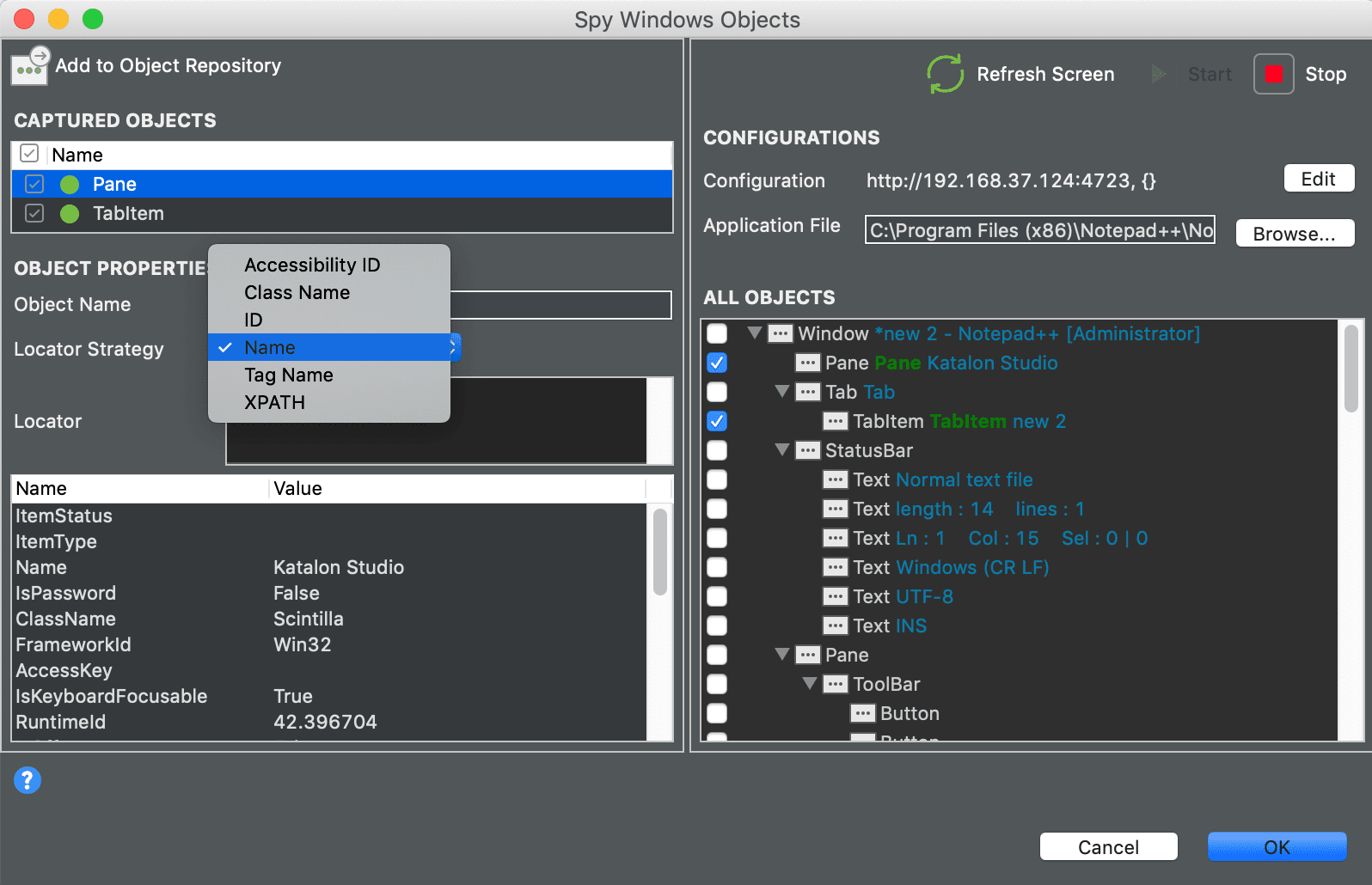
One of Katalon’s most outstanding features is the capability to locate UI elements automatically. You can decide your locator strategy between accessibility ID, class name, ID, name, tag name, and XPath in the corresponding UI element attributes.
Windows built-in and custom keywords
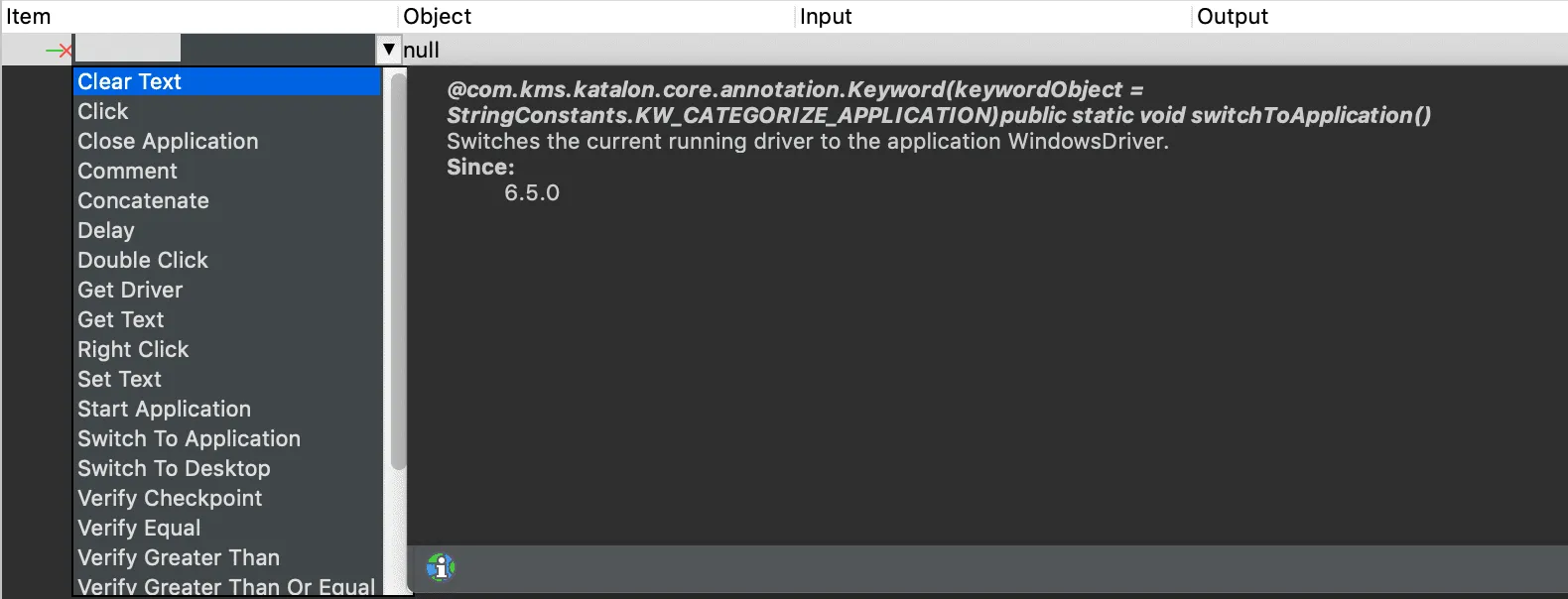
Use Katalon's built-in Windows keywords in your test projects. The keyword library helps you set up test cases quickly without designing every test step by hand.
Moreover, you can also use your custom keywords to extend the testing capabilities and gain more control over your test projects. Katalon Studio provides you with multiple approaches to either simplify test projects or advance them even further.
Minimal maintenance
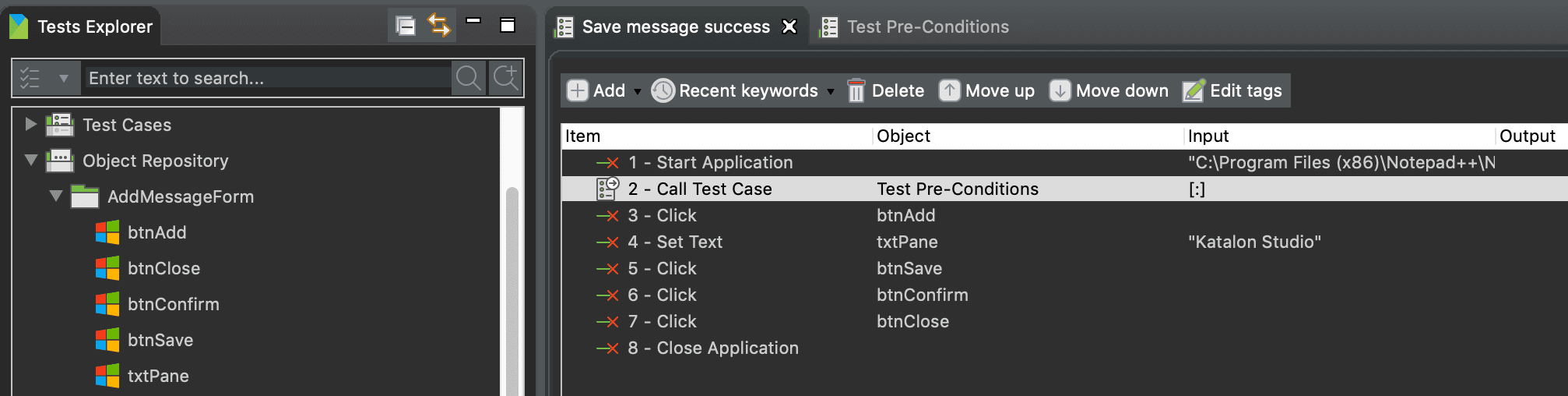
Test artifacts, including test objects, test steps, and custom keywords, can be reused and shared across your team in different test cases. Test profiles in Katalon Studio reduce the effort of maintaining and reusing your work.
Why Automation for Desktop App Testing?
In recent years, companies have turned to web and mobile apps to attract and engage customers. Even so, desktop apps still bring real benefits to businesses and product teams.
Many desktop apps can work offline, giving end users more flexibility and, in some cases, more security. Desktop apps can also give developers more control over interactions and performance than web and mobile apps.
How customers perceive your desktop app shapes how they see your brand. That's why building a desktop application takes a lot of testing, including functional, security, usability, and stability tests, before it reaches users.
There’s more!
Katalon Studio 7 is packed with new features that solve test automation problems for teams of any size. Besides desktop app testing, it adds Smart Wait, test artifact sharing, and private plugins.
For more Katalon Studio 7 features, check out 7 Things to Know About Katalon Studio 7.
Frequently asked questions
Katalon Studio supports Windows desktop apps built with UWP, Windows Forms, WPF, and classic Win32, using Windows Application Driver (WinAppDriver).
The app itself must run on a Windows machine with WinAppDriver. If you use Katalon Studio on macOS or Linux, you can run the tests remotely against that Windows machine.
No. You can capture objects with Spy Windows, record actions, and use built-in keywords without code. Custom keywords let more advanced users extend tests in Groovy or Java.



Test everything. Ship with confidence.
From generating test cases to spotting failures, Katalon's AI works across your entire pipeline, automatically.
