


Unit testing checks individual pieces of code in isolation, while functional testing checks that the whole application does what users need. Compare their scope, speed, and techniques, with examples and best practices for both.
Unit Testing vs Functional Testing definition
Unit testing | Functional testing |
|---|---|
Unit testing is a software testing method in which individual units of an application are verified in isolation from the rest of the system. It breaks an application into small testable components, like code functions, and checks that they follow their designed specifications. This allows for early detection of code failures and lower debugging costs. | Functional testing evaluates the behavior of each feature and of the application as a whole. It focuses on what users can do, such as whether they can log in with their credentials, interact smoothly with the app, or manage their information. The goal is to ensure the application meets its functional requirements. |
Unit Testing vs Functional Testing: How do they work?
Functional testing is a process that expands across the software development life cycle, from code-level testing to regression testing. Different levels of testing are well represented in the testing pyramid.
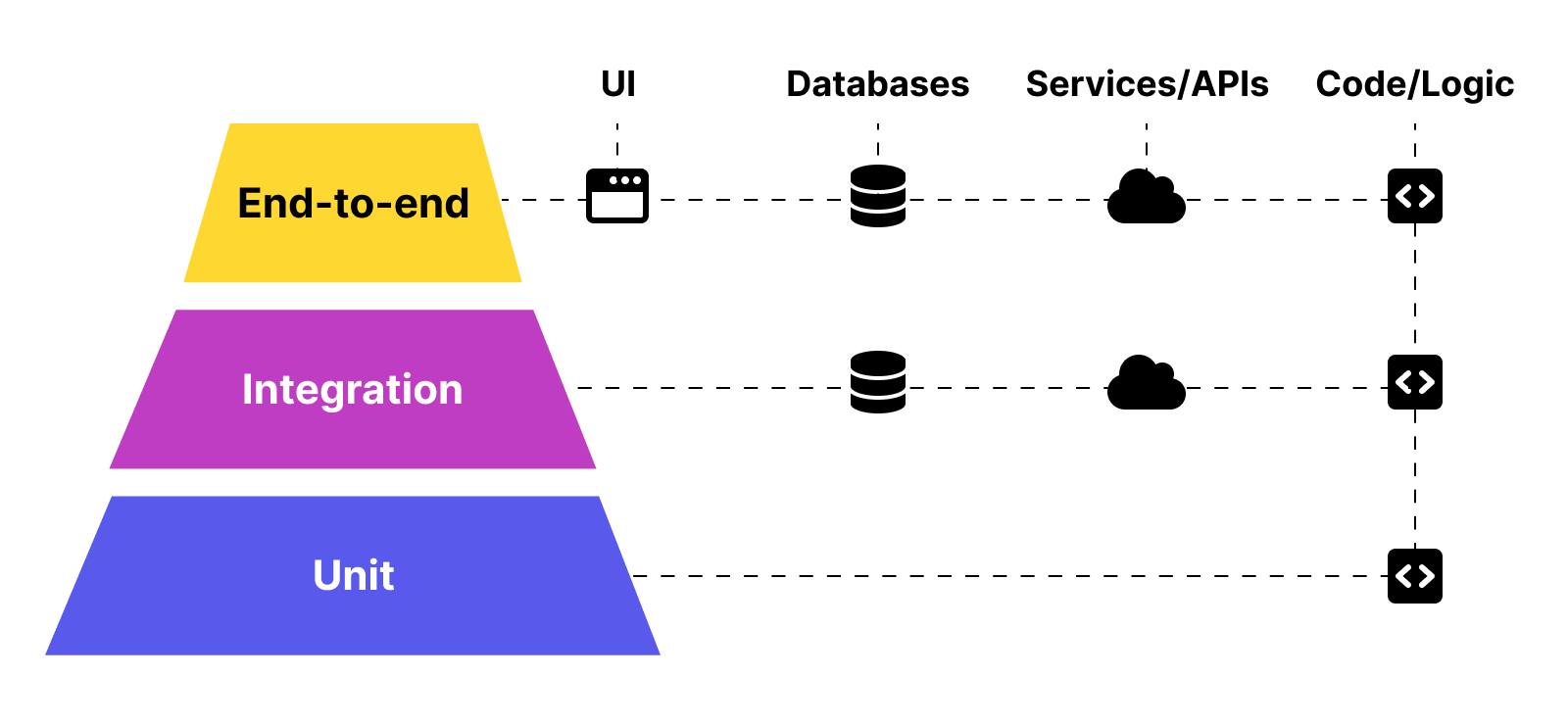
To get a firm grasp on how these types of testing work and their relationship, we'll look further into each layer.
Unit Testing
Unit testing is the first layer and makes up the largest section of the pyramid. This type of testing is typically performed by developers, so defects in the code can be caught and fixed before they can impact other parts of the application. As the foundational test, unit testing is the first gateway to software quality before moving on to more integrated tests.
For example, a bank is developing a mobile app for transaction services. Developers would create unit tests for the “transfer money" function to see if the specified amount is deducted from the sender's account and added to the receiver's. Other individual functions such as “check balance" or “view transaction” are also considered unit testing.

Integration Testing
The next layer is integration testing which checks different modules when they're combined as integrated units. Modules can function normally on their own but clash once they interact with each other. Integration testing helps prevent such incompatibility and collapses.
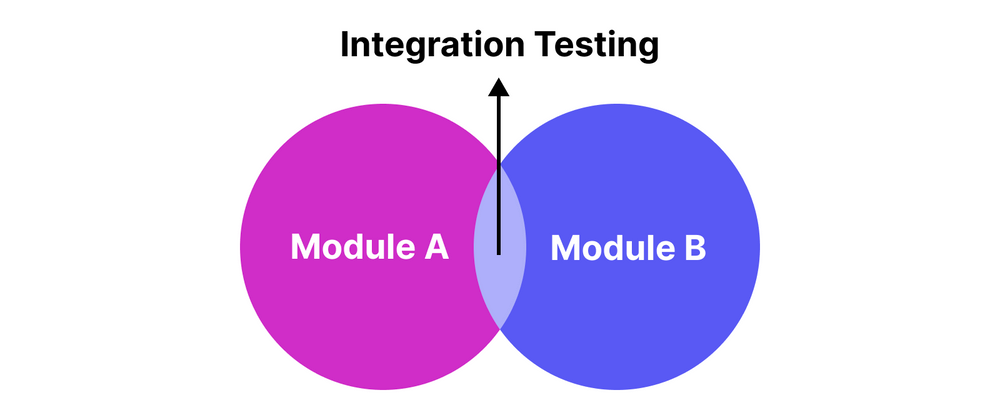
It’s also applied to validating smooth communication between software back-end APIs and its front-end UI. For example, the integration between the search functionality and the product retrieval API can be tested to check the accuracy of search results and verify that the UI correctly displays the retrieved product information.
*Read more:* Unit Testing vs Integration Testing: What are the key differences?
Functional Testing
Other than unit testing and integration testing, there are other testing types that also fall under the roof of functional testing, including:
- System Testing: The software is tested as an integrated system to see if it meets the specified requirements.
- User Acceptance Testing: Tests the application against predefined acceptance criteria to ensure it's ready for production.
- Regression Testing: Checks if changes made in the code have introduced any new bugs or defects.
These testing techniques have different approaches but are all deployed to check various aspects of the software, from input validation, UI interactions, and data processing to business logic, and integration with other components or systems.
Key differences between unit testing vs functional testing
Criteria | Unit testing | Functional testing |
|---|---|---|
Objectives | Written from the programmer's perspective to ensure a unit of code performs specific tasks. | Written from users' perspectives to verify the system's functionality. |
Performer | Developers | Usually QA teams |
Scope | Limited, focused on isolated code units. | Wider scope, covering the interactions and integrations of various components. |
Technique | White box testing: involves testing internal details of code. | Black box testing: functionality is tested against user and business requirements without access to code structure. |
Dependencies | Often uses mocks or stubs to replace external dependencies. | Tests the application with its dependencies, including databases, APIs, and external systems. |
Speed | Large numbers of tests that typically run in milliseconds each. | Fewer tests that take seconds to minutes each. |
Unit testing vs integration testing vs functional testing
We can further understand each testing type's role and their relationship through an example of testing a food delivery app. Below is the scope of each test following the granularity level.
Unit testing | Integration testing | Functional testing |
|---|---|---|
Checks the "add to cart" function: whether the selected item is properly added to the basket. | Validates the communication between the cart module and the payment gateway module. The total price should be calculated correctly from the order details. | Tests user interaction with different features, such as searching for restaurants, placing an order, making a payment, and tracking the order status. |
Unit tests and integration tests both verify functional behavior at lower levels, which is why many teams group them under the functional testing umbrella. Built on each other in sequence, these levels make sure software is tested thoroughly, from individual components to the integrated system, resulting in high-quality, reliable software.
How Do Unit Testing And Functional Testing Improve Software Quality?
Unit testing
Covering code with tests results in cost efficiency, simpler refactoring, better code design, and many other benefits.
Testing software in its early construction stage helps prevent bugs from going further down the line where the fixing cost has already increased significantly. The earlier a bug is detected, the lower the cost of its correction.
Well-written tests also serve as living documentation for developers to thoroughly understand the logic of each module and the system as a whole, which leads to better code design and organization.
In unit tests, code is tested separately in a contained environment, making them more reusable as they can be easily plugged into different parts of the application or used in different projects. Unit testing encourages reusable code that is clean, efficient, and consistent.
Functional testing
If unit testing lays a firm ground for the software code structure, functional testing guarantees that these components deliver the expected output as a whole.
Before an app can bring users a smooth and intuitive experience, making sure that it can be considered working should be the very first check box. It would be no use to see how much traffic a login page can handle at a time if users cannot sign in with their credentials in the first place.
Functional testing becomes even more critical in a DevOps and Agile development environment. As features are continuously built and deployed, tests should be run to ensure existing functionality remains unaffected.
Unit testing and functional testing best practices
Test early, fail fast
Minor bugs in the code function can go unnoticed. Once they’ve manifested in the UI layer, the fixing cost would be a lot higher as they are now intertwined with various other components.
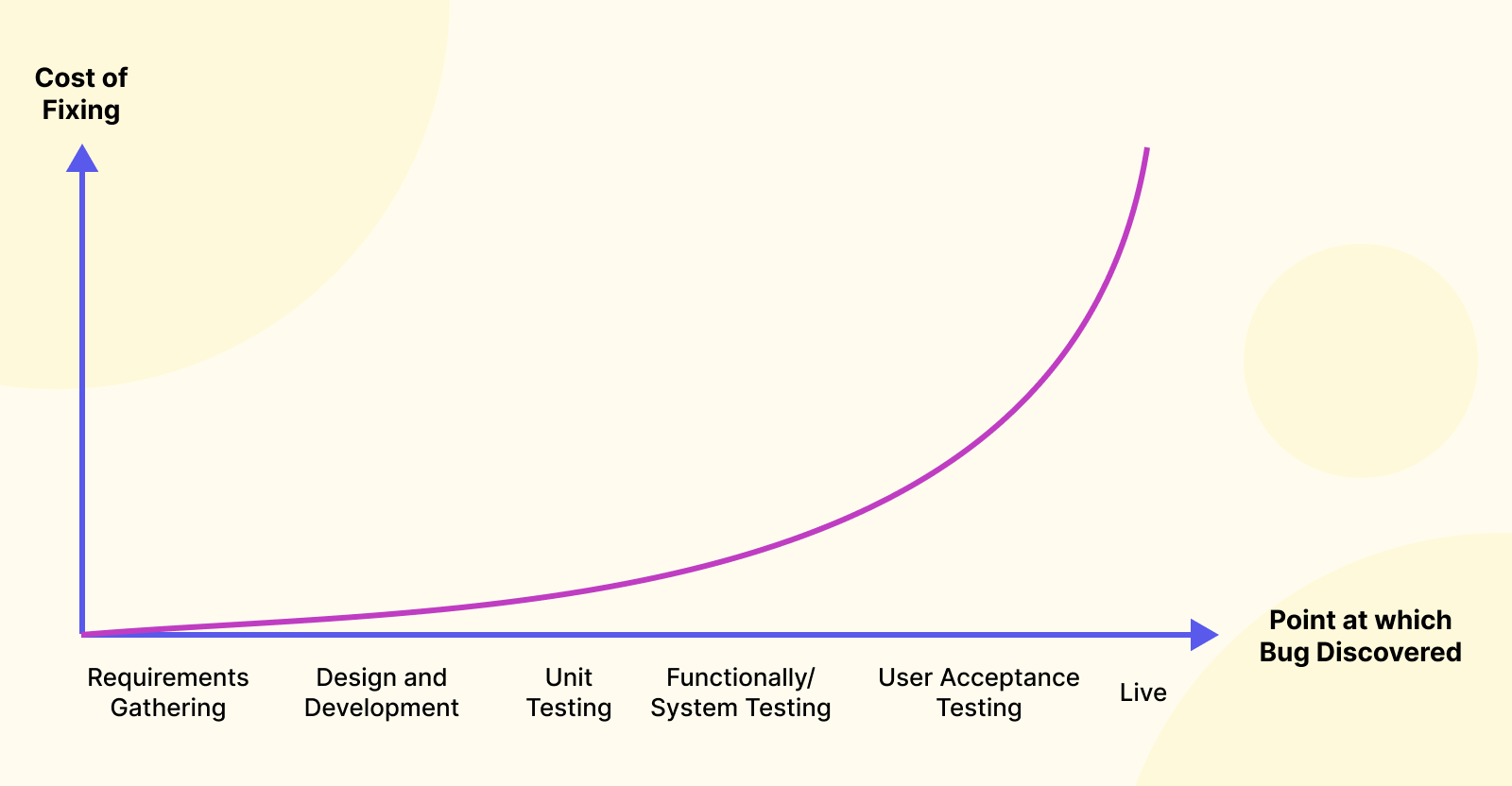
Issues in specific functions can damage the user experience and have a direct impact on the company. For example, if the checkout button on your e-commerce app malfunctions, the company might suffer a loss in revenue.
Both unit and functional testing should be performed early and frequently in the development cycle to save extra cost and effort.
Implement test automation
While cases like user acceptance testing still call for manual work, automating test scripts would help shorten time and increase testing productivity.
Test automation is best for:
- Repetitive testing: Tests that need to be performed repeatedly like in case of smoke testing, sanity testing, or regression testing whenever there are software changes.
- Compatibility across platforms: Large-scale testing on multiple configurations, devices, and operating systems.
- Data-driven testing: Validate a fixed workflow against databases and files such as testing a registration form filling.
Automating tests helps teams deliver under time constraints without compromising software quality.
*Read more:* Sanity Testing vs Smoke Testing: A Comparison
Reusable tests
Releases are constantly rolled out to meet market demands. Making use of existing test scripts and data helps keep the whole suite updated with new builds and changing requirements. Getting test artifacts up and running also reduces effort in creating and maintaining test cases.
In large-sized companies, instead of creating similar tests from scratch for different products or teams, tests can be reused and modified according to the need of each project. This helps save resources and ensures testing is performed in a consistent manner.
Document and report defects
Testing doesn't end at just detecting bugs. Having them fixed timely and efficiently is another challenge as teams are easily trapped in unaligned priorities, piled-up defects, and miscommunication.
Clear defect reporting is a healthy solution to this problem by providing detailed information, such as requirements, test results, and other relevant test data. This helps stakeholders understand the nature and severity of defects, and streamline the process of tracking and fixing bugs.
Automate UI and API testing with Katalon
Katalon is a comprehensive software quality management platform for testing the API and UI of the web, mobile, and desktop applications. Find all the testing essentials you need to automate an end-to-end testing process in Katalon.
Low-code/full-code test authoring modes
Get tests ready quickly with low-code and full-code options. Hours of building test cases can be cut to minutes with a keyword library and a test recorder. More experienced users can switch to scripting in Groovy (or Java) to write custom keywords.
Data-driven testing
Test data can be created using various data sources such as Excel, CSV, or databases, and easily integrated into your test scripts. Katalon also supports data snapshot capturing to validate changes and Global Variables binding to manage test scripts in different development stages. Learn more: Katalon - An All-in-one Automated Data-driven Testing Tool.
Increased coverage with compatibility testing
End-to-end and regression test suites can be run in parallel across local and cloud browsers, devices, and operating systems. Achieve more coverage with fewer workarounds with Katalon's native integrations. You can connect with tools such as Circle CI, Jenkins, and GitLab to schedule or auto-trigger test cases on the CI/CD pipeline and containers.
Root cause analysis
Teams can review all failed tests and bundle them into smaller groups based on their similarities, which helps to pinpoint the common root cause of related issues.
In Debug mode, Katalon pauses at each breakpoint or goes straight to the exact steps where tests fail, enabling you to examine the state of your application, specifically the necessary test steps.
Easy test artifacts maintenance
A centralized object repository is built-in to store and access all of your UI elements, objects, and locators. When there's a UI change, you're only a few clicks away from getting these locators and properties up-to-date across test cases.
Frequently asked questions
Unit testing verifies individual units of an application in isolation (such as code functions or UI elements) to confirm they match designed specifications and enable early defect detection with reduced debugging cost.
Functional testing evaluates feature behavior and the overall application against functional requirements, focusing on usability and accessibility from a user standpoint (for example: login, smooth interaction, and information management).
Unit testing is written from a programmer’s perspective to ensure a code unit performs specific tasks, while functional testing is written from a user perspective to verify system functionality meets user and business requirements.
Unit testing is typically performed by developers, while functional testing is typically performed by dedicated QA teams.
Unit testing has limited scope focused on isolated units, uses white-box techniques (internal code details), and often uses mocks/stubs for external dependencies. Functional testing has wider scope covering component interactions and integrations, uses black-box techniques, and tests with dependencies such as databases, APIs, and external systems.
Unit testing forms the first and largest layer of the pyramid, integration testing validates combined modules and API–UI communication, and functional testing covers broader techniques such as system testing, user acceptance testing, and regression testing to validate end-to-end behavior and requirements.
Key practices include testing early and frequently (“test early, fail fast”), implementing automation for repetitive and compatibility/data-driven scenarios, reusing test scripts and data across releases/projects, and documenting/reporting defects with clear details (requirements, results, and relevant test data).





Test everything. Ship with confidence.
From generating test cases to spotting failures, Katalon's AI works across your entire pipeline, automatically.
