


What telecom software testing covers, the domain knowledge testers need, example test cases, tools, and best practices for network, billing, and customer systems.
Telecom software testing checks that the software behind phone and data networks works for every user. That covers network management systems, billing and CRM platforms, and customer apps. With 5G and IoT growing fast, these systems are more complex, and harder to test, than ever.
This guide covers what it involves, the domain knowledge testers need, example test cases, tools, and best practices.
What is telecom software testing?
It's the process of testing the software that runs communication networks and services. It checks functionality, performance, and reliability, so users get a good experience and the provider meets industry standards.
It's hard because voice, data, and media services each run on their own protocols, and they all affect each other. Teams also have to test faster as release cycles shrink.
Why it matters
- Better user experience: customers expect personalized service on every channel and fast fixes. Testing finds what gets in the way.
- Reliable services: calls and data must work every time, especially in emergencies, when a working connection can save lives.
- Efficient use of network resources: providers serve millions of users a day. Performance testing shows how to allocate resources and plan for traffic spikes.
- Data security and privacy: the whole industry runs on moving data, so encryption, authentication, and other protections need regular testing.
- Safe adoption of new technology: 5G, IoT, and AI-driven services bring new kinds of issues. Testing lets providers move fast without cutting corners on quality.
- Regulatory compliance: these networks hold sensitive data. Testing checks that systems meet industry standards.
Domain knowledge testers need
Testers in this field need industry knowledge as well as testing skills. Knowing the domain helps them design scenarios that fit the system under test.
Subject matter experts usually brief testers before each project. Testers who already understand how networks work design better tests and ask better questions. Domain knowledge helps them:
- Design a test strategy that covers the critical parts of each service
- Recreate real-world scenarios more accurately
- Spot risks and issues early
- Explore the system without predefined test cases and still find bugs
- Talk with developers and stakeholders in the right terminology
- Work faster, with less training needed
Topics worth reading up on:
- Cellular networks (3G, 4G, 5G)
- Voice over IP (VoIP)
- Fiber optics
- Roaming and handover
- Signal propagation
- Network topologies
- Internet of Things (IoT)
- Network security
- Spectrum allocation
- Broadband technologies
- Call routing
- Data compression
- Industry standards (3GPP, ITU)
- Mobile apps and services
- Network virtualization
- Satellite communication
- Billing and charging systems
Domain knowledge also means knowing what each service is expected to deliver. Accenture's telco benchmarking covers metrics for more than 200 networks in over 120 countries, which gives you useful reference points.
Core business processes to test
These are the industry's core processes. Each one depends on software that needs testing:
- Network infrastructure development: builds the physical network that everything else runs on.
- Service provisioning: activates voice, data, and media services for customers.
- Network management: keeps the network performing well and limits disruptions.
- Network operations: monitors network health and fixes issues quickly.
- CRM: handles customer questions and issues, and builds loyalty.
- Regulatory compliance: keeps the business within the law and protects customer data.
- Service innovation: creates new offerings that set the provider apart.
- Billing management: bills customers accurately and collects revenue.
- Emergency services: connects people to emergency help, with accurate location data.
- Network expansion: extends coverage to new and underserved areas.
- Research and development: develops the next generation of services.
For network infrastructure, testing checks that physical components are installed and tuned correctly. For service provisioning, QA teams test from the user's point of view, so customers can use services without disruption.
OSS and BSS
These processes fall into 2 main groups:
- OSS (operations support systems): software, devices, and apps that manage the technical side of the network.
- BSS (business support systems): systems that run the business side, such as billing, CRM, and service delivery.
OSS and BSS work best together, because network problems quickly become customer problems. A billing error can start as a network fault, so test the hand-offs between the two.
A typical end-to-end workflow looks like this:
- Research the market to understand customer needs.
- Design the network architecture based on that research.
- Plan capacity so the network can handle expected traffic.
- Install and configure network equipment, such as switches, routers, and base stations.
- Set up communication links between them.
- Run functional testing to check the system works as expected.
- Activate services when customers request them.
- Capture customer details and set up profiles in the CRM.
- Monitor performance to keep service quality high.
- Rate usage based on plans, tariffs, and pricing.
- Generate itemized invoices and bills.
- Handle customer questions, complaints, and technical issues.
- Find bottlenecks and fix them.
- Develop new services to stay competitive.
The testing life cycle
Testing here follows the same 6 stages as the standard software testing life cycle (STLC):
- Requirement analysis
- Test planning
- Test case development
- Environment setup
- Test execution
- Test cycle closure
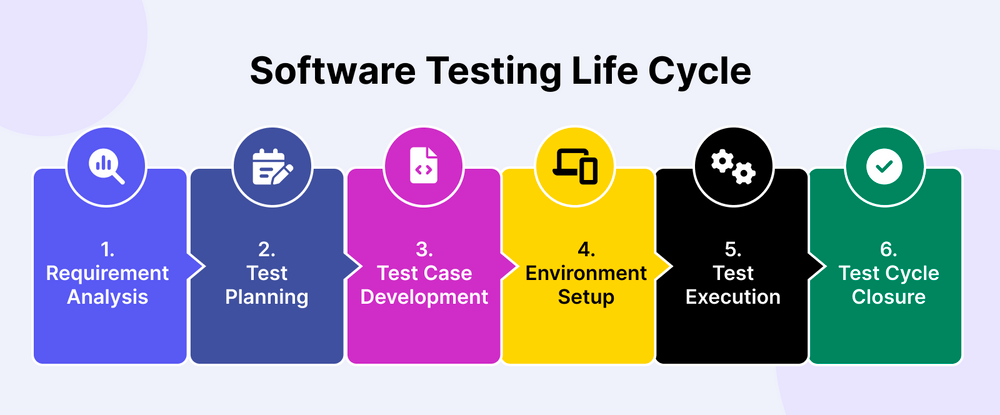
In requirement analysis, the product owner, developers, and testers agree on what the project should achieve. Each side describes things differently, which is why many teams use BDD testing: it writes user stories and scenarios in plain business language everyone can follow.
Next, testers write a detailed test plan that lists the test cases and the environments needed to run them. Then they run the tests and analyze the results to guide decisions and future testing.
Example test cases
Test case | Description |
|---|---|
Call connectivity | Check that calls connect between two numbers with good call quality. |
SMS | Check that SMS messages are sent and received with the right content and order. |
Data connection | Visit different websites and check data speeds on each network type. |
Roaming | Check that service continues when switching between home and roaming networks. |
Voicemail | Check that voicemail messages can be left, saved, and retrieved. |
Call waiting | Put one call on hold, answer another, and switch between them. |
Conference call | Create and join multi-person calls with clear audio. |
Call forwarding | Enable, disable, and change call forwarding settings. |
Network coverage | Check signal strength in urban, rural, indoor, and outdoor areas. |
Emergency call | Check that emergency calls connect, even with weak coverage. |
Balance and usage | Check that account balance and usage details are accurate. |
International roaming | Use services abroad and check charges and features. |
Call drops and handover | Check that calls hand over between cell towers without dropping. |
Network switching | Check that the device switches between network technologies as available. |
Network compatibility | Check that the device works with different network bands and frequencies. |
SIM card | Insert, remove, and replace SIM cards and check they're recognized. |
Caller ID | Check that caller details display correctly on incoming calls. |
Network congestion | Check device performance and call quality at peak times. |
App-based services | Test the functionality and usability of the provider's apps. |
Device compatibility | Check that the device supports the provider's services and features. |
Popular tools
Tool | Type | What it does |
|---|---|---|
Network protocol analyzer | Captures and decodes network traffic in real time to diagnose network issues. | |
Spirent TestCenter | Network test platform | Generates traffic and emulates networks to test equipment and services. |
Keysight network test (formerly Ixia) | Network and application test platform | Simulates real-world traffic to test network performance, security, and applications. |
Keysight BreakingPoint | Security and performance testing | Simulates realistic traffic to test security infrastructure under stress. |
Hammer Call Analyzer | Voice quality analysis | Checks call setup, voice quality, and performance on VoIP and mobile networks. |
SIP protocol testing | Generates SIP traffic and simulates calls to test VoIP systems. | |
Juniper Paragon Active Assurance (formerly Netrounds) | Active network testing and monitoring | Sends synthetic traffic to measure service performance and quality of service. |
VIAVI MTS (formerly JDSU) | Modular field test platform | Tests fiber, transport, and wireless networks with swappable modules. |
Common challenges
Four challenges come up again and again:
- Many technologies: networks mix many technologies. Testing gets harder still when the provider also runs web, desktop, and mobile apps.
- Fragmented tool stacks: teams often test each system with a different tool. Results end up in silos, with no single view of quality.
- Interoperability: products from different vendors must work together. Plan integration testing that covers every touchpoint between internal and external systems.
- Security: these systems hold sensitive user data, so security testing is essential to find vulnerabilities before attackers do.
Best practices
- Build domain knowledge: pair testers with network and billing experts, and keep a shared glossary of terms.
- Test the OSS and BSS hand-offs: many customer-facing bugs, such as billing errors, start where network and business systems meet.
- Automate regression tests: automate repeat checks for core flows like provisioning and billing, so every release is covered.
- Test on real conditions: include different network types, coverage levels, and peak traffic in your test environments.
- Centralize results: bring results from every tool into one place, so you can see quality across the whole stack.
How Katalon helps

Katalon True Platform is an AI-augmented quality management platform for creating, managing, and running tests across many environments. It helps teams:
- Run UI, visual, API, functional, and end-to-end tests across many browser, device, and OS combinations, in one place
- Speed up testing with AI features such as self-healing tests and test failure analysis
- Connect to existing CI/CD pipelines
- Manage test data and test artifacts
- Protect sensitive data with enterprise-grade security
- Use analytics and reports for real-time visibility and better decisions
Frequently asked questions
It tests the software that runs communication networks and services, such as network management, billing, CRM, and customer apps. It checks functionality, performance, reliability, and compliance.
Testers should understand cellular networks, VoIP, roaming and handover, network security, and billing systems, alongside core testing skills. Domain knowledge helps them design better tests.
OSS (operations support systems) manage the technical side of the network. BSS (business support systems) run billing, CRM, and service delivery. Test each one, and the hand-offs between them.
Examples include call connectivity, SMS, data connections, roaming and handover, emergency calls, call forwarding, voicemail, and network compatibility.
Common tools include Wireshark for packet analysis, Spirent TestCenter and Keysight for network testing, SIPp for VoIP, Juniper Paragon Active Assurance for active monitoring, and VIAVI MTS for field testing.
The main challenges are the mix of technologies, fragmented tool stacks, interoperability between vendors, and protecting sensitive user data.
Katalon True Platform runs UI, API, visual, and end-to-end tests in one place, with AI features such as self-healing tests, CI/CD integrations, enterprise-grade security, and reporting.





Test everything. Ship with confidence.
From generating test cases to spotting failures, Katalon's AI works across your entire pipeline, automatically.
