


Better prompts mean better test code. Learn the basics of prompt engineering, four best practices for writing reliable prompts, and a worked example of refining a prompt in Katalon AI Assistant to generate a cleaner test script.
In test automation, tools like Katalon Studio have changed how we approach software testing. But what if we could take it a step further? Enter Katalon AI Assistant (formerly StudioAssist), an AI coding companion feature for scripting within Katalon Studio. Built on large language models and integrated into Katalon Studio, Katalon AI Assistant helps you write and understand test code. From context-based code suggestions (to create scripts or custom keywords) to detailed descriptions of your existing code, this tool can reduce the time it takes to create stable automation scripts.
For those familiar with AI-powered tools like ChatGPT, Gemini, or other LLM-based tools, you understand that the output quality is deeply correlated with the input question or prompt. Since Katalon AI Assistant is also built on large language models, good prompt engineering will generate more accurate test script code.
This article is a practical guide to prompt engineering in Katalon Studio. Understanding and using Katalon AI Assistant effectively can considerably reduce your test creation effort.
The Emergence of Prompt Engineering
What is a Prompt?
In its simplest form, a prompt is the text you feed into an AI model during an interaction. Think of it as the question or request that initiates an AI's response. In the context of Katalon AI Assistant, a prompt could be a specific scenario or set of instructions related to recreating test steps in a test script. The crux of prompt engineering revolves around optimizing these prompts to get the most accurate and helpful responses.
The Intricacies of Blind Prompts
Many users initially engage with AI models like OpenAI's GPT in a "chat mode," using what is often referred to as a "blind prompt." These are open-ended questions or commands that typically yield a generic response. While it's convenient to ask a question and get an answer, the specificity and context you provide in your prompt can significantly influence the quality of the response.
Challenge: The Reliability Factor
One common challenge with blind prompts is their inherent unreliability. Users often find that the response received may not align with their expectations, either being too vague or entirely off-topic. This lack of reliability can become even more apparent when the same question is posed in different contexts, leading to varied results. Hence, using blind prompts without a comprehensive understanding of prompt crafting could lead to undesirable or unreliable outcomes.
The Essence of Prompt Engineering
So, what exactly is prompt engineering? It is the deliberate process of crafting prompts to elicit reliable, useful, and contextually relevant responses from an AI model. It is a mechanism to bring a degree of reliability and specificity to an otherwise unpredictable interaction with AI.
Why is Prompt Engineering Important?
One compelling reason is the pace of innovation in machine learning and software. As these technologies evolve at breakneck speed, knowing how to interact with them effectively becomes essential. In the context of Katalon AI Assistant, well-engineered prompts yield more targeted and actionable test scripts, so you get more out of the tool.
Prompting Best Practices
Creating effective prompts is a nuanced skill, and mastering it can make all the difference in how you work with AI-powered tools like Katalon AI Assistant. Here are four pillars of prompting: best practices that provide a foundation for writing clear and reliable prompts.
1. Provide Examples
Begin by including examples in your prompt. A diverse set of examples clarifies your intent and keeps the AI from guessing at what you want. The idea is to show the AI the kind of output you're expecting, which leads to a more targeted response.
2. Give Directions for Formatting Responses
Clarifying your desired output format can further tailor the AI's response to your needs. For instance, if you're looking for code snippets, you could specify the programming language or the style you prefer. Clear directions for formatting can greatly influence the precision of the AI's output.
3. Evaluate Quality
This pillar underscores the importance of iteration in improving prompt reliability. As you create and test prompts, you'll want to run the exact prompt multiple times to check for any inconsistencies or errors. Evaluating the quality of responses over several iterations helps you refine your prompts for greater reliability.
A quick note on "hallucinations": in the context of large language models, a hallucination refers to a response generated by the AI that is either factually incorrect or inconsistent with the given prompt. Being aware of these hallucinations is key to evaluating the quality of a prompt's response.
4. Maintain a Dynamic Interaction
Katalon AI Assistant is designed to mimic the back-and-forth dynamic that users experience with other LLM-based tools like ChatGPT. This pillar encourages users to keep that conversational engagement with the AI, as it enhances the scope for clarification and fine-tuning prompts in real time.
Understanding and employing these practices can significantly enhance your ability to generate effective prompts. It's a structured approach that builds a solid foundation for anyone looking to explore the full scope of Katalon AI Assistant's capabilities, ultimately leading to more efficient and reliable test automation.
Prompt Engineering within Katalon AI Assistant in Katalon Studio
So, how can we apply all of these principles in practice using Katalon AI Assistant within Katalon Studio? To illustrate, we'll walk through the process of creating a test automation script for an online retailer, using shop.polymer-project.org as our test subject. We'll then craft an initial prompt in Katalon AI Assistant to evaluate the website, and apply the best practices discussed earlier to refine the prompt for a more accurate test script. Let's get started.
For the purposes of this example, we will assume that you are already familiar with Katalon Studio and all the necessary steps to set up the test environment.
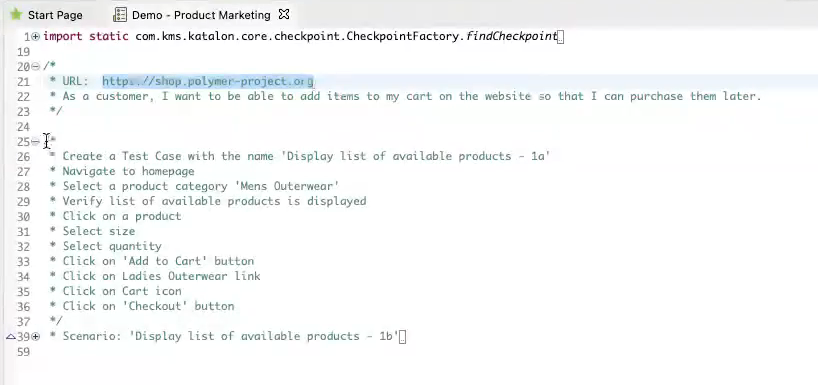
Once we are in the script mode in Katalon Studio, we will provide the following prompt:
/*
 * URL: https://shop.polymer-project.org
 * As a customer, I want to be able to add items to my cart on the website so that I can purchase them later.
 */

/*
 * Create a Test Case with the name 'Display list of available products - 1a'
 * Navigate to homepage
 * Select a product category 'Mens Outerwear'
 * Verify list of available products is displayed
 * Click on a product
 * Select size
 * Select quantity
 * Click on 'Add to Cart' button
 * Click on Ladies Outerwear link
 * Click on Cart icon
 * Click on 'Checkout' button
 */
Once the prompt is in, right-click in the script editor and select Katalon AI Assistant > Generate Code.
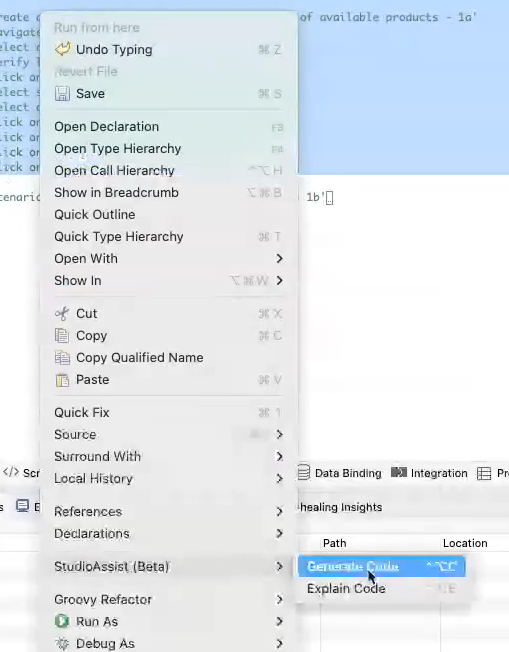
After a few moments, Katalon AI Assistant will provide the following results:
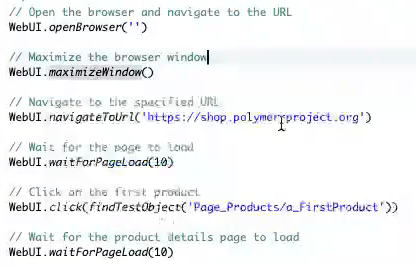
Let's analyze the results. The script navigates to the URL as expected, but it adds an extra step: a 10-second wait for the page to load. That step wasn't in the prompt. It's a mild example of the model filling gaps with its own assumptions, the same behavior that leads to hallucinations, and it's a sign the prompt needs more detail.
Up to this point, the step we executed can be classified as a blind prompt. Since it serves as our baseline, we can use its outcomes to craft a more refined prompt that aligns more closely with our expected results.
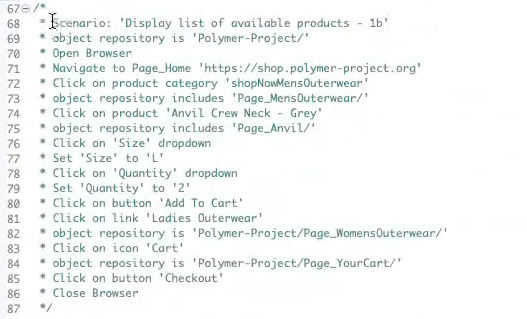
Now let’s modify the prompt. Remember, the answer you will get from any AI model will be as good as the prompt you provide. In this case, we will increase the level of detail in the prompt. Here is the new version of the prompt we will use:
/*
 * Scenario: 'Display list of available products - 1b'
 * object repository is 'Polymer-Project/'
 * Open Browser
 * Navigate to Page_Home 'https://shop.polymer-project.org'
 * Click on product category 'shopNowMensOuterwear'
 * object repository includes 'Page_MensOuterwear/'
 * Click on product 'Anvil Crew Neck - Grey'
 * object repository includes 'Page_Anvil/'
 * Click on 'Size' dropdown
 * Set 'Size' to 'L'
 * Click on 'Quantity' dropdown
 * Set 'Quantity' to '2'
 * Click on button 'Add To Cart'
 * Click on link 'Ladies Outerwear'
 * object repository is 'Polymer-Project/Page_WomensOuterwear/'
 * Click on icon 'Cart'
 * object repository is 'Polymer-Project/Page_YourCart/'
 * Click on button 'Checkout'
 * Close Browser
 */
We will perform the same steps to instruct Katalon AI Assistant to create the script, and here is the result we obtained:
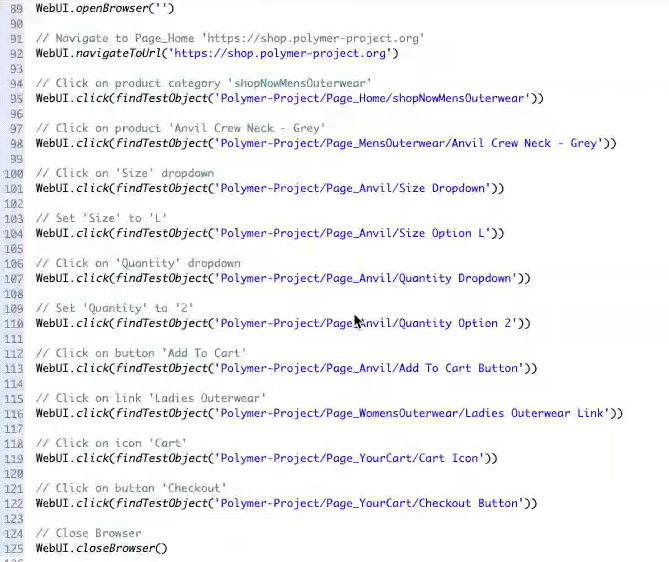
This prompt is considerably more detailed than the original. It names the exact objects, values, and steps, which leaves the model far less room to add steps of its own and produces a script that's closer to what we need. You should still review the generated code and run it before relying on it.
Wrapping up
This is just the beginning. While Katalon AI Assistant in Katalon Studio focuses on creating and explaining code, the use cases expand considerably when you apply prompt engineering best practices to your test authoring process, from generating helper functions to crafting test data sets and writing regular expressions.
The more proficient you become at prompt engineering, the more value you'll get from Katalon AI Assistant.
Frequently asked questions
Because shifting automation upstream isn’t solely a tester responsibility—development, operations, and QA all need to align to build a solid foundation and set realistic expectations.
It can include low-level and broader coverage such as unit tests, plus integration, API, database, and services testing, reducing dependency on the UI.
Processes may need to change—breaking down requirements further, introducing new coding practices, tweaking design processes, and ensuring stable back-end and front-end interfaces to minimize disruption to automated tests.
Don’t seek a single perfect tool; instead pick the best tool for each automation type and build a framework that pulls them together, with testers and developers working closely on processes.
Improved velocity, greater coverage, and higher reliability, including faster and more consistent tests, shorter feedback loops for finding defects earlier, and reduced risk of human error and critical bugs reaching production.





Test everything. Ship with confidence.
From generating test cases to spotting failures, Katalon's AI works across your entire pipeline, automatically.
