


Katalon StudioAssist (now Katalon AI Assistant) turns plain-text comments into test code and explains existing scripts in plain English. Learn how to set it up and get the best results from its generate and explain features.
In the fast-moving field of software quality management, Katalon introduced a new feature: Katalon StudioAssist. Powered by GPT (Generative Pre-trained Transformer) technology, it's designed to change how individual contributors work with their existing test code.
Katalon StudioAssist uses AI to explain your existing test code, making it easier to understand, debug, and optimize. It can also generate new code snippets from contextual comments, boosting productivity for developers and testers alike.
Katalon StudioAssist goes beyond code generation. It acts as a companion throughout your coding work, providing real-time assistance and shortening the learning curve for those new to Katalon Studio. By simplifying complex coding tasks, Katalon StudioAssist helps teams of any size scale their testing and deliver high-quality software.
In this article, we share best practices, tips, and tricks to help you get the most out of it in your existing and new Katalon test scripts. Let's dive in!
1. Generate Code
Katalon has always been about enabling every user to contribute to testing with their own skill set. More people generating test scripts means faster, broader test coverage, so potential defects can be caught earlier in the sprint or cycle. That's why the StudioAssist generate code feature lets users turn plain written text into lines of code for their scripts, so people with little automation or scripting experience can still write test scripts.
This may seem like behavior-driven development (BDD), but because StudioAssist uses a large language model, you can write test steps with a much broader and more flexible vocabulary.
Let's go over an example. Please note that to use the generate code feature, you need existing objects in your Object Repository (for example, from a previous Record-and-Playback session). To start, open the Script view of any test case in Katalon Studio.
How To Use It
- If you want to use Katalon's AI service, follow these steps to enable AI capabilities in your Katalon account.
- If you want to use your own OpenAI or Azure OpenAI key, follow these steps.
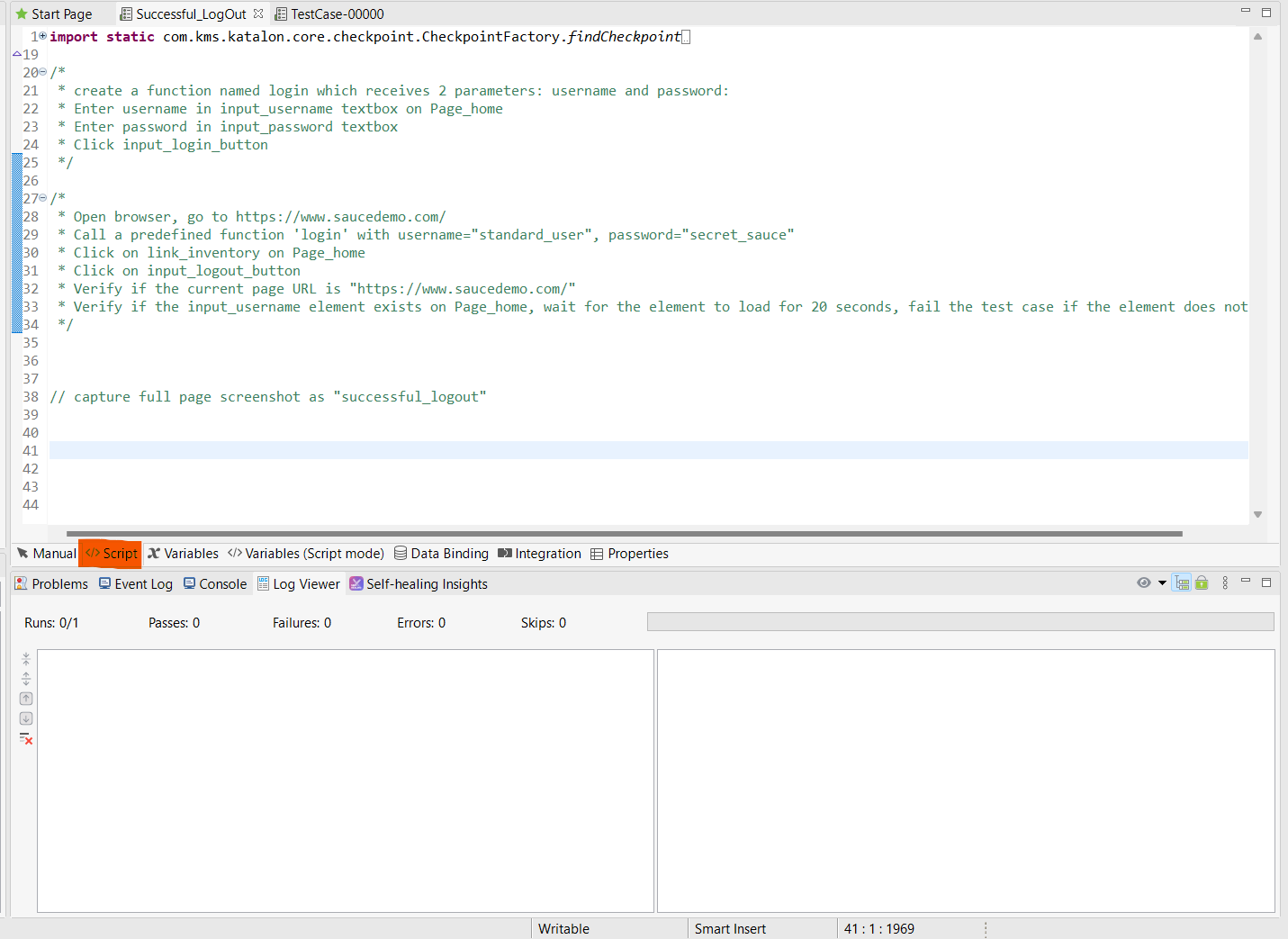
Once there, write your test steps as a comment so the plain text doesn't interfere with compiling the script. A key thing to remember is that the UI elements in the text need to reference objects by their names in the Object Repository. For example, we referenced the text field by its object name, "input_username", which sits in the Object Repository folder "Page_home". This is key when writing a test script with the generate code feature.
The only thing left to do is highlight that section, right-click, and select StudioAssist > Generate Code.
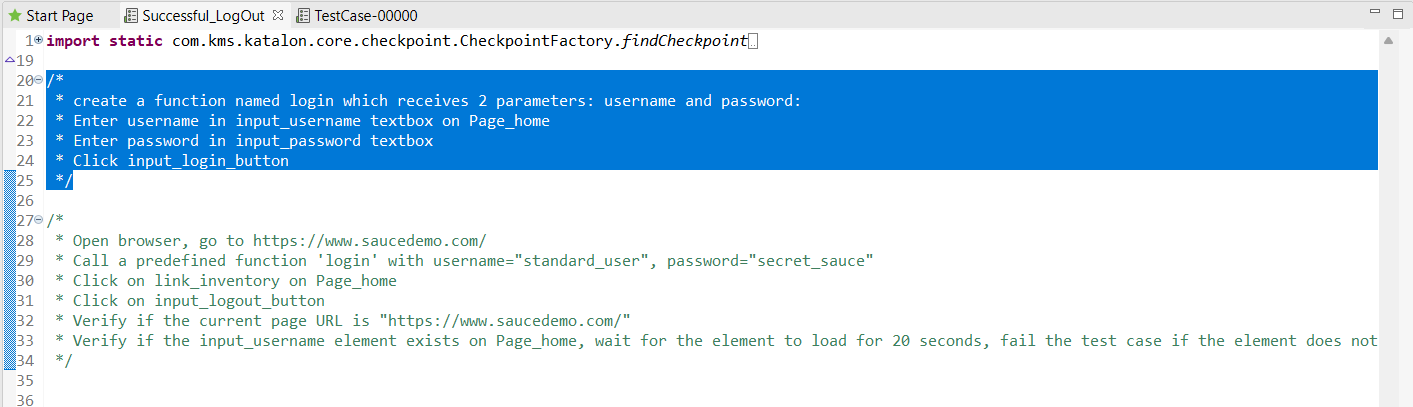
Katalon uses OpenAI's GPT models to translate the text into lines of code for your script. Each generated line of code sits next to the line of text it came from, so all users can clearly understand what each step in the test case is doing.
The generate code feature of StudioAssist, like many features in Katalon, lets users apply their own skill sets to create test cases quickly and collaborate with other roles such as automation engineers and developers.
2. Explain Code
Regardless of your technical skills, it’s always easier to read plain text than lines of code. A best practice developers often use is their own documentation in the form of comments for any work that needs to be done so that the next user to contribute can easily interpret the script and quickly make any necessary changes. So it goes without saying that for an environment where business users collaborate with developers the ability to understand step(s) in a test case quickly will lead to faster test creation and maintenance.
In StudioAssist, highlight any section or line of code, right-click it, and select StudioAssist > Explain Code.
The explanation appears in plain text below the highlighted section. It doesn't just walk through the code step by step; it also gives an overall summary of what the code does.
Final Words
StudioAssist arrived in Katalon Studio 9.0.0 to help reduce the time it takes to create tests. Using OpenAI's GPT models, it lets you create test code from plain-text descriptions and get detailed explanations of new and existing scripts. StudioAssist has since been renamed Katalon AI Assistant.
Frequently asked questions
Katalon StudioAssist is an AI-powered feature in Katalon Studio 9.0.0 that uses GPT technology to help users understand, debug, and optimize test code. It can explain existing scripts in plain language and generate new code snippets from natural-language comments, reducing the learning curve and boosting productivity.
In a test case’s Script view, you write your steps as comments, referring to object repository items by name (e.g., Page_home/input_username). You then highlight the comment section, right-click, choose StudioAssist → Generate Code, and StudioAssist converts that plain text into executable test code that aligns each line of code with its corresponding step description.
StudioAssist relies on the object names in the Katalon object repository to correctly map natural-language instructions to UI elements. If comments reference the same names as the objects (like Page_home/input_username), StudioAssist can generate accurate, runnable code that interacts with those elements.
The Explain Code feature lets you highlight any section of test code, right-click, and select StudioAssist → Explain Code. StudioAssist then produces a plain-text explanation of what that code does, providing both step-by-step details and an overall summary, which helps users quickly understand unfamiliar or complex scripts.
StudioAssist allows non-automation experts to write test steps in natural language and have them turned into code, while also helping more technical users optimize and document existing scripts. This makes collaboration between business users, testers, and developers easier and speeds up test creation and maintenance across the team.




Test everything. Ship with confidence.
From generating test cases to spotting failures, Katalon's AI works across your entire pipeline, automatically.
