


The Katalon Studio for Bamboo plugin runs Katalon tests in Atlassian Bamboo without hand-written commands. See its key features, including command arguments, headless execution with Xvfb, and artifact import, plus how to install it.
Katalon Studio for Bamboo is a plugin that integrates Katalon Studio with the Bamboo CI server. This blog walks you through the plugin’s features so you can take Katalon Studio test automation further with Bamboo.
Overview
Bamboo is a continuous integration and continuous deployment (CI/CD) server developed by Atlassian. Many teams use Bamboo in their CI/CD pipelines because of these benefits:
- Deep developer tool integrations
- Built-in deployment support
- Flexible build agent management
- Automated merging
- Built-in Git branching and workflows
- Enterprise support and resources
By integrating Katalon Studio with Bamboo, you can run Katalon tests as part of your Bamboo builds and deployments and monitor the results directly in Bamboo.
The plugin also lets you skip writing commands by hand, which can be time-consuming or require some programming skill. Instead of using the command-line interface (CLI), you enter information (e.g., which Katalon Studio version to download before executing tests, which test suites to run, and where to store result files) through a friendly user interface.
Here are some highlights of Katalon Studio for Bamboo:
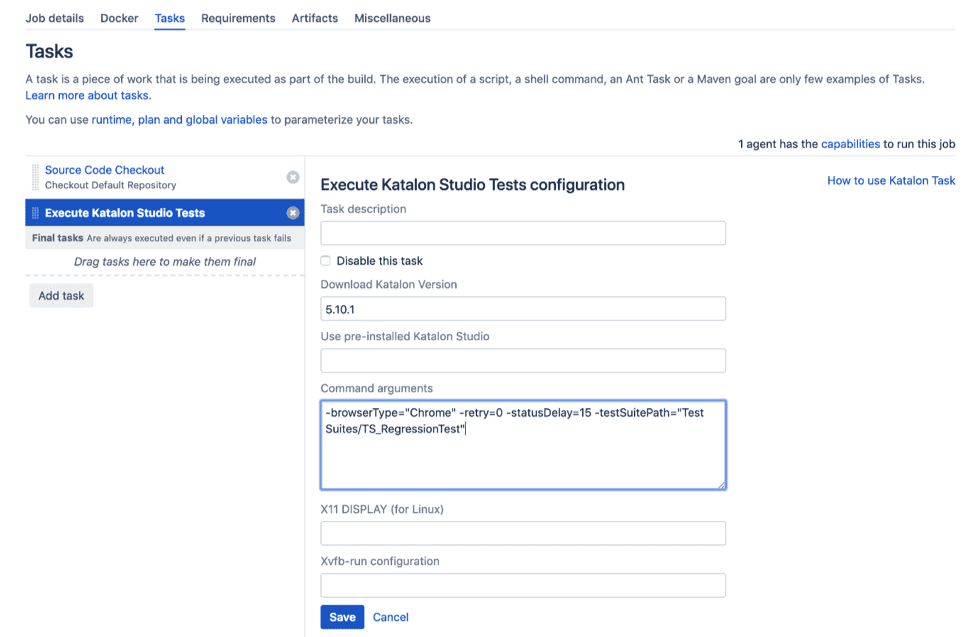
1. Command Arguments
Input all relevant command arguments for your test plan
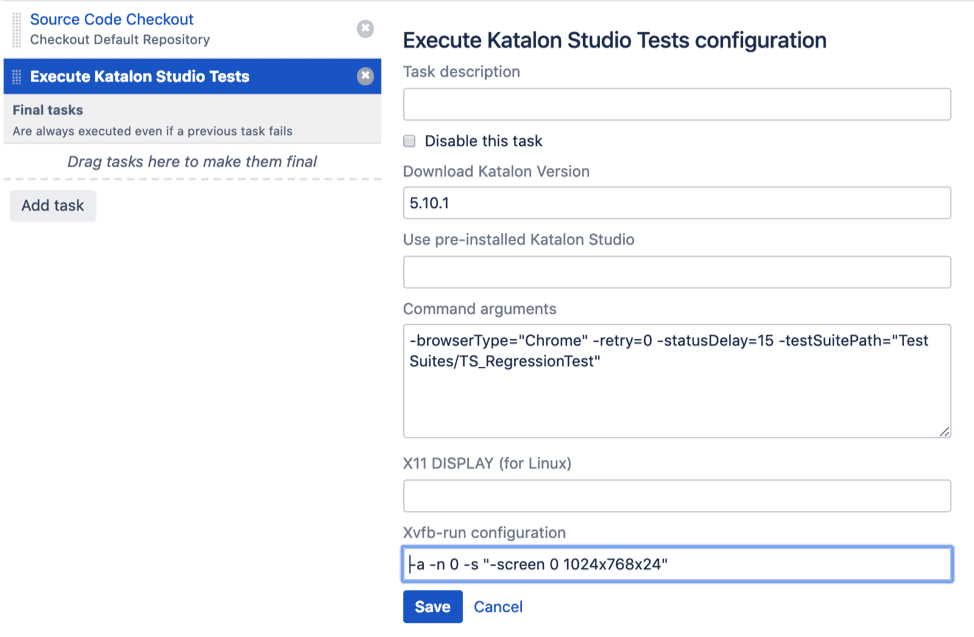
2. Headless Test Execution
Configure to run Katalon Studio on a headless machine with Xvfb
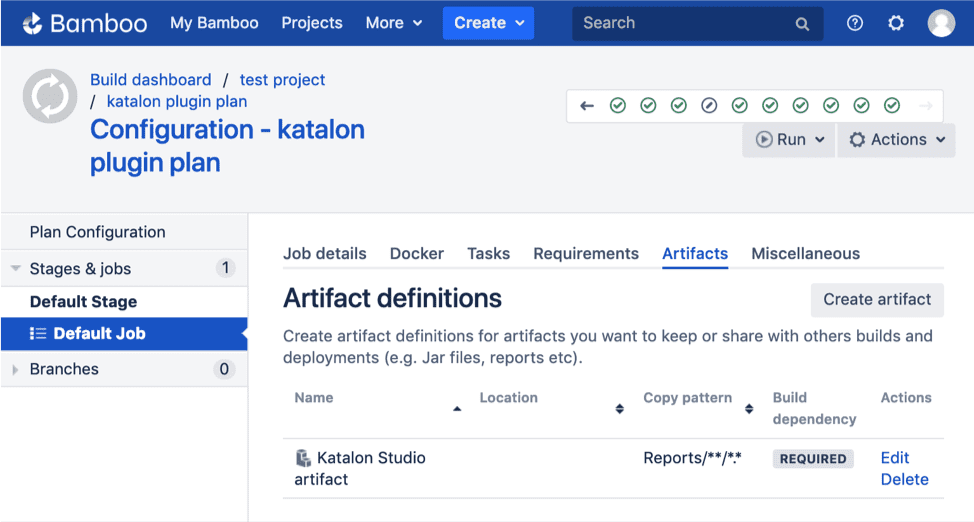
3. Import Katalon Studio Artifacts
Configure to copy reports of all executed test suites from Katalon and view them in Bamboo
How Does It Work?
To start using Katalon plugin for Bamboo, you need to install the plugin from Atlassian Marketplace. Follow these steps to install:
- Log into your Bamboo instance as an admin
- Click the admin dropdown and choose Atlassian Marketplace
- Click Find new apps or Find new add-ons on the left-hand side of the page
- Search for Katalon Studio for Bamboo
- Click Try it free to begin a trial or Buy now to purchase a license for the plugin
- Enter your information and click Generate license when redirected to MyAtlassian
- Click Apply license
Learn more about how to use Katalon Studio for Bamboo.
To find the previous Katalon Studio for Bamboo versions that are compatible with your projects, visit our version history page.
×
Frequently asked questions
The Katalon Studio for Bamboo plugin integrates Katalon Studio with the Bamboo CI/CD server, allowing you to configure and run Katalon tests from Bamboo, monitor build and deployment status from within your projects, and avoid manual command-line scripting.
Instead of writing long CLI commands, the plugin lets you input command arguments through a user-friendly interface. You can specify things like which Katalon version to download, which test suites to run, and where to store result files, all from Bamboo’s configuration screens.
Yes. The plugin supports headless test execution by allowing you to configure Katalon Studio to run on a headless machine with Xvfb, which is useful for CI environments without a graphical interface.
You can configure the plugin to import Katalon Studio artifacts, meaning reports from executed test suites are copied and made available directly in Bamboo, so you can view test results alongside your build information.
You install it via the Atlassian Marketplace from within Bamboo: log in as an admin, go to the admin dropdown → Atlassian Marketplace → Find new apps, search for “Katalon Studio for Bamboo”, then choose Try it free or Buy now, generate a license in MyAtlassian, and apply the license in Bamboo.





Test everything. Ship with confidence.
From generating test cases to spotting failures, Katalon's AI works across your entire pipeline, automatically.
