


June's updates focus on smarter coverage and smoother execution: test gap analysis in TrueTest, expanded live testing, network logs, app profiling, and smart queuing in TestCloud, plus faster startup and custom AI prompts in Studio.
June’s product updates focus on smarter test coverage and smoother execution. From spotlighting real user behavior with test gap analysis to improving manual and automated test workflows in TestCloud, Katalon continues to help teams test what matters most and do it faster.
Here is what we delivered in June:
Enhanced Studio performance and AI prompting
This month’s Studio release brings significant performance improvements, particularly in resolving issues during complex executions.
What’s new:
- Experience improved Studio startup and execution stability.
- Add your own AI prompt templates in StudioAssist.
- Navigate to test artifacts in TestOps via deep linking.
Test gap analysis
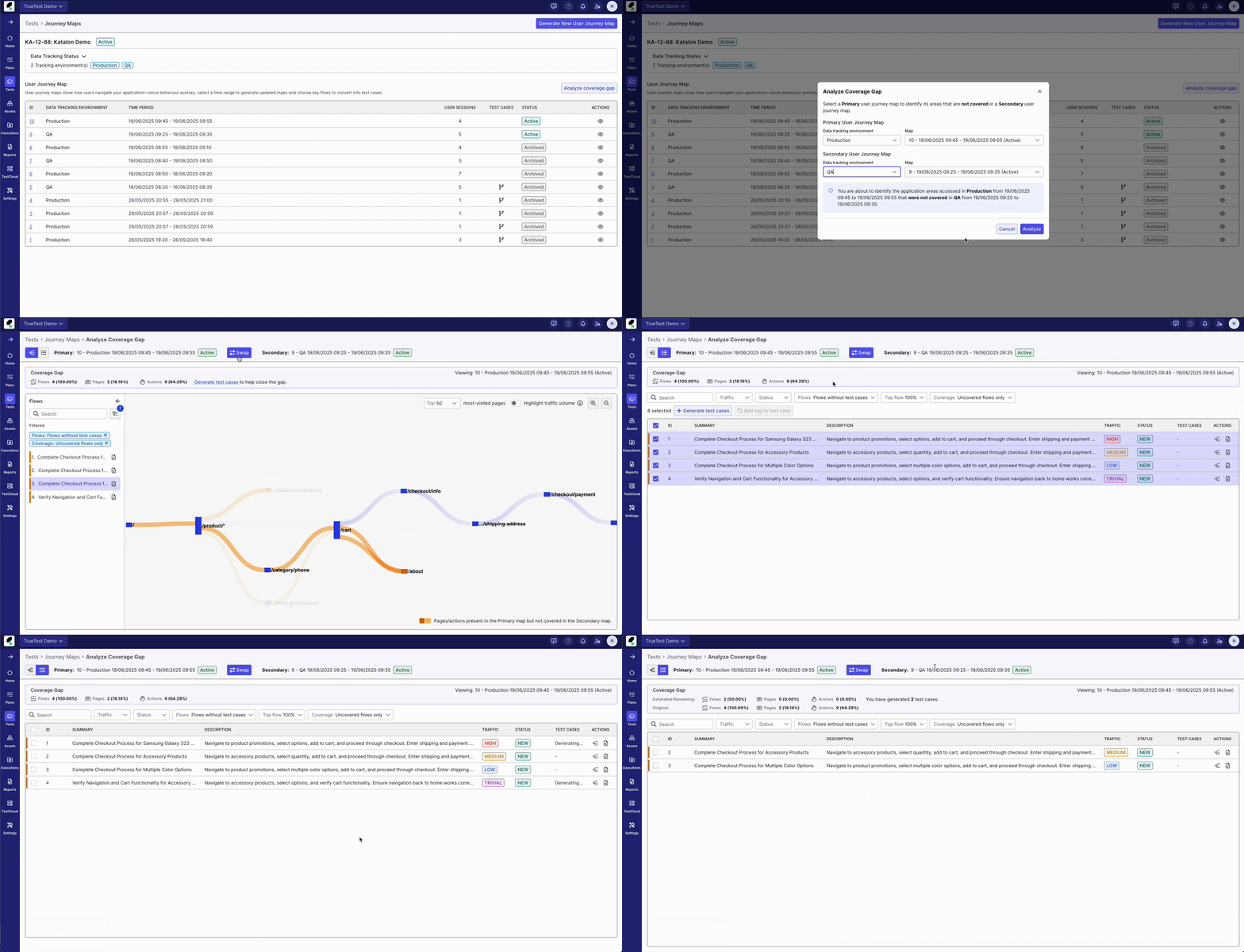
TrueTest now introduces Test gap analysis, a feature that compares production and testing environments to identify gaps in test coverage.
Traditional test planning often relies on assumptions and predefined requirements. Test gap analysis surfaces real user journeys from production that haven’t yet been tested, letting teams generate test cases for those flows automatically.
What it does:
- Compares primary (production) and secondary (test) journey maps.
- Highlights pages and actions present in production but missing in testing.
- Automatically filters for partially covered or uncovered flows.
- Allows automatic test case generation to fill those gaps.
Editable domain patterns in data tracking
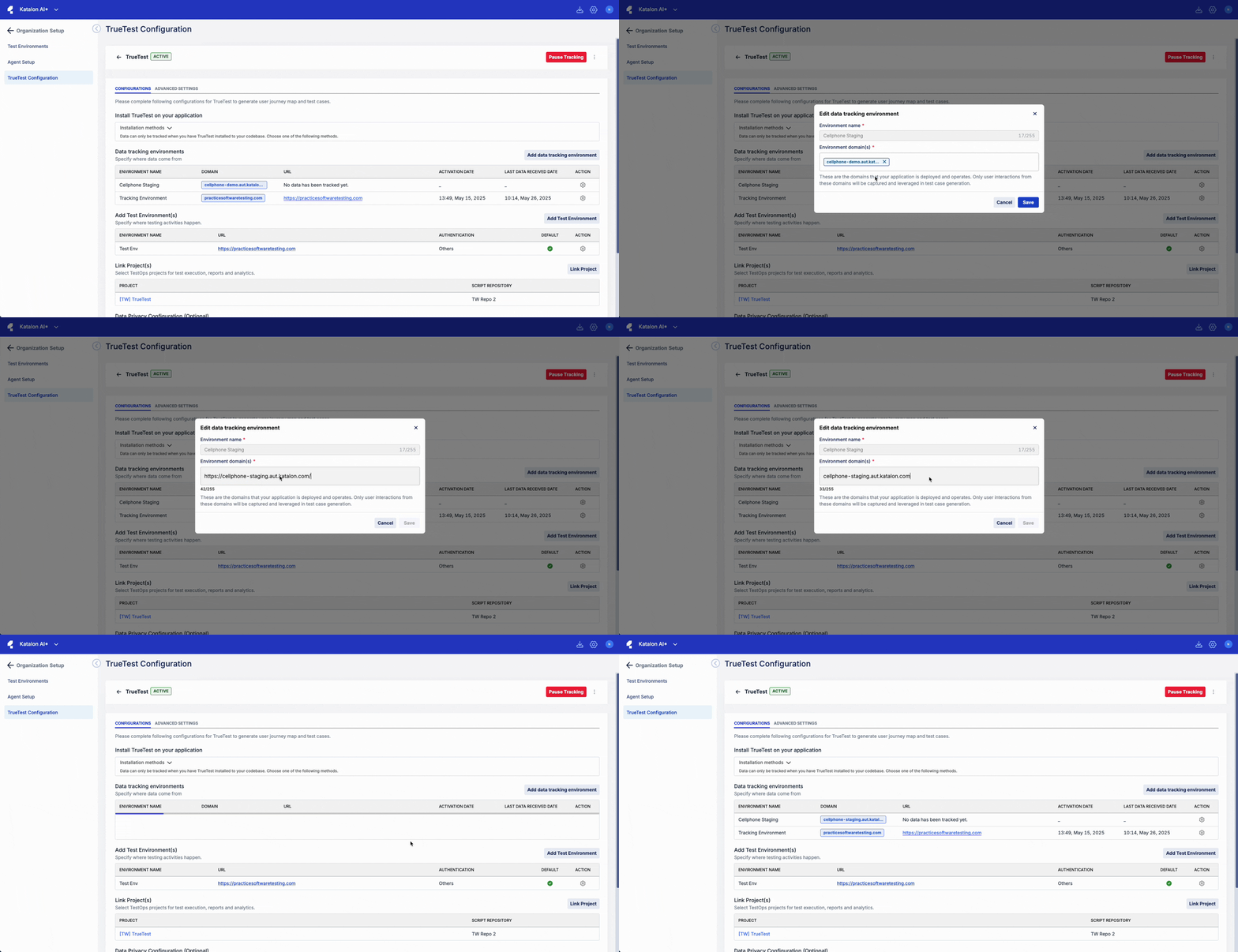
TrueTest now enables edits to domain patterns in the data tracking environment, improving flexibility and reducing input errors.
Highlights:
- Changes must be made before tracking begins.
- Post-tracking edits may limit traceability of URLs.
- Environment name edits are still restricted to preserve artifact management.
Pause tracking
TrueTest allows you to pause data tracking by simply clicking on the “Pause Tracking” button.
Expanded live testing
Manual testing just got a big upgrade. Live testing now supports full-spectrum testing for:
- Desktop browsers
- Mobile browsers
- Native mobile apps
Capabilities include:
- Camera image injection, biometrics, GPS, IP geolocation, and network throttling.
- Font, time zone, language, and device control (volume, rotation, recent apps).
- Switch device feature for quick multi-device testing.
- Clipboard fetching, screenshot capture, and session video recording.
- DevTools access for in-session debugging.
Live testing now offers a flexible, cloud-hosted, and real-device experience across various platforms.
Execution monitoring network logs
TestCloud now supports network logs, enabling deep diagnostics of API calls and performance data.
Highlights:
- View HTTP request/response headers, bodies, status codes, and timing.
- Export captured logs in HAR format.
- View in execution monitoring or via REST API.
- To enable:
- Go to Project Settings > Desired Capabilities > TestCloud.
- Add enableNetwork:true to katalon:options dictionary.
App profiling with AI-powered insights
We’re introducing App profiling, an AI-enhanced performance dashboard that turns raw data into readable insights.
Metrics include:
- CPU, memory, disk, and network usage.
- Battery consumption, rendering stats, and frame issues.
- Responsiveness and thermal data.
- Summary views and proactive AI alerts for abnormal behavior.
Smart queue for cloud execution
Smart queue now dynamically controls the test volume entering execution queues, reducing the risk of timeouts and failed runs due to unavailable resources.
Benefits:
- Ensures tests only start when resources are ready.
- Improves execution success rate.
- Reduces infrastructure strain and spurious failures.
Execution monitoring shows Selenium/Appium commands with linked media
TestCloud’s execution monitoring has been upgraded for more transparent post-run analysis.
What’s new:
- After a test finishes, view Selenium/Appium command history.
- Accelerate debugging! Instantly jump from a 'take screenshot' command to its visual artifact (screenshot & video timestamp), or click a screenshot to pinpoint the exact command that captured it.
In case you missed it
Explore recent insights and product updates:
- Katalon Product Roundup Webinar – May 2025
- Katalon Studio 10.2 Release: 3 reasons to upgrade now!
- Test Automation That Keeps Up With Your Business Applications’ Speed
- Stop guessing. Start testing what matters.
- Katalon Officially Launches TrueTest™ — The First AI-Native Testing System That Thinks Like a Tester and Learns from Users
- Quality Horizon - The Software Quality Forum
Wrapping up
June’s updates bring sharper test prioritization, expanded manual testing capabilities, and smoother workflows across Studio, TrueTest, and TestCloud. As we continue to enhance Katalon’s AI-native platform, we want to thank you for building the future of quality with us.
Frequently asked questions
It compares production and test journey maps to highlight pages and actions users rely on that haven't been tested, then lets you generate test cases for those flows automatically.
Go to Project Settings > Desired Capabilities > TestCloud and add enableNetwork:true to the katalon:options dictionary.
Live testing supports desktop browsers, mobile browsers, and native mobile apps on cloud-hosted real devices.
It controls how many tests enter execution queues so tests only start when resources are ready, which reduces timeouts and failed runs.




Test everything. Ship with confidence.
From generating test cases to spotting failures, Katalon's AI works across your entire pipeline, automatically.
