


Internet Explorer 11 reached end of life on June 15, 2022. Here's what IE mode in Microsoft Edge means for legacy apps, and how Katalon Studio lets you reuse existing IE tests in IE mode.
Internet Explorer reached end of life on June 15, 2022.
You might have stumbled upon an Internet Explorer issue of not being able to view certain content on the browser or experiencing a page that takes forever to load.
Well, out of the old and in with the new.
On June 15, 2022, Microsoft ended support for the Internet Explorer (IE) 11 desktop app on most versions of Windows 10, making way for Microsoft Edge.
To minimize the impact on users and businesses using legacy Internet Explorer-based sites and applications, Microsoft:
- Announced the end-of-life plan on August 17, 2020
- Ceased support for Internet Explorer 11 on Microsoft 365 services on November 30, 2020
- Updated the affected versions of Windows 10
Internet Explorer EOL – Microsoft Edge and IE Mode
Note that the IE 11 desktop app is retired, but its engine lives on: Microsoft Edge includes an IE mode that renders legacy sites with the same MSHTML (Trident) engine.
For many organizations, rebuilding legacy applications isn't a top priority, and modernizing a large legacy web app portfolio can be expensive.
Microsoft built IE mode so that organizations with years of investment in IE 11 legacy apps don't need to run two browsers side by side.
Microsoft Edge
With Internet Explorer retired, Microsoft Edge is the recommended replacement. Built on Chromium, it offers stronger security, faster page loading, and better rendering than IE 11.
For the general public, improvements include:
- Microsoft Defender SmartScreen: Warns users about phishing sites and malicious downloads.
- Sleeping tabs: Puts inactive tabs to sleep to reduce CPU and memory use when many tabs are open.
- Efficiency mode: Reduces resource use to extend battery life.
- Settings migration: Imports favorites, browsing history, cookies, and saved passwords from other browsers.
- Enterprise Mode Site List: Lets admins specify which legacy sites should open in IE mode.
IE Mode
The Edge browser gives users the best of both worlds: compatibility with legacy sites and apps, plus full support for the modern web. Its highlights include:
- Dual engine for backward compatibility: The Chromium engine powers modern sites, while the Trident (MSHTML) engine handles legacy sites.
- Single-browser security: Legacy apps open in IE mode inside Edge, so users don't need to switch to a separate, unsupported browser.
Microsoft has committed to supporting IE mode in Edge through at least 2029 (Microsoft Lifecycle FAQ).
Testing in IE Mode: IE to Edge Migration with Testing Tools
Testing platforms, tools, libraries, or frameworks have also done their part of the preparation by announcing their support for testing in the IE Mode.
Katalon Studio, part of the Katalon True Platform, added support in version 8.4.0 for running tests in IE mode in Microsoft Edge. You can reuse your existing IE test cases and test suites by adding one custom keyword step that opens Edge in IE mode. Katalon Test Cloud also supports running tests in IE mode.
The approach uses a custom keyword as the first test step to open Microsoft Edge in IE mode. Try it out with:
- Execute tests with Katalon Studio in Internet Explorer (IE) mode in Microsoft Edge
- Open IE Mode Sample Project
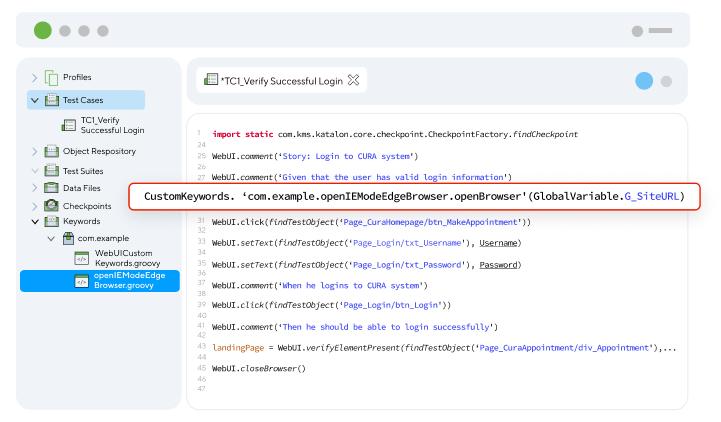
Note that there are some scenarios that will require additional workarounds. A few instances are:
- Adding a wait command when there’s a test step to open a new browser window
- Making a copy of tabs’ window handle when switching back and forth between several tabs
Frequently asked questions
Microsoft ended support for the Internet Explorer 11 desktop app on June 15, 2022, for most versions of Windows 10. Microsoft Edge with IE mode is the supported replacement.
IE mode lets Edge render legacy sites with the Internet Explorer MSHTML engine while using Chromium for modern sites. Admins choose which sites open in IE mode through the Enterprise Mode Site List.
Yes. From Katalon Studio 8.4.0, you can add a custom keyword as the first step of a test case to open Microsoft Edge in IE mode, then reuse your existing IE test steps. Katalon Test Cloud also supports IE mode execution.


Test everything. Ship with confidence.
From generating test cases to spotting failures, Katalon's AI works across your entire pipeline, automatically.
