


Recorded tests are quick to create but often break when the app changes. Katalon Studio 5.5's Advanced Recording lets you continue recording existing tests, edit and run steps while recording, and merge duplicate test objects.
1. Introduction
Writing and maintaining test scripts directly affects the effectiveness and efficiency of test automation. One dilemma is that scripts generated quickly with tools often stop working when the application under test (AUT) changes. That's exactly the problem with the recording capability in many test automation tools: the cost of maintaining recorded test cases is so high that it cancels out the benefits of automation.
To address this, Katalon introduced new recording capabilities that help automation engineers improve their workflows and the quality of their tests. Advanced recording is useful for automation beginners and experienced engineers alike.
Katalon’s new recording is designed to generate effective, efficient, and maintainable tests that can be collaborated among team members. With this enhancement, the recording becomes an essential part of Katalon Studio.
2. Why is advanced recording needed?
Record and playback is great for beginners starting their automation careers because it makes generating and running automated tests quick and easy. But it has several major drawbacks in professional settings:
Stability
The recording capability depends heavily on a capture engine such as Selenium Webdriver which does not fully address the complexity of modern user interfaces. The generated test scripts may not be playable and fragile to changes in the AUT. For example, modern UI framework such as AngularJS has dynamically generated ID for HTML components. Therefore, scripts created by ID locator approach which is popular in recording will be more likely not playable under a small interface change.
Reusability
Test cases generated from recording are linear and hard to reuse across test cases and suites. The recording process also usually isn't designed to encourage engineers to reuse existing scripts.
Maintainability
In automation testing, maintainability is always the main concern in any long-term projects as the maintenance cost of test scripts can be enormous if the AUT is changing.
Learn basic “Record & Playback” using Katalon Studio here Creating test case using Record & Playback
3. Recording in Katalon Studio 5.5
Katalon's Advanced Recording resolves the tension between generating tests quickly and keeping them easy to maintain. Automation engineers get fast test generation while still being able to maintain and reuse test cases. In teams with mixed skill sets, it also helps members collaborate effectively on creating test cases.
In Katalon Studio 5.5, the recording capability has been improved with the spirit of Advanced Recording: efficiency, effectiveness, maintainability, and collaboration.
Continue to record from an existing test case
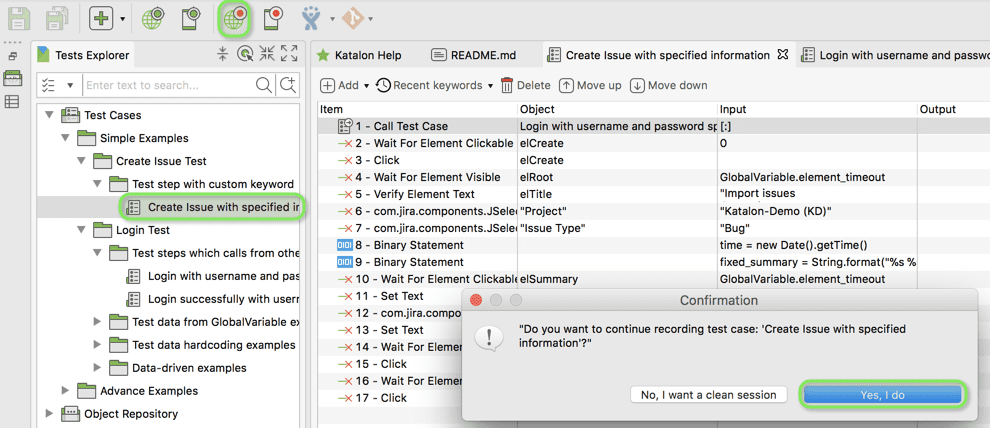
Users are now able to load all steps of a test case to the recording window for continuing to record and generate new test steps for the test case. As shown in the figure below, when users select a test case and click on Record, a prompt will be shown to confirm if they want to record for the test case.
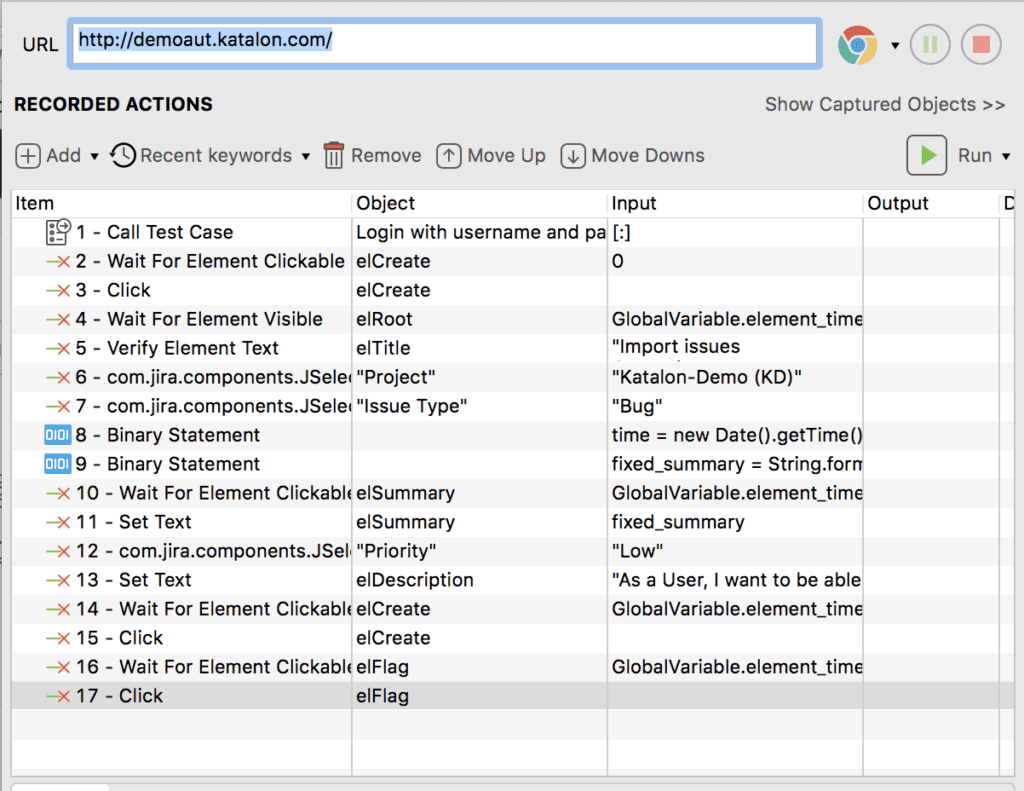
Test steps and corresponding dependencies of the selected test case are loaded to the recording window as shown below.
Be able to fully edit the test case while recording
During recording, most test step types can be added. The Variables section is available for editing. Test objects in the object repository can also be customized throughout the recording process and are synched with the objects in the test steps.
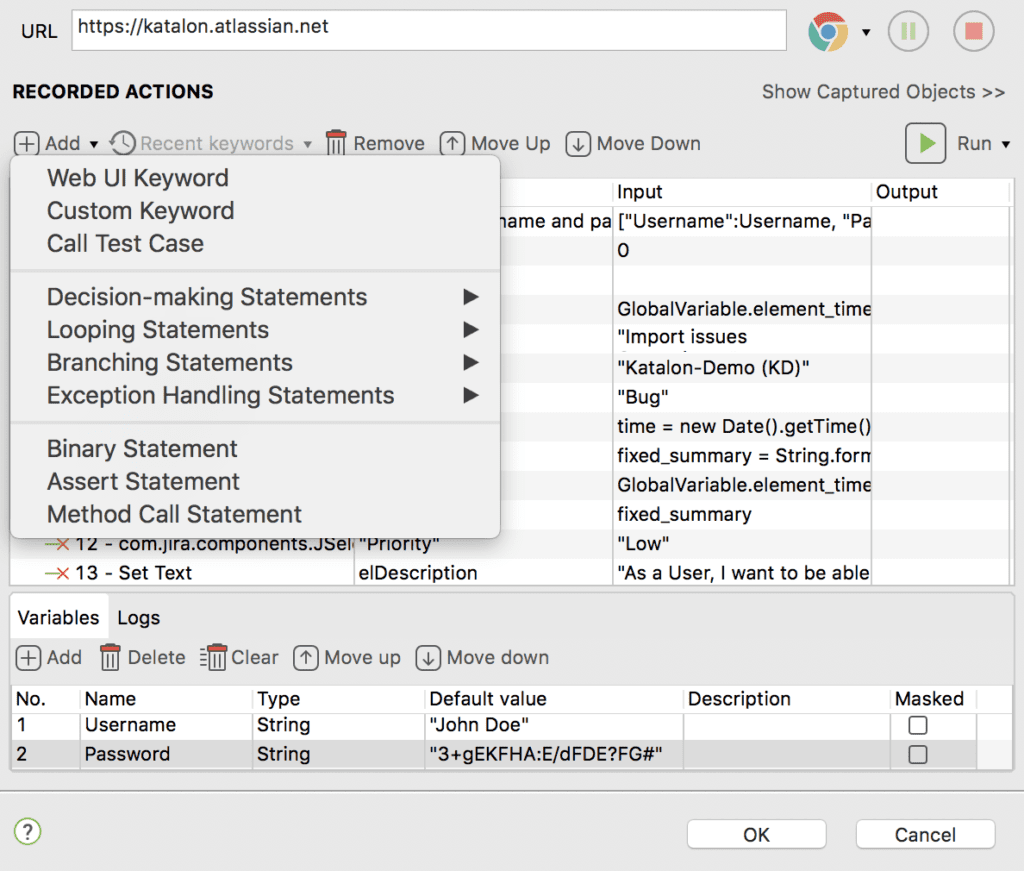
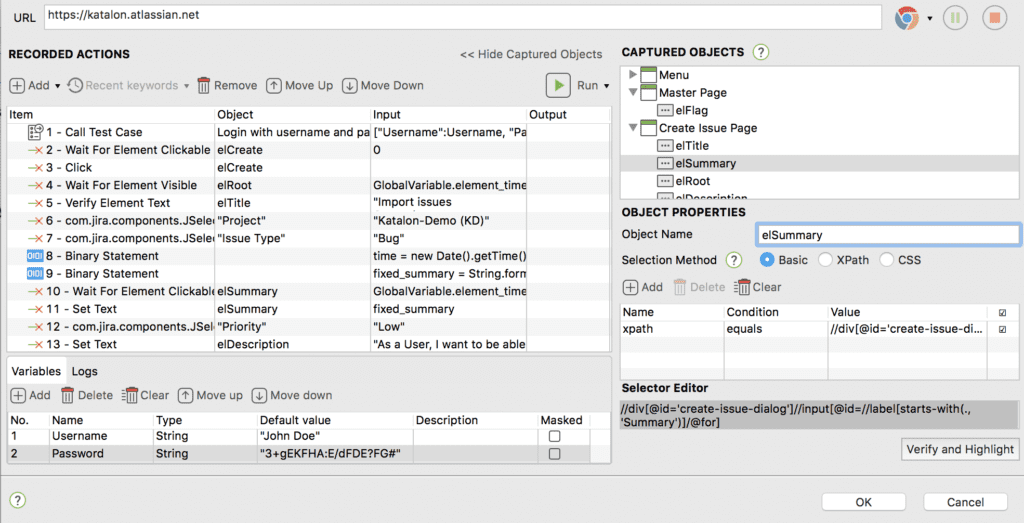
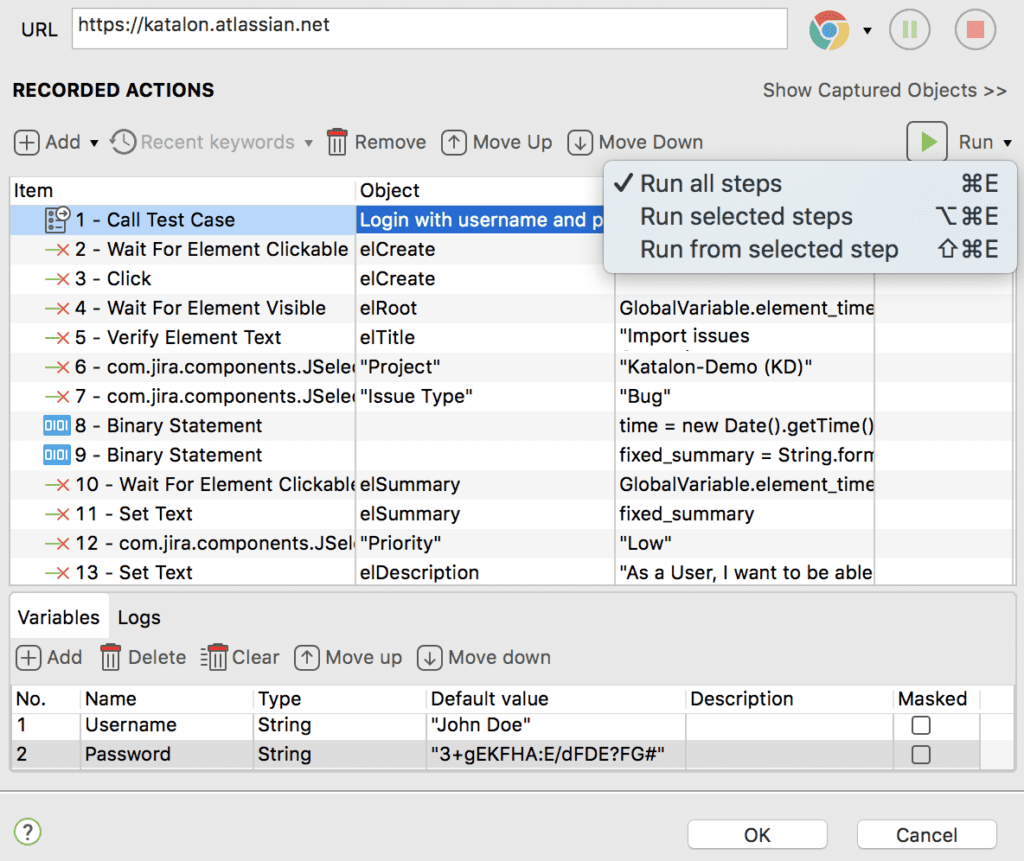
Execute specific steps while recording
Multiple options for running test steps are available, such as Run All Steps, Run Selected Steps, and Run From Selected Step. Logs and execution status are tracked as well.
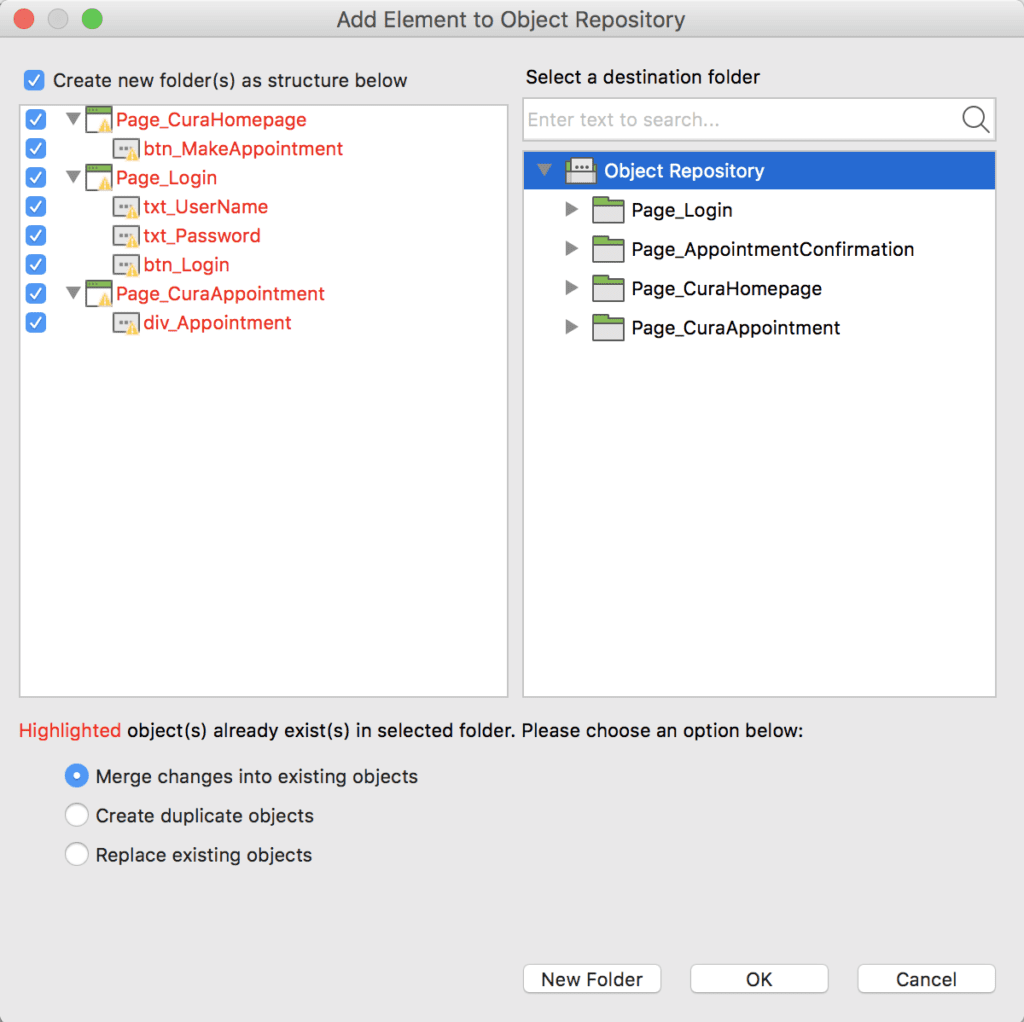
Merge duplicate test objects after recording
After recording, there’s a default option to merge recorded test objects with the existing ones if their names match.
Benefits of the new recording
With the above functionalities, the new recording provides the following benefits:
- Playable steps from the start: Running selected steps during recording confirms that every recorded step plays back correctly, which is especially useful for long, complex test cases. A solid test case from the start means much less maintenance later. Running steps during recording also makes it possible to add advanced steps such as custom keywords or calls to other test cases. For example, if an engineer knows an existing test case covers part of a new flow, they can call it and run it instead of re-recording those steps, which encourages reuse across the project.
- Spy, record, and run in one place: The new recording combines three previously separate functions: spying, recording, and executing. Loading existing steps into recording mode lets users reproduce issues, fix them, and verify the fix immediately, all on one screen.
- Consistent test objects: Test objects matter as much as test cases. Merging duplicate test objects improves the consistency and maintainability of test artifacts.
- Better collaboration: Not every tester on a team is an automation expert. Many are manual testers or have less than a year of automation experience and prefer recording, while experts build the framework and shared assets. Katalon Studio introduces advanced features gradually into test creation so everyone can make better use of existing test assets.
4. Explore More Features of Katalon Studio v5.5
Note: The original video walkthrough of these features was contributed by Karthik K.K. from ExecuteAutomation.
It's Just the Beginning
At the time of this release, Katalon was already working on the next set of features, including:
- Smart object locator strategies: Object locator strategies are often a black box in Selenium-based tools. Katalon planned smarter locator strategies that would be more maintainable and resilient to changes in the AUT, reducing maintenance costs. (Later versions of Katalon Studio introduced Smart XPath and self-healing locators.)
Read more: The Complete List of Exceptions in Selenium
- Object types: Test objects are an important asset in Katalon Studio projects. Object types with behaviors and semantics were planned to let users group common, repetitive actions into a single reusable step. For example, recording a searchable combo box normally takes several fragile steps: focus the search box, type the search text, wait for results, and select an item. With an object type, those steps become one meaningful step, such as setting the combo box value, which is more stable and easier to reuse.
Enjoy Katalon Studio v5.5 and let us know your feedback.
Frequently asked questions
Katalon announced the launch of a new partnership program and two initial service partners: KMS Technology and KMS Solutions.
The program offers implementation, training, and strategic consulting services to help customers maximize success with Katalon’s test automation platform.
KMS Technology is based in Atlanta, GA, and KMS Solutions is based in Ho Chi Minh City, Vietnam.
KMS Consulting Group provides dedicated consulting services worldwide, while KMS Solutions provides services in Asia.
Katalon Studio is cited as Gartner Peer Insights Customers’ Choice in 2019 and trusted by over 65,000+ companies worldwide.



Test everything. Ship with confidence.
From generating test cases to spotting failures, Katalon's AI works across your entire pipeline, automatically.
